If your iPhone dropped in water in Almaty, power it off, skip the rice and the hairdryer, pull the SIM tray, and get it to a technician for free diagnostics. iServices checks the device in front of you in 15 minutes, cleans corrosion, and gives a warranty up to 1 year.
What to Do in the First 30 Minutes After an iPhone Dropped in Water
The first half hour decides how much of the device can be saved. Liquid spreads across the circuitry while the handset is still powered, so the order of your actions matters more than raw speed.
Service details: “iPhone Water Damage Repair”.
Power It Off and Leave It Off
The single most damaging move after water contact is pressing the power button to check if the handset still works, because current through wet contacts starts corrosion within minutes. If the screen is still lit, hold the side button and a volume key together and slide to power off. A damp logic board carries current between pins that were never meant to touch, and every extra minute of operation pushes oxidation further under the shields. Do not plug it in to see whether it charges — the charging port is the first place liquid pools. A device that lights up after a splash is not proof it survived: the display working says nothing about the circuitry underneath, so treat a functioning wet handset exactly like a dead one.
Skip the Rice, the Hairdryer and the Charger
- Do not charge it. Current through a damp charging port corrodes the pins and can short the logic board.
- Do not use a hairdryer. Warm air pushes moisture deeper toward the components instead of out.
- Do not bury it in rice. Starch dust gets into ports and the grain absorbs nothing inside a sealed body.
- Do not shake or tap it hard. You move liquid from the edges toward the components.
- Do pull the SIM tray. It opens one channel for moisture and lets you keep the card safe.
Dry the Outside and Head for Diagnostics
Wipe the outside with a dry cloth, keep the device off, and bring it in — our engineers run free diagnostics in front of you in 15 minutes, even if you decide not to repair. If you dropped your iPhone in water in Almaty, there is no need to guess about the extent of the damage: a technician checks the handset while you watch and shows exactly which parts are affected. Owners who call a courier have the gadget collected and returned across the city in about 90 minutes, free with a repair. Waiting a day "to see if it dries" is the most common reason a salvageable unit turns into a logic board replacement, because corrosion does not pause while you wait.
Why Rice and a Hairdryer Make an iPhone Dropped in Water Worse
Home drying advice spreads fast because it feels like action. The physics behind it is simple, and once you see what each method actually does to a wet phone, the choice becomes obvious.
What Rice Really Does Inside a Phone
Rice absorbs humidity from open air, but the handset is a sealed shell, so the grain never reaches the water sitting on the logic board and only adds dust to the ports. The grains draw vapour solely from the air they touch, and that air barely circulates through the speaker mesh or the charging cavity. Meanwhile, fine starch dust and broken fragments settle into the grilles, the microphone holes and the Lightning or USB-C opening, where they mix with residual dampness into a paste that later blocks contacts. A bowl of grain on the counter changes nothing under the display, where the actual droplets sit on the connector pins. The "it worked after rice" stories are usually devices that had little liquid inside to begin with — the grain got the credit that time and luck deserved.
Why Heat From a Hairdryer or Radiator Backfires
Warm air from a hairdryer or a radiator drives moisture from the openings deeper toward the components and can soften the adhesive that keeps the display sealed. A hairdryer pushes a high-volume stream straight into the earpiece slot, the speaker grille and the port, and that pressure carries droplets inward instead of lifting them out. The gasket around the screen and the strips under it soften at moderate heat, so the seal that kept splashes out opens up and lets humid vapour circulate freely within the housing. A radiator works more slowly but in the same direction: steady warmth raises the internal temperature for hours and keeps the trapped dampness moving across the circuitry. Heat also accelerates the chemical side of corrosion, so a device dried warm often fails faster than one that was simply left alone in a dry room.
The Drying Myths Side by Side
| Method | What people expect | What actually happens |
|---|---|---|
| Rice | Pulls water out | Adds dust, reaches nothing inside |
| Hairdryer | Dries it fast | Pushes moisture inward |
| Radiator or sun | Gentle warmth dries it | Heat speeds up corrosion |
| Shaking | Water flies out | Spreads water onto components |
| Ultrasonic cleaning | — | Removes moisture and corrosion products |
The Delayed Corrosion That Kills an iPhone Dropped in Water
A device that still turns on after water feels like a lucky escape. In most cases it is a countdown, and understanding why explains the strange failures that show up a week later.
Why a Wet iPhone Can Work and Then Fail
Water left on the circuitry keeps reacting with metal contacts for days, so a handset can run normally and then fail a week later when corrosion finally bridges two points that should stay separate. Tap water carries minerals, dust and traces of soap that settle into the narrow gaps around the charging port, the camera modules and the connectors under the display. Each deposit slowly eats into the metal, thinning a contact that still passes current today. Warm indoor air keeps that residue chemically active long after the visible droplets are gone. The failure often looks unrelated to water — a dead camera, a flickering screen, a unit that stops charging — which is why people blame a software update instead of the splash from last week.
Signs Water Got Inside Even If the Phone Works
- Fog under the glass. Moisture trapped behind the display is a direct sign water is still inside.
- Muffled or crackling sound. Liquid in the speaker and microphone mesh changes how they sound.
- Face ID or True Tone acting up. These sensors sit close to the paths moisture travels along.
- A camera fogging from inside. Condensation behind the lens means liquid reached the module.
- Charging that cuts in and out. Corrosion on the port pins shows up as an unreliable connection.
Fresh Water, Salt Water and Pool Water
Salt water and pool water are far more aggressive than tap water because dissolved salts conduct current and leave corrosive residue on every contact they touch. Pool water adds chlorine and its own mineral load, so the residue attacks the connectors under the display and around the charging port faster than a plain spill. Fresh water from a sink is the mildest case, yet even there the dissolved calcium leaves a film that holds moisture against the metal. Salt residue keeps pulling water out of the air, so the internals never truly dry while the handset sits in a bag. A device that fell into the sea needs cleaning the same day, and rinsing it under the tap first only spreads the salt further inside.
What a Technician Actually Does With a Wet Phone
Once the phone is on the bench, the work follows a clear order. Knowing what happens at each stage tells you what to expect and why some cases end with cleaning while others need a board.
Cleaning the Board Instead of Replacing It
In most water cases we clean the mainboard rather than replace it, using an ultrasonic bath to lift moisture and corrosion products off the contacts before they eat through the traces. The bath works at a controlled frequency that shakes loose the mineral residue fresh water leaves behind, and it reaches the connectors, shield covers and charge port contacts that a cloth never touches. After the bath the circuitry goes through a rinse and a slow dry, then we inspect the contacts under magnification to confirm the metal is still bright. Cleaning only works while the metal is still intact, so the earlier a wet device reaches the bath, the higher the chance the original board survives.
When the Board Needs Microscope Repair
When corrosion has already damaged traces or a component on the mainboard, we repair it under a microscope, and that work takes 1 to 3 days rather than the usual 20 to 40 minutes. Under the microscope the engineer can see a corroded pad, a lifted filter or a broken trace that looks like a clean surface to the naked eye, then rebuild the connection with a jumper wire or a replacement component. A phone that will not turn on after water is not automatically a lost cause — the circuitry is often repairable, and the microscope is what makes those tiny connections workable again.
Cleaning or Board Repair, Which Case Is Yours
| Scenario | Water type | Phone state | Likely path |
|---|---|---|---|
| Quick splash | Fresh | Off | Ultrasonic cleaning |
| Soaked through | Fresh | On | Cleaning plus component check |
| Sea or pool | Salt | Any | Cleaning, often board repair |
| Will not power on | Any | Dead | Microscope board repair |
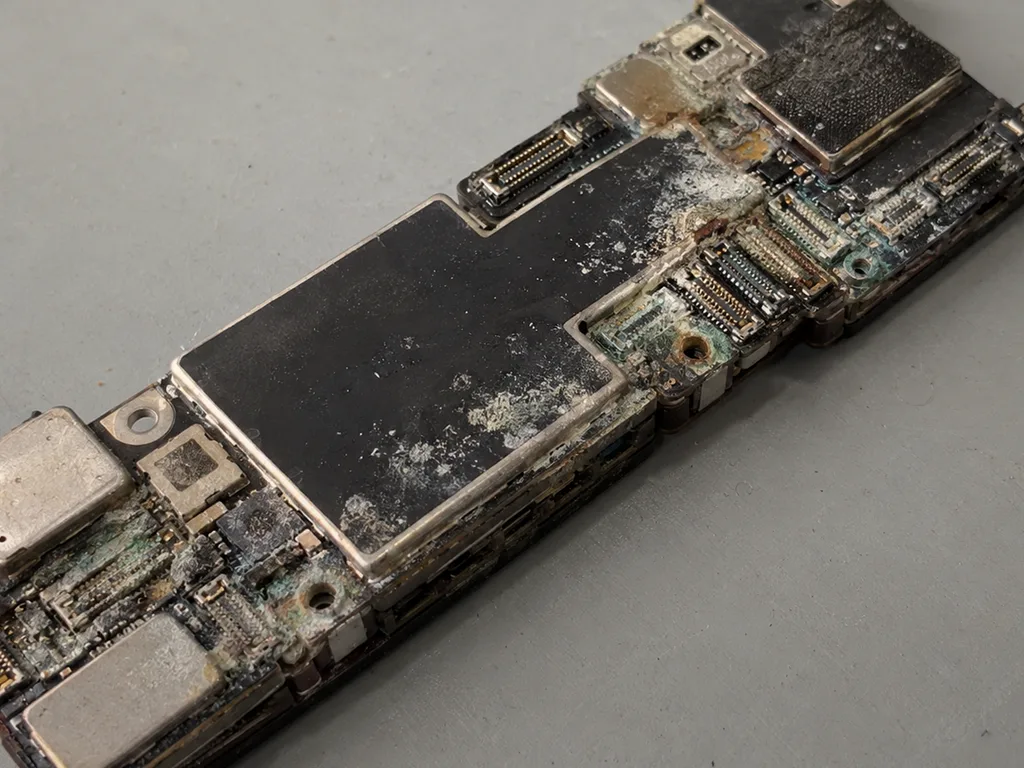 Before: traces of moisture
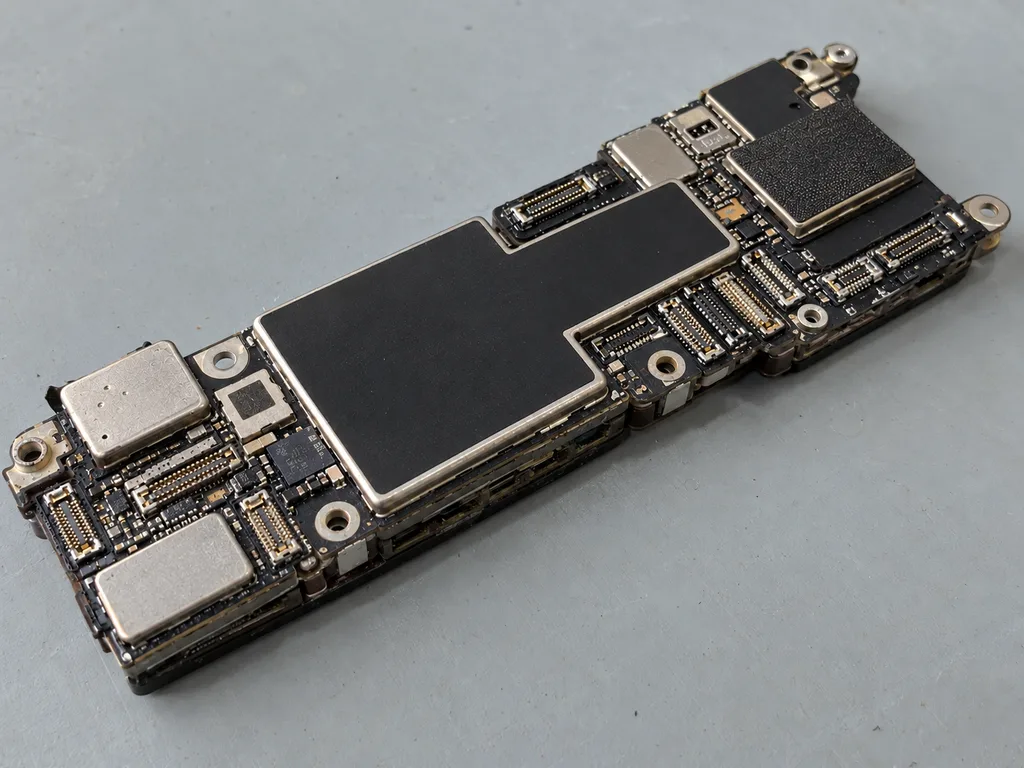 After: cleaning and repair
How We Diagnose and Check the Device After Cleaning
Diagnostics after water is not a quick glance at the screen. It is a structured check that tells you what survived, what needs work, and what you are covered for afterwards.
Free Diagnostics in Front of You
Our diagnostics are free and take about 15 minutes in front of you, and after water contact the full check can stretch to two days when we need to watch how the internals behave. The engineer opens the device at the bench while you watch, points at the corrosion, and names the parts that need attention before anything is agreed. In straightforward cases the verdict comes in a quarter of an hour; in heavier flooding we keep the logic board under observation, warm it up, run it, and re-check the readings. Watching a device over a day or two is not delay for its own sake — some corrosion only shows up once the phone has warmed up and run for a while. Ask for the free inspection even if you plan to think it over: fifteen minutes now saves you guessing later.
The 32 Functions We Check After the Work
- Face ID: the sensor array sits near paths water follows, so it is tested first.
- True Tone: a display that lost its colour sensing shows up here.
- Cameras: front and rear modules are tested for focus and condensation.
- Microphones and speakers: water in the mesh changes how they sound.
- Charging: the port is checked for a stable connection after corrosion.
- Network: signal and cellular behaviour confirm the mainboard is healthy.
What the Receipt and Warranty Cover
Before any work starts we fix the price, the part, the turnaround and the warranty on the receipt, and the warranty runs up to 1 year. The new component is shown in its factory packaging prior to installation, so you see what goes into the phone rather than reading a part number afterwards. The whole conversation at the counter takes about two minutes, and you leave with the receipt, the warranty card and the old part in hand. A written receipt matters most in water cases, because it is the record of exactly what was agreed ahead of the phone being opened and what you can hold the workshop to afterwards. Keep it with the old component — together they are your proof if anything is questioned months down the line.
Getting a Wet iPhone to Us in Almaty
A wet device does not need to sit in a bag until you find a free hour. There are two simple ways to get it onto the bench, and both start with a message.
Send a Photo on WhatsApp First
Send a photo of the damage on WhatsApp and an engineer replies within 5 minutes with a price and a free time slot, so you know what to expect before you leave home. The person on the other end is a technician, not a call-centre script — they look at the model, the visible damage and the story behind it, then quote from the picture. A clear photo helps, because a bent housing or a cracked corner changes the plan for the visit. A photo cannot show corrosion inside, but it does let the engineer tell you whether the case looks like a cleaning or a board job, which sets your expectations for the visit. Keep the handset off while you take the picture.
Bring It In or Call a Courier
You can bring the device to either branch in Almaty or Astana, or call a courier who crosses the city in 90 minutes and is free with a repair. We accept devices 7 days a week, so a weekend drop-off does not push the work to Monday. A courier is the better choice when the unit is already off and dry on the outside, because the trip is short and the hardware is not being handled or shaken on the way. Hand it over powered down, without a case, and mention the water exposure to the courier so the intake note is accurate. If you drive yourself, keep the handset out of the sun and off the dashboard — a hot car interior is the same mistake as a hairdryer, just slower.
Waiting While We Work
Most repairs finish while you wait — 72% of them are done in the waiting area with coffee and Wi-Fi — and the whole process from first contact to pickup usually takes less than an hour. You pay by Kaspi, card or cash once the work is confirmed on the receipt. Waiting on site is worth it for a water case, because the engineer can show you the check results and the old part before you leave, rather than explaining it later over the phone. The conversation at the counter settles more questions than any follow-up message, especially when the board turns out cleaner than expected.
Summary: What to do first if your iPhone dropped in water
The outcome after a wet iPhone is decided in a short window, and the useful actions are simple and unglamorous. What follows is the short version worth keeping in mind.
- Power off and stay off. Current through wet contacts starts corrosion within minutes, so the device stays dark until a technician has seen it.
- Skip rice, heat and charging. None of them remove water from inside the case, and several push moisture deeper or feed current to a damp board.
- Watch for delayed signs. Fog under the lens, muffled sound and flaky charging mean liquid is trapped near the metal.
- Get diagnostics early. Cleaning works best while the contacts and traces remain intact, not after green corrosion sets in.
- Ask for the receipt. A written record of the part, the turnaround and the warranty protects you if something fails weeks later.