When an iPhone is not charging in Almaty, the cause is usually the cable, lint in the port, the charging flex or, less often, the power controller on the board. iServices runs free 15-minute diagnostics in front of you, fixes most charging faults in 20–40 minutes while you wait and gives a warranty up to 1 year.
Why an iPhone Stops Charging and How the Fault Chain Works
Charging runs along a chain: cable, power adapter, port, port flex, power controller. A break at any link produces the same symptom, so the fault has to be traced in order rather than guessed at part by part.
Service details: “iPhone Charging Port Replacement”.
Cable, Port or Board — How to Tell the Difference
The cable and power adapter fail first in most cases, the charging port comes second, and the power controller on the board is the rarest cause. A worn Lightning or USB-C plug loses contact at the pins long before the socket itself gives up, and a third-party adapter that no longer delivers stable voltage mimics a dead socket almost exactly. The charging assembly sits next, exposed to pocket lint, moisture and the sideways load of a cord pulled at an angle. Board-level faults — a damaged charging IC, a burnt trace under the connector — show up last and usually after a drop, water contact or a cheap charger. If you are dealing with an iPhone not charging in Almaty, tracing the chain in this order saves you from replacing parts that are still fine.
Why It Charges Only at an Angle or When You Hold the Cable
Charging only at an angle almost always means lint packed into the socket or a worn connector inside it, not a software problem. Pocket fibre compresses into a felt-like layer at the back of the socket, so the plug travels less than a millimetre short of the contacts and only touches them when the cable is levered sideways. The same symptom appears when the pins themselves are bent or the solder joints on the flex crack after a fall. Software cannot produce angle-dependent behaviour, which is why resetting settings or updating iOS changes nothing here. Pushing the cable in harder to make contact bends the pins further, so the fault gets worse each time you do it.
The Charging Icon Shows but the Percentage Does Not Move
An icon with a flat percentage points to a weak current path or a battery that no longer holds charge, and a software glitch is the least likely cause. A cord with broken strands or an adapter that sags under load delivers enough current to light the icon but not enough to raise the level, and the device quietly drains while it sits on the charger. A battery at the end of its service life accepts charge slowly and reports a percentage that barely climbs, especially in the cold. A forced restart rules out the software branch in under a minute, so do it first before you suspect hardware.
What You Can Check Yourself in Five Minutes and When to Book a Repair
Some causes disappear at home in five minutes with no tools at all. Below is a short self-check, a safe method for cleaning the port, and the signs that mean the device should go to a technician.
A Five-Minute Self-Check Before You Do Anything Else
- Try another cable: swap the Lightning cord for one that reliably charges a different handset.
- Try another power adapter: replace the charging brick and plug the cord into a laptop USB socket.
- Try another wall socket: move to an outlet in a different room, since one tripped point mimics a fault.
- Force a restart: on a frozen device a hard restart clears the software glitch blocking power intake.
- Look inside the port: shine a torch into the opening and check for a grey plug of lint.
How to Clean the Charging Port Without Damaging It
A wooden or plastic toothpick, a torch and short gentle scoops remove lint safely, while metal pins and compressed air push debris deeper. Power the device off first, hold it with the opening facing down so loosened lint falls out rather than in, and work the toothpick along the walls in short strokes — never lever against the central contact pin, which bends easily. Shine a light inside before you start; if a solid grey plug of lint sits at the back, cleaning usually restores charging on the spot. If the opening looks clean and the cord still sits loose, the fault is mechanical and cleaning will not help.
Signs It Is Time to Stop and Bring the Phone In
Heat at the socket, a burning smell, a port that no longer grips the cord or a handset that dies the moment you unplug it are all reasons to stop and book diagnostics. A phone that gets hot with a third-party charger points to a failing charging assembly or a tired battery, and continuing to use it stresses the board. We run free diagnostics in front of the customer — the engineer opens the device, shows what is broken and spends about 15 minutes on it even if you decide not to repair. Bring the phone in early rather than waiting for the battery to hit zero.
When an iPhone Will Not Charge After Water Contact
Liquid damage is a separate branch of the same symptom. The handset shows no charging, yet the order of actions differs — and the first rule is simple: never plug in a wet iPhone.
Why a Wet iPhone Often Refuses to Charge
Moisture inside the port or on the logic board shorts the charging contacts, and the device may refuse to charge even after it looks dry outside. The liquid bridges pins in the connector, so the power controller reads a fault and blocks current instead of pushing it into a battery it cannot verify. A drop in a sink, a wet pocket in the rain, a spilled drink — the volume rarely matters, because a few drops reach the same contacts as full immersion. The connector is only the visible entry point; fluid travels along the flex cable toward the mainboard, where it settles under shielding. Corrosion keeps spreading while the unit sits wet inside, so the delay between contact with liquid and diagnostics matters more than how much got in.
What to Do in the First Hour After Contact With Water
- Power the device off: shut it down completely and leave it off, because current through wet contacts turns a moisture problem into a short circuit.
- Do not plug it in: skip the charger and the cable entirely, even if the screen still works and the handset asks for power.
- Skip rice and the hairdryer: rice and heat move moisture around instead of removing it and can push droplets further toward the mainboard.
- Get it to diagnostics: bring the unit in as soon as you can.
How Water Damage Diagnostics Works and Why It Takes Longer
After liquid contact our diagnostics can take up to two days, because the mainboard has to be inspected under a microscope for corrosion before any part is replaced. We run this check in front of you and it stays free even if you decide against the repair. The engineer looks at the charging connector, the flex cable and the power controller traces, and the microscope reveals corrosion under shielding that no external inspection would show. Replacing the port on a corroded circuit without cleaning it first risks the same fault coming back. Every job we finish carries a warranty up to 1 year, which is why the slow path here is the cheaper one in the long run.
How iPhone Charging Repair Works at a Direct Service
Charging repair is not a case of swapping the connector and hoping for the best. It is a short, predictable sequence: diagnostics, choosing the component, fixing terms in writing, the work itself, then checking the phone together with you.
From WhatsApp Photo to a Fixed Quote on the Receipt
You send a photo of the damage on WhatsApp, an engineer replies within 5 minutes with a price and a free time slot, and the terms are fixed on the receipt before work starts. The technician confirms the fault with free diagnostics in front of you — 15 minutes, even if you decide not to repair. The new component is shown in factory packaging before installation, and the paperwork takes 2 minutes. Our workshop has handled 46,000+ repairs over 11 years, and 72% of jobs are finished while the customer waits in the waiting area with coffee and Wi-Fi. A quote locked in before the repair protects you from a higher bill if the engineer finds a second fault once the phone is open.
Replacing the Whole Port or Just the Flex Cable
The connector and its flex cable are usually one unit, so a worn socket means replacing the whole unit, while a damaged tail alone can sometimes be swapped on its own. On most generations of the device the Lightning or USB-C socket sits on a flex that also carries the microphone and, on some models, the SIM reader — which is why a single failed contact takes the whole tail with it. A clean socket that grips the cable firmly but still will not charge points past the connector toward the power controller on the board, where a flex swap changes nothing. Board-level faults are traced under a microscope, not by trial replacement.
Original Part or Aftermarket Part for the Charging Assembly
| Option | What it is | What the receipt shows | Warranty |
|---|---|---|---|
| Original | Factory charging assembly | Type and serial | Up to 1 year |
| Aftermarket | Compatible assembly | Type only | Up to 1 year |
| Board-level | Microscope repair of the charging IC | Fault description | Up to 1 year |
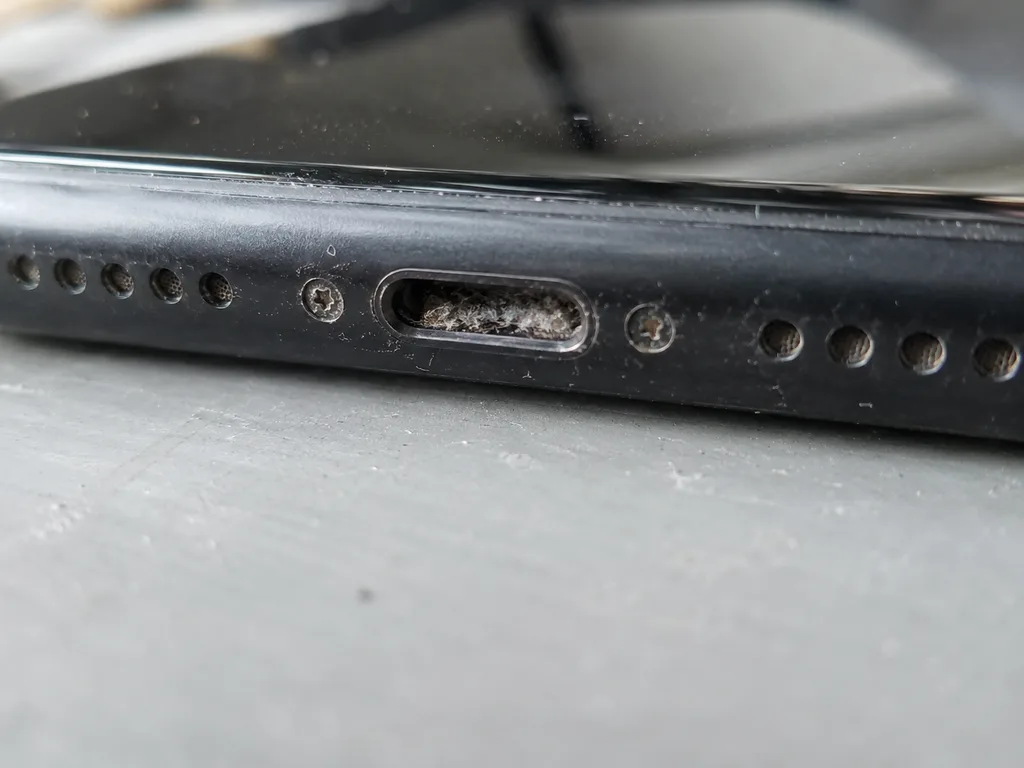 Before: the port does not charge
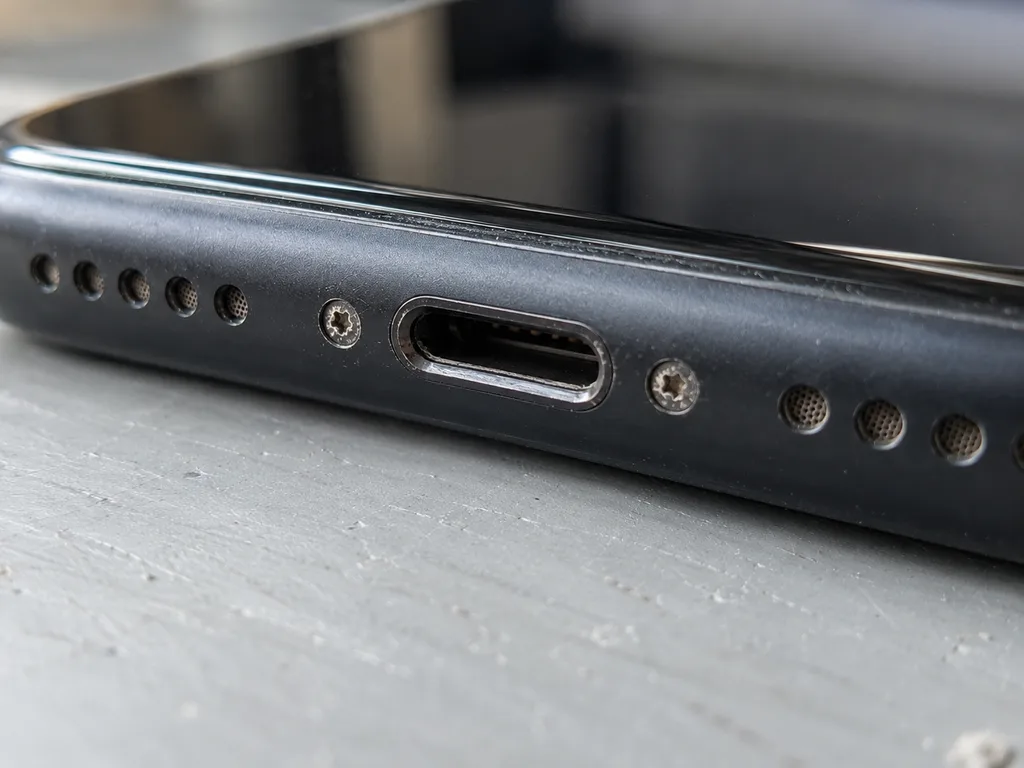 After: a new port
How Long the Repair Takes and Whether You Can Wait
Timing depends on which link in the fault chain turns out to be broken. Most charging work fits into a single visit, while board-level faults stretch across several days.
Typical Timings for Charging and Related Repairs
| Job | Typical time |
|---|---|
| Charging port or flex replacement | 20–40 minutes |
| Battery replacement | 25 minutes |
| Camera glass replacement | 20 minutes |
| Speaker replacement | 30 minutes |
| Screen replacement | 40 minutes |
| Board-level repair | 1–3 days |
| MacBook and iPad repair | 1 hour to 1 day |
Waiting on Site or Handing the Phone Over by Courier
72% of jobs are finished while the customer waits in the waiting area with coffee and Wi-Fi, and a courier across the city takes 90 minutes and is free with a repair. The engineer replies on WhatsApp within 5 minutes and quotes a price from a photo, so you learn before leaving home whether your case is a short waiting-room job or a longer one. A board-level fault stays under the microscope for 1–3 days, which no waiting area can cover. The photo estimate reflects the typical turnaround for your case, so plan the visit around that window rather than around a guess.
When You Can Collect the Phone the Same Day
We accept devices 7 days a week, and a charging job started in the morning is usually ready the same day, while board-level work needs 1–3 days. Weekday hours run 10:00–19:00, weekends and holidays 11:00–18:00, so a morning drop-off leaves room for the full quality check of about 10 minutes before pickup. Turnarounds stay tight because most jobs are done while you wait: a battery replacement takes 25 minutes, a port 20–40. Bringing the phone in before the afternoon gives the engineer time to finish both the fix and the check and still hand it back the same day.
Where to Get Help in Almaty and How to Book
Once the cause is clear and the phone needs real repair work, the next decision is where to take it and how to book without wasting a trip. This section covers both.
Why a Direct Contractor Beats an Aggregator
We are a direct contractor with our own technicians and workshop, not an aggregator or a middleman, so the person who diagnoses your phone is the person who repairs it. In eleven years of work we have completed 46,000+ repairs, and that volume comes from keeping the whole job under one roof rather than passing devices around. A charging fault is small and easy to misread: a worn port, a damaged flex cable or a board issue can look identical from the outside. When one engineer opens the phone, traces the fault and fits the part, nobody has to reconstruct someone else's notes. With an aggregator the device can travel between hands before it is opened, and each handover is a chance for a part to be swapped or a fault to be missed. Ask who actually holds the screwdriver before you hand over the phone.
What the Warranty Covers and What You Get Back
Every repair comes with a warranty up to 1 year, and you get the device back with the receipt, the warranty card and the old part. The warranty covers the replaced charging assembly — the port, the flex cable or the board work we performed — so if the same fault returns, the fix is on us. Keeping the old part matters: it is proof of what came out of your device and a reference if anything is questioned later. Your data stays on the phone through a charging repair, because the work touches the port and the board, not the storage. Before you pay, read the receipt: the part, the turnaround and the warranty period are written there, not promised verbally. A shop that hands back a device without paperwork leaves you with nothing to claim against.
How to Book Diagnostics or a Courier Pickup
Send a photo of the damage on WhatsApp, get a reply within 5 minutes with a price and a free slot, then come in for free 15-minute diagnostics or call a courier. The engineer looks at the picture and quotes from what is visible, so you know the ballpark before leaving home. Diagnostics happen in front of you and cost nothing even if you decide against the repair. If a trip is inconvenient, a courier can collect the phone across the city in about 90 minutes, free with a repair. Payment is by Kaspi, card or cash. The photo quote is based on what is visible, so the final price is confirmed only after the engineer checks the device in front of you — treat the first figure as an estimate, not a contract.
Summary: iPhone not charging, what to do first
A charging fault rarely has a single cause, so the useful habit is a sequence: rule out the cheap layers first, then escalate. The points below compress the whole chain into a short checklist.
- Start with the cable and adapter: swap both for a known working pair and try a different wall socket before touching the phone itself.
- Inspect the connector before cleaning: a torch and a wooden toothpick reveal lint, while metal tools short the pins.
- Angle-only charging points to the socket or flex: a lead that works solely when held at a tilt rarely means a dead board.
- Water changes the timeline: a phone that took on liquid needs proper drying and diagnostics, not repeated plug-in attempts.
- Work through the chain in order: most faults sit in the lead, the connector or the flex, and only a minority reach the board — sequencing saves both time and unnecessary part swaps.