Your city

AstanaAstana, Kabanbay Batyr Ave., 7/2 · +7 727 339-99-12
Eng

iMac dust cleaning in Almaty

Your iMac is noisy and overheating — we clean the cooling system and replace thermal paste in a day, no extra charges later.

iMac with a dark blue wallpaper and a large grey crossed-out fan icon in the centeriMac with a dark blue wallpaper and a large orange hourglass icon in the centeriMac with a black screen off and a large red power icon in the center
iMac with the screen on showing a dark blue abstract wallpaper with soft waves
BeforeAfter
Fan is noisy
Price incl. labor
from 13 900 ₸
Warranty
up to 1 year
  • Inspection and prep
  • Careful opening
  • Dust removal

When your iMac needs dust cleaning

A roaring fan, slowdowns and sudden shutdowns often point to one thing: dust has built up inside the all-in-one.

The fan roars for no reason

Even with a single browser tab open, the iMac sounds like it is exporting video, and the vents blow warm air.

Slowdowns under load

During exports and games the processor cuts its speed to avoid overheating, and the picture starts to stutter.

It shuts down by itself

The screen goes dark mid-film or mid-task: overheating protection kicked in because dust blocks cooling.

The case has never been opened

If the iMac sits near a radiator, on a windowsill or around pets, dust builds up inside much faster.

iMac dust cleaning prices in Almaty

The price is the same across iMac generations; the technician confirms the scope of work after looking at your computer.

ServiceOriginalAftermarket
iMac fan replacement24 900 ₸13 900 ₸
iMac display panel replacement146 900 ₸90 900 ₸
iMac power supply replacement80 900 ₸44 900 ₸
iMac speaker replacement37 900 ₸20 900 ₸
iMac glass replacement69 900 ₸38 900 ₸
Other repairsPrice
iMac 24" M1 dust cleaningdisassembly and dust cleaning19 900 ₸per job
iMac M3 dust cleaningdisassembly and dust cleaning19 900 ₸per job
iMac dust cleaningdisassembly and dust cleaning15 900 ₸per job
iMac Pro 27" (2017) dust cleaningdisassembly and dust cleaning15 900 ₸per job
iMac logic board repairmicrosoldering · 1–3 days50 900 ₸per job
iMac SSD installationstorage installation43 900 ₸with parts
iMac RAM replacementmemory chip installation15 900 ₸with parts
iMac graphics card replacementboard-level chip · microsoldering71 900 ₸with parts
iMac Wi-Fi module repairwireless module · board-level repair34 900 ₸with parts
iMac macOS installationOS installation, no parts replaced13 900 ₸per job
iMac 27" Intel dust cleaningdisassembly and dust cleaning66 900 ₸per job
iMac 24" M4 dust cleaningdisassembly and dust cleaning19 900 ₸per job
iMac 21.5" Intel dust cleaningdisassembly and dust cleaning19 900 ₸per job

If the inspection reveals another fault, the technician explains it first and agrees on the next steps with you.

What iMac dust cleaning includes

Cleaning runs in a set order from the first look to the check after reassembly, and this list shows what it consists of.

  1. 01
    iMac with a magnifying glass icon on screen for inspection
    Inspection and prep

    The technician listens to your complaint, checks noise and heat, then powers the iMac down and prepares the bench.

  2. 02
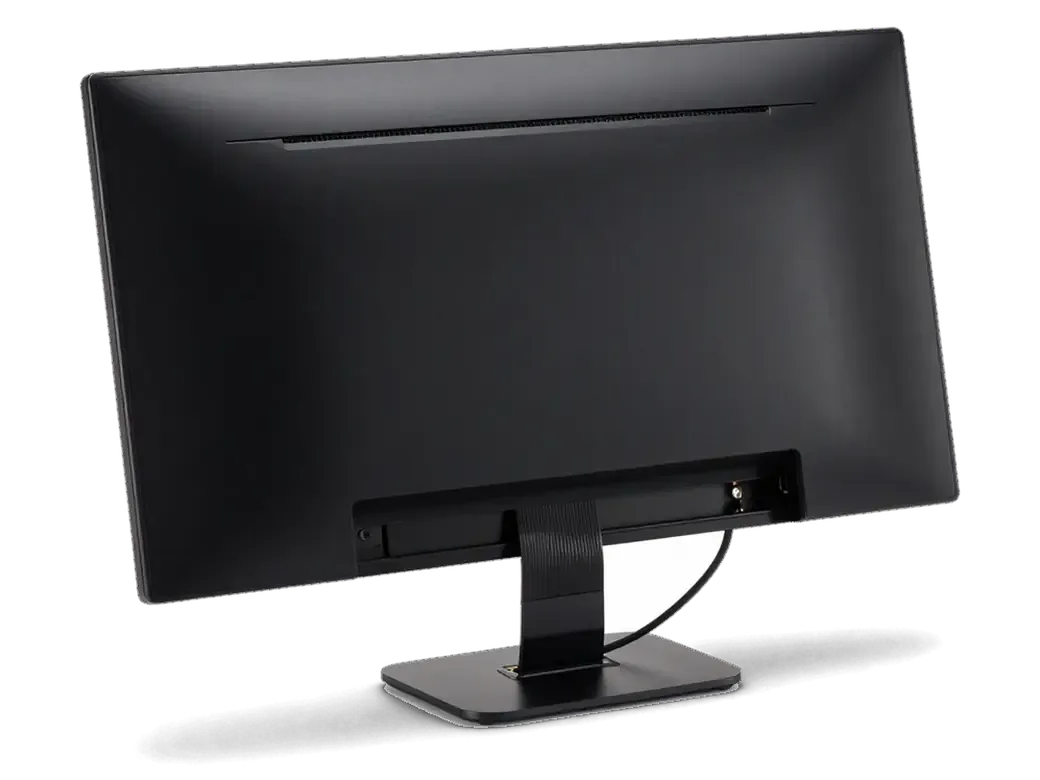
    iMac with display tilted open on a ribbon cable and case opened
    Careful opening

    The display is separated from the body without damaging the adhesive strip or the thin panel cables.

  3. 03
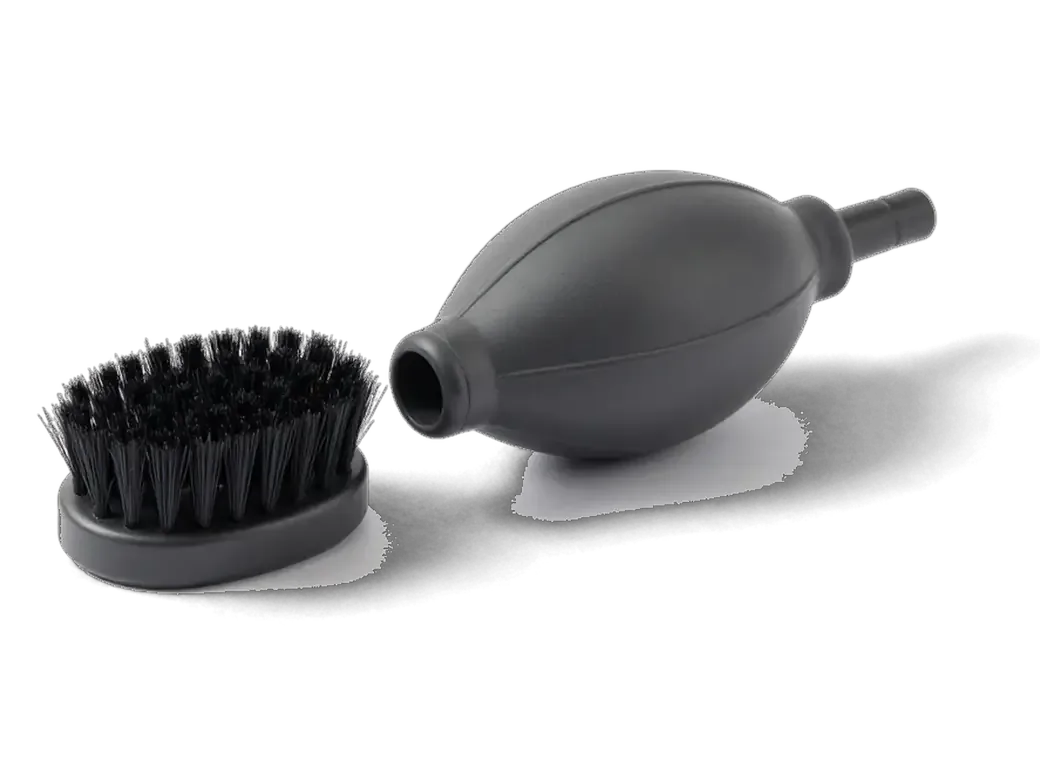
    Anti-static brush and air blower nozzle for cleaning an iMac
    Dust removal

    Heat sink, air channels and boards are cleaned with a brush and an air stream, avoiding delicate parts.

  4. 04
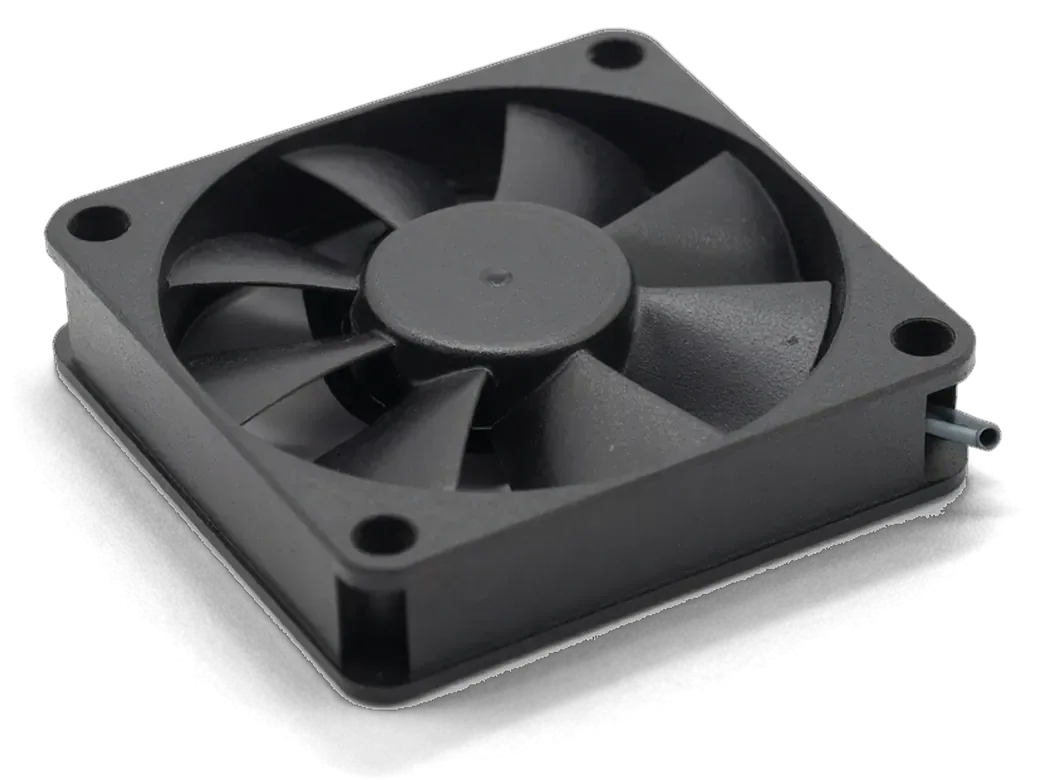
    iMac cooling fan with blades and a cable
    Fan cleaning

    Residue is taken off the blades so the fan spins freely and does not add extra noise under load.

  5. 05
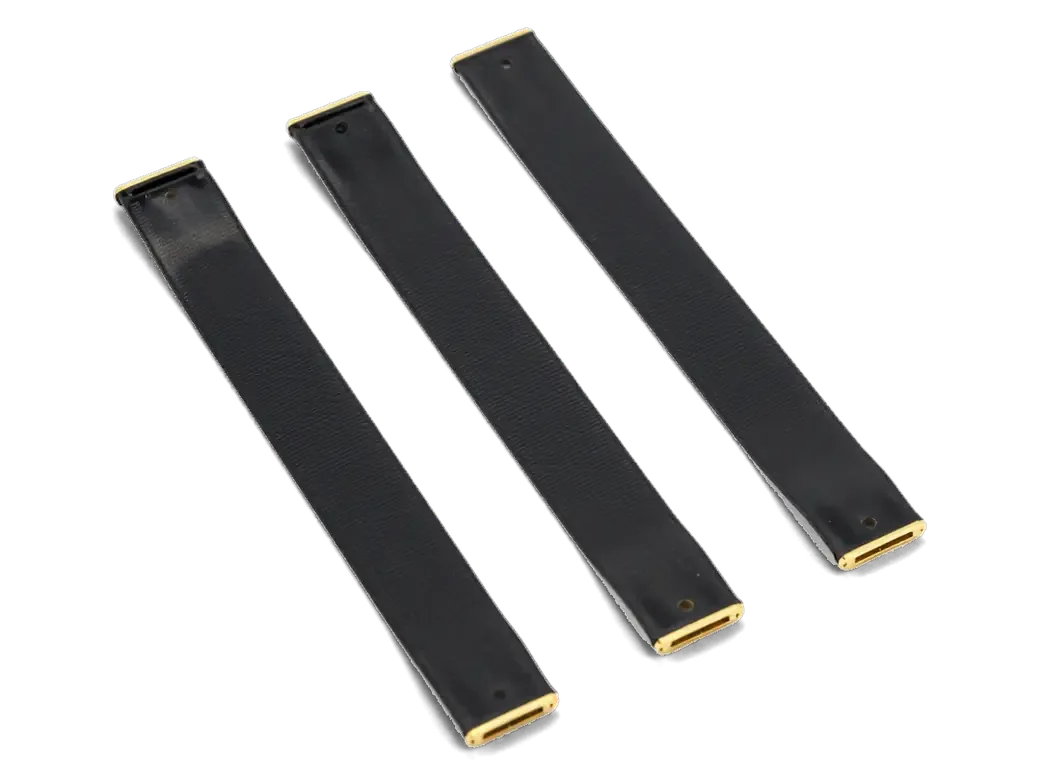
    Ribbon cables with connectors being checked during iMac assembly
    Connection check

    Cables, sockets and mounts are looked over so nothing rattles or hums once the computer is closed.

  6. 06
    iMac with a green checkmark on screen after assembly
    Reassembly and test

    The screen goes back on, the system boots, and temperatures are watched at idle and under load.

  7. iMac fan replacement dust cleaning
    from13 900 ₸

    Afterwards the iMac breathes more freely and runs more evenly.

    Price for my model

Scheduled iMac dust cleaning or only when symptoms appear

You can clean ahead of time while everything works, or wait for the first signs of overheating; each approach has its own merits.

Original Applewarranty up to 1 year
iMac dust cleaningafter diagnostics
iMac all-in-one computer with a large dust cloud icon on the screen
When to do it
While the computer is still quiet and stable
Main benefit
Dust has no time to pack into dense felt
Best for
People who use their iMac every day
Downside
It may be done earlier than strictly needed
Chosen by 64% of clients
Book with an original part
Aftermarketwarranty 6 months
iMac dust cleaning15 900 ₸
iMac all-in-one computer with a fan icon displayed on the screen
When to do it
After noise, heat or sudden shutdowns
Main benefit
Solves a cooling problem you can already see
Best for
Owners who haven't opened the case in years
Downside
Dust may be packed and parts more worn
Chosen by 36% of clients
Book with an aftermarket part

Why people bring their computers here

Opening an all-in-one is nerve-racking, so here is what earns trust from people who bring us their iMac.

11years

11 years of repairs

Eleven years of opening all-in-one computers means we know exactly where dust likes to settle inside them.

1year

Warranty on the work

The finished job carries a warranty up to 1 year, and the technician explains the terms before cleaning starts.

8technicians

Experienced technicians

Experienced technicians open the computer and know how to avoid damaging the screen adhesive and its cables.

0₸

Honest diagnosis

If dust is not the only problem, we say so right away and never push work you do not need.

0opening marks

Careful with the screen

The iMac display is glued on, so it is lifted gently to keep gaps and smudges out of the final result.

7days a week

Convenient hours

Mon–Fri 10:00–19:00, weekends and holidays 11:00–18:00, so weekday commitments need not get in the way.

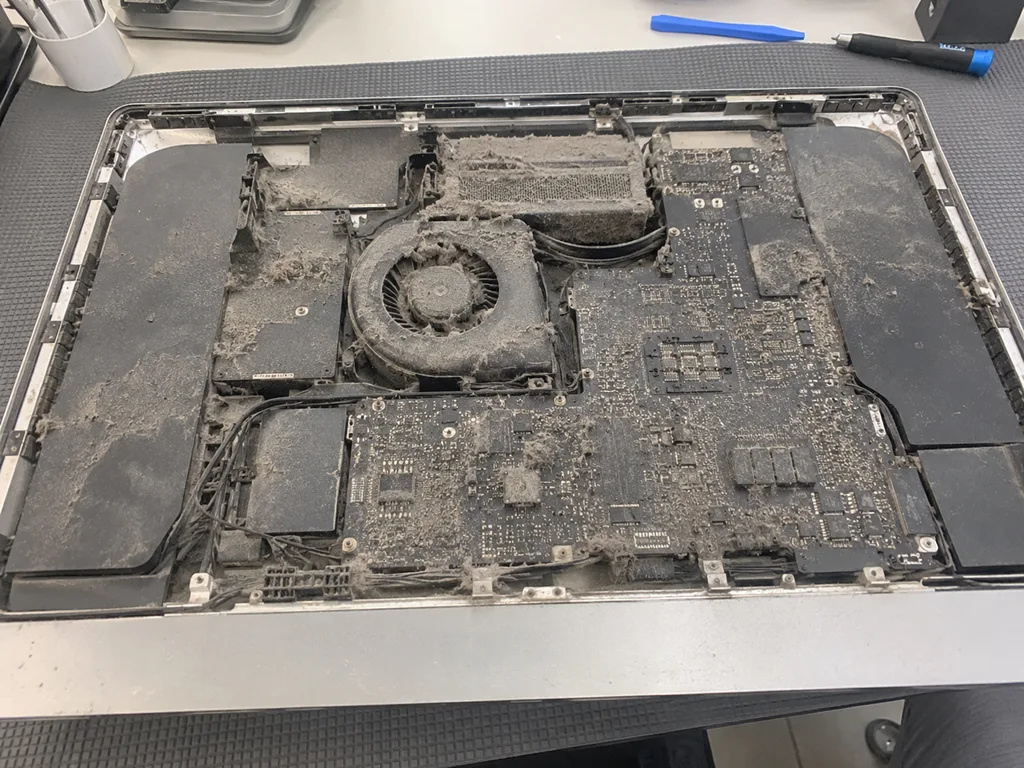
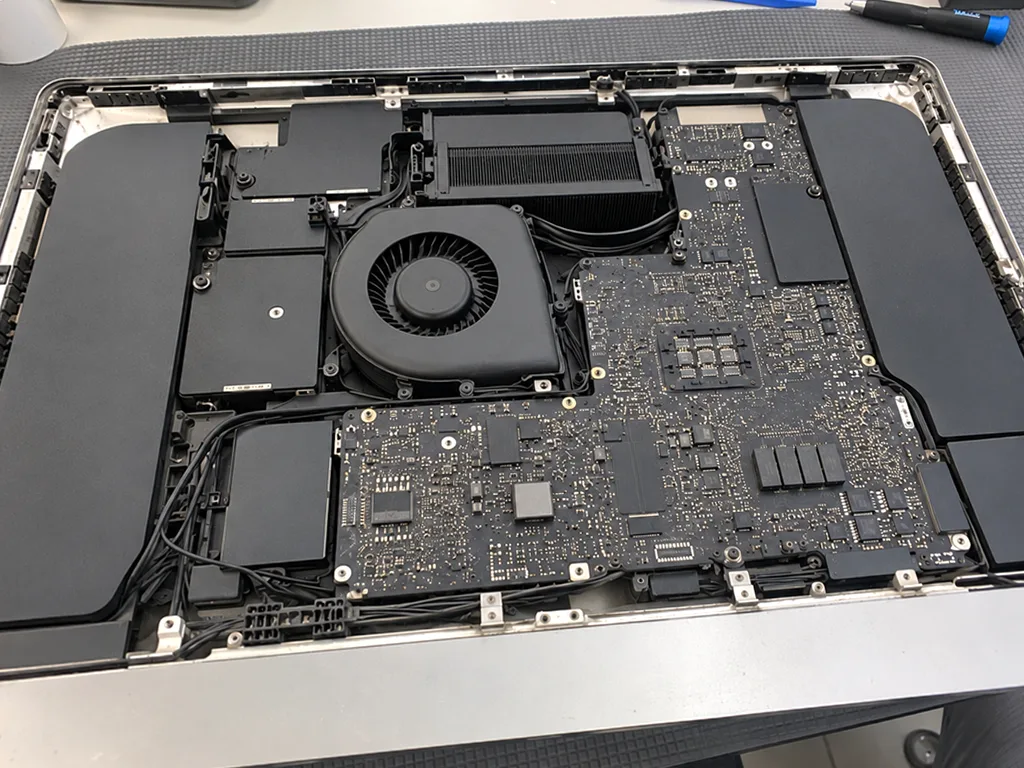
iMac dust cleaning in Almaty before and after

1 / 1
Before photo: fan and heatsink clogged with dustBefore: fan and heatsink clogged with dust
After photo: clean fan and heatsinkAfter: clean fan and heatsink
BeforeAfter

iMac 27 2017: noisy and shutting down

1 dayCleaningWarranty 3 months
Problem
The fan never went quiet, and the iMac shut down by itself in Photoshop.
What we did
Removed the panel, cleaned the fan and heatsink, and replaced the thermal paste on the CPU and GPU.
−24°temperature under load
I want the same

How iMac dust cleaning is done in Almaty

Usually the whole journey — from message to pickup — takes less than an hour; complex repairs follow the timeline in the receipt.

Book a repair
  1. Step 1

    Message or call

    5 min

    You send a photo of the damage on WhatsApp — we quote the price and available time. Or you call a courier.

  2. Step 2

    Free diagnostics

    15 min

    An engineer checks the device in front of you and shows what is broken. 0 ₸, even if you decline the repair.

  3. Step 3

    Price in the receipt

    2 min

    We fix the price, the part (original or analog), the timeline and the warranty. You sign — we start.

  4. Step 4

    Repair while you wait

    20–40 min

    Before installation we show you the new part in its factory packaging. You wait in the waiting area with coffee and Wi‑Fi.

  5. Step 5

    Post-repair check

    10 min

    Screen, camera, microphones, speakers, ports, Wi‑Fi and Bluetooth. You check together with the engineer.

  6. Step 6

    Pick up your device

    warranty up to 1 year

    Together with the receipt, warranty card and the old part. Payment — Kaspi, card or cash.

Who will clean the dust out of your iMac

Technicians for iPhone, Mac, iPad, Apple Watch and AirPods repair.

1 / 6
MNMukhpilov Nail — smartphone repair technician, iServices service center in AlmatyPhoto: Mukhpilov Nail

Mukhpilov Nail

smartphone repair technician
10years of experience
4.83rating, 83 reviews
MRMolchanov Rinat — Apple repair and diagnostics engineer, iServices service center in AlmatyPhoto: Molchanov Rinat

Molchanov Rinat

Apple repair and diagnostics engineer
10years of experience
4.85rating, 33 reviews
SAShokan A — diagnostics technician, iServices service center in AlmatyPhoto: Shokan A

Shokan A

diagnostics technician
8years of experience
5.0rating, 37 reviews
SBSybanbaev Birzhan — firmware specialist, iServices service center in AlmatyPhoto: Sybanbaev Birzhan

Sybanbaev Birzhan

firmware specialist
7years of experience
4.75rating, 74 reviews
DGDenis Gushchin — display replacement technician, iServices service center in AlmatyPhoto: Denis Gushchin

Denis Gushchin

display replacement technician
20years of experience
5.0rating, 34 reviews
DADuisebaev Azhdar — connector replacement technician, iServices service center in AlmatyPhoto: Duisebaev Azhdar

Duisebaev Azhdar

connector replacement technician
7years of experience
4.3rating, 35 reviews
Gamid K, phone repair technician
“If the repair didn’t suit you or you have a complaint, write to me personally.”
Gamid Kphone repair technician · +7 705 556-07-59

We'll quote iMac dust cleaning in Almaty from a photo in 5 minutes

Send a photo of the screen and the iMac model. An engineer will reply on WhatsApp, give the price and today's available time.

  1. 5 minAn engineer replies and names the price
  2. 0 ₸Diagnostics in front of you in 15 minutes
  3. 30 minMost repairs — while you wait

iMac Dust Cleaning in Almaty with a Full Internal Check

In short

iServices performs iMac dust cleaning in Almaty by opening the monoblock, clearing the fan and heatsink, and renewing thermal paste where needed. Our technicians run free diagnostics in front of you for 15 minutes, fix the part, turnaround and warranty on the receipt, and back the work with a warranty up to 1 year.

Mukhpilov NailWe reply on WhatsApp within 10 minutes
Ask

Warning signs that your iMac is clogged with dust

Dust rarely announces itself in one dramatic failure. It shows up as three quiet symptoms — rising noise, extra warmth, slower performance — each with a different cause underneath. Below we break down what each signal points to.

Why a dusty machine gets loud and hot over time

Dust blankets the heatsink fins and fan blades, so the fan must spin faster to move the same air, and the extra warmth pushes the chip into throttling. The fine layer acts as insulation on the aluminium fins, cutting the surface that actually touches moving air, while the blades lose their pitch and stir less volume per revolution. Warmth then travels slower along the copper heat pipes, the chip hits its thermal limit sooner and drops clock speed to protect itself. A machine that was silent at light tasks and now ramps up during a video call is the classic early signal — catching it here is cheaper than waiting for shutdowns.

Dust noise versus a worn fan bearing explained

  • Whoosh that scales with load: airflow fighting clogged fins, which points to dust rather than the motor.
  • Constant rattle or ticking: the bearing is worn, and the sound stays steady no matter how hard the blades work.
  • Click at low speed only: the impeller is catching debris or the shaft has play, so cleaning alone will not fix it.
  • Silence after the service: the motor was fine and dust was the whole story.
  • Rattle that survives the service: we flag the worn part during free diagnostics instead of promising that a service alone will silence it.

Where dust builds up inside an iMac

Air enters an iMac low and leaves high, and along that short path two components catch almost all of the dust. The route explains why the machine gets louder long before anything looks dirty from outside.

The airflow path and the two places dust settles

An iMac pulls air in through the bottom intake and pushes it out the rear vent, so dust collects first on the fan blades and then packs the heatsink fins behind them. The intake sits under the stand, a few centimetres above the desk, which is exactly where carpet fibres, paper dust and pet hair circulate. From there the stream crosses the impeller, and every particle heavy enough to stick lands on the leading edge of a blade. What passes through gets pressed into the fin stack, where the gaps between plates narrow to about a millimetre. The heatsink is the part that actually matters — a fan can look clean while the fins behind it are felted solid, which is why a visual check through the vent tells you almost nothing.

How dust load differs across generations

Four iMac families compared on heat, dust and opening
ModelHeat outputHow dust shows upScreen opening
Intel 21.5"HighFast clogging, loud fanMagnets or adhesive
Intel 27"HighHeatsink felts quicklyAdhesive on slim versions
iMac Pro 27"ModerateSlower build-upAdhesive
iMac 24" M1/M3LowerThin chassis, tight fitGlued panel

How we clean an iMac from the inside

An inside clean follows one fixed route: diagnostics, opening the display, clearing the airflow path, then a load test that proves the result. Below are the steps and the checks we run before the machine goes back to you.

From free diagnostics to a resealed screen step by step

We start with free diagnostics in front of you for 15 minutes, then open the display, clear the fan and heatsink with anti-static brushes and pressure air, renew thermal paste where it has dried out, and reseal the screen with fresh tape. Suction cups lift the glass without stress on the corners, and a thin tool cuts the old adhesive strip. The blades are held still while the air passes, so the bearing is not spun past its limit. Thermal paste is replaced only when it has hardened — a still-soft layer is left alone so the contact surface is not disturbed. This is what iMac dust cleaning in Almaty looks like step by step, and the engineer can walk through each stage. We show the old strip and the debris pulled out; it is the simplest way to see what the work removed.

How we confirm the result under load after cleaning

After reassembly we run the machine under load and compare temperatures and fan RPM against the readings taken before the procedure, so the improvement is measured rather than assumed. The load test pushes the processor and graphics for several minutes while a sensor readout logs the peak, and we keep the pre-clean figures side by side with the new ones. Dust raises both noise and temperature, so the two numbers together tell the real story — a quiet fan alone can simply mean the sensor is misreading. A drop in RPM at the same task is the honest proof — if the numbers barely move, we say so and look at the bearing or airflow instead of calling it done.

Why a vacuum or air can outside the case does not work

The temptation to clean an iMac from the outside is understandable — no tools, no risk, five minutes of work. Physics disagrees, though, and the section below explains what an external tool actually does inside the chassis.

What actually happens when you blow air through the vent outside

A can of compressed gas or a vacuum nozzle reaches only the outer grille, and the pressure can push loosened dust deeper into the heatsink instead of removing it. The intake slot at the bottom rear of the chassis is a narrow channel, so most of the blast bounces off the plastic lip and never travels along the fin stack. Where the stream does connect, it lifts the light surface layer and drives it toward the fan hub, packing the material tighter than it sat before. A vacuum held against the same slot pulls a thin film of loose lint and nothing else. The felted deposit on the aluminium fins is held by static and moisture, so it does not lift with a puff — it has to be brushed away with the panel open.

When opening the case is the only real option left

On every desktop Mac the heatsink sits behind the display, so a genuine internal service means removing the screen — there is no service hatch that gives access to the cooling assembly. Older bodies carry glass held on magnets, which lifts away cleanly; later generations bond the panel to the frame with adhesive tape, and that bond has to be cut and replaced. We quote the opening step up front and show the part and the work before starting, so the screen removal is agreed rather than discovered mid-job. Technicians here handle the removal and the reseal as one operation, and the free 15-minute check runs before anything is opened.

Keeping the outside clean and how often to book a clean

Outside care is simple, but it has rules. Below is how to wipe the case and panel without damage, and how often to book an internal service.

Cleaning the case, stand and screen without damage

  • Microfiber cloth: wipe the aluminium case, stand and display with a slightly damp microfiber cloth, then finish with a dry section.
  • Water only: plain water handles fingerprints and light dust; aggressive sprays and alcohol-heavy wipes can dull the anodised finish and the anti-reflective layer.
  • No paper towels: paper and rough kitchen towels leave micro-scratches on the panel, so keep them away from it.
  • Screen sprays: a dedicated cleaner goes onto the microfiber, never straight onto the display, where liquid can run into the bezel.
  • Dry pass first: a dry cloth lifts loose dust before any moisture touches the surface and pushes grit across the surface.

How often to clean and how long the visit takes in practice

A home desktop usually needs an internal service every 1-2 years, while an office machine or one standing near pets and carpets collects dust faster and benefits from a yearly check. Most of our repairs finish while the customer waits in the waiting area with coffee and Wi-Fi, so the visit rarely eats a working day. We fix the turnaround and the warranty up to 1 year on the receipt before work starts, so nothing about the schedule is left open. If coming in is awkward, a courier across Almaty takes 90 minutes and is free with a repair. Machines on the floor near a balcony door clog noticeably quicker than ones on a desk, so they need attention sooner. Book the service before the fan noise starts rising, not after.

Summary: iMac dust cleaning

Five points sum up what decides whether an internal service is worth booking, from the first warning signs to how often the procedure should repeat.

  • Noise and heat come first: dust on the heatsink and blades raises temperature and rotation speed long before the iMac slows to a crawl.
  • Exterior tools stop at the grille: a vacuum or air can only reach the vents, while the fins behind the display need the case opened.
  • Proof is in the measurements: the result counts only when temperature and rotation speed under load are compared before and after.
  • Outside care is simple: wipe the case, stand and screen with a slightly damp microfiber cloth and skip harsh sprays.
  • Timing: book an internal service every 1–2 years, sooner in offices or homes with pets.

What people ask about iMac dust cleaning

Did not find an answer? Message us on WhatsApp: an engineer replies, not a bot.

Ask a question
Why is my iMac loud when nothing heavy is running?

Most often the fan struggles to push air through a heat sink clogged with dust, so it spins faster than necessary. Sometimes background processes are to blame, so check Activity Monitor first.

Can I clean an iMac with a vacuum cleaner?

You can gently pass a soft nozzle over the outside grilles, but a vacuum does not belong inside the case because static is dangerous for the board. Leave opening the all-in-one to a technician.

Do I have to leave the computer at the service?

The time depends on the model and condition of the iMac, so the technician names it after inspection. Booking ahead helps you avoid waiting in a queue.

Will cleaning erase data from the drive?

No, cleaning does not touch your data. The technician works on the cooling system and does not change the contents of the drive, although having a backup is always wise.

Will cleaning help if my iMac shuts down by itself?

If the cause is overheating from dust, yes. Shutdowns can also come from power or the board, so the technician checks temperatures first and names the cause afterwards.

Is cleaning an iMac 24 M1 different from cleaning an older Intel iMac?

The idea is the same, but the two machines collect dust very differently. The thin M1 model runs cool and rarely clogs badly, while a large Intel iMac draws far more air through its vents and fills up faster. On both the display is glued on, so it has to be lifted carefully to reach the fan.

How do I know the fan is worn out?

Typical signs are grinding, an uneven hum that rises and falls, and stops at high temperatures. In that case cleaning only helps partly, and replacing the fan is the better choice.

What Almaty owners say about iMac dust cleaning

1 / 2
4.9

average rating on Google Maps, wikicity and our website · 445 reviews
Google Maps4.438 reviews ›wikicity5.015 reviews ›Reviews on the iServices website5.0392 reviews ›
МЭ
Марат Э.Order No. IS‑2111‑•••10 · 14 November 2021
iMac 21,5″ (2017) · cleaning

С iMac 21,5″ (2017) вышла неприятность: компьютер сильно нагревался под нагрузкой. После обращения проверили терморежим и состояние охлаждения; Спасибо Аждар: разобрался с нюансами без лишних разговоров.

iServices customer review, in Russian
ЖХ
Жанна Х.Order No. IS‑2608‑•••93 · 2 August 2026
iMac 24″ (M4, 2024) · cleaning

У моего iMac 24″ (M4, 2024) компьютер сильно нагревался под нагрузкой. В итоге проверили терморежим и состояние охлаждения.

iServices customer review, in Russian
Showing 2 of 2See all reviews

Where to get iMac dust cleaning in Almaty

Address
Almaty, Zharokov St., 128
Opening hours
Mon–Fri 10:00–19:00Sat–Sun 11:00–18:00
Phone and messengers
+7 705 556-07-59WhatsApp: +7 705 556-07-59
Directions map: iServices Almaty — Zharokov, 128© OpenStreetMapFind us on the maps: Google Maps · 2GIS