The iPhone 12 Pro pairs flat steel edges with an OLED panel and MagSafe, and that combination shapes which faults we see most. Here is what tends to break and how each fault shows up before you book anything.
The faults we see most on the 12 Pro
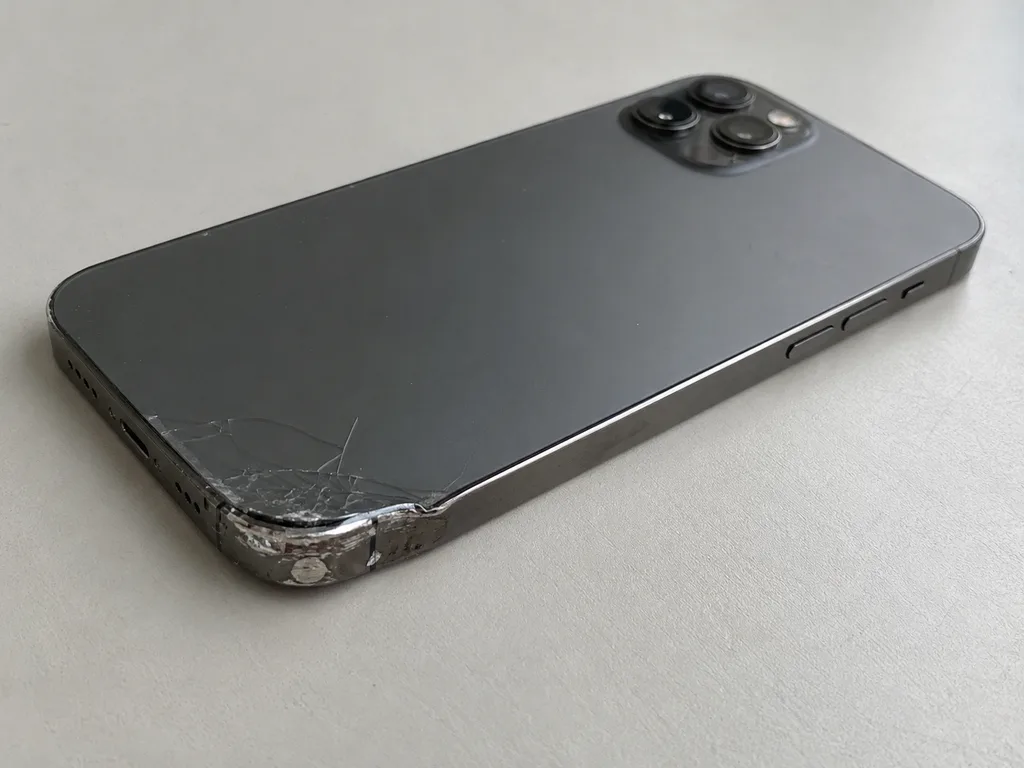
Most repairs we handle come down to four faults: a cracked or flickering OLED screen, a worn battery, a charging port that no longer grips the Lightning cable, and shattered camera glass. The display module carries the panel, digitizer and True Tone together, so a single impact can damage any layer of that stack. The battery ages faster under MagSafe charging cycles, and the port collects pocket lint until the pins stop seating the plug. The flat steel frame takes impacts differently from curved bodies, so a drop often cracks the glass while leaving the frame and the OLED matrix intact, which is why the same fall can mean either a quick glass swap or a full assembly depending on what the diagnostic shows.
Symptom, likely cause and what we do
Matching visible symptoms to the parts behind them| What you notice | Likely cause | What we do |
|---|
| Cracks, no touch response | Broken glass or OLED matrix | Glass-only swap or full module |
|---|
| Lines, flicker, green tint | Damaged OLED panel | Display module replacement |
|---|
| Dies fast, shuts down cold | Worn battery | Battery replacement |
|---|
| Cable falls out, slow charge | Worn Lightning port | Port and flex replacement |
|---|
| Blurry photos, cracked lens | Shattered camera glass | Camera glass replacement |
|---|
| Face ID stops after a drop | TrueDepth module fault | Module diagnosis and repair |
|---|
Why the 12 Pro is not the same as older models
The 12 Pro moved the whole lineup to OLED, added MagSafe and flat steel edges, and tightened the link between certain parts and the logic board, so repairs are less interchangeable than on earlier models. The display, battery and camera assemblies each talk to the board through paired components, and the TrueDepth array is matched to its unit at the factory. A donor display from another 12 Pro may power on yet refuse to deliver True Tone, and a swapped battery can throw an unknown-part notice. Because some components are paired to the board, a part pulled from another 12 Pro will not simply drop in and behave, which is why we source the correct part for your unit rather than reusing a donor.
Screen Damage and What We Can Actually Replace
A cracked front is the most common reason a 12 Pro comes to us, and the first question is always whether the whole module has to go. Often it does not.
Glass-only replacement versus a full display module
If the OLED matrix still lights up cleanly and the digitizer responds, we can replace just the cracked outer layer; if there are lines, dead zones or a green tint, the full module has to be swapped. A glass-only job keeps your original panel and its calibration, which usually gives better image quality. The sensing film sits as a separate layer above the OLED, so a clean matrix with a responsive digitiser is exactly the case where the outer sheet alone is worth doing. We inspect the panel under a bright light and sweep a finger over the whole surface before recommending the lighter option. This route is what most 12 Pro owners actually need, since the OLED under a single impact crack usually survives intact. It only makes sense when the matrix underneath is genuinely undamaged.
What happens to True Tone after a screen repair
True Tone keeps working after a repair when the display calibration is transferred to the new module, and we carry that transfer out as part of the job rather than leaving it to chance. The calibration data lives on the original module and tells the phone how to shift colour temperature with ambient light, so a fresh unit without that transfer reads as a plain, slightly colder display. Our engineers move the data during fitting and confirm the result in the settings menu with you present. On some aftermarket assemblies the calibration cannot be copied, so True Tone may stay off even though everything looks fine. That is one concrete reason the original part is worth considering here, and 64% of our customers pick it for exactly this kind of reason.
How long a screen repair takes
A screen replacement on the 12 Pro takes about 40 minutes, and in most cases you can wait in our area with coffee and Wi-Fi while the engineer works. The display is tested before and after fitting, so the 40 minutes includes the function check rather than just the swap. That check covers the digitizer over the full surface, brightness steps and the True Tone response. Workshop-wide, 72% of repairs finish while the customer waits on site, and a screen job is the clearest example of that pattern. The time you are quoted already accounts for confirming the sensing layer, brightness and colour shift, so treat the 40 minutes as the full visit, not an estimate that quietly grows.
Original Part or Aftermarket and What Happens to Face ID and True Tone
The component you choose decides more than the bill; it decides which features behave exactly as before. Here is how original and aftermarket options differ on a 12 Pro and what stays intact either way.
Original versus aftermarket, compared by function
How the two component options differ on a 12 Pro| Aspect | Original | Aftermarket |
|---|
| True Tone | Works after calibration transfer | May not work on some panels |
|---|
| Parts message | No unknown-part warning | Warning may appear |
|---|
| Fit and finish | Matches factory spec | Varies by supplier |
|---|
| Longevity | Factory-grade wear | Shorter on budget tiers |
|---|
| Your choice | Fixed on the receipt | Fixed on the receipt |
|---|
Does Face ID survive a repair
Face ID keeps working after a screen or battery repair because the TrueDepth module that powers it is a separate unit from the display, and we do not touch it unless it is the fault. The dot projector and infrared camera sit in that module, paired to the board at the factory, while the panel is a distinct assembly with its own flex cables. During a swap the engineer transfers the original TrueDepth hardware across and leaves its pairing intact, so unlocking by face still works the moment you test it at handover. If Face ID itself stopped after a drop, the cause is usually the TrueDepth assembly rather than the glass, so we diagnose that module on its own before quoting, since a new panel would not bring it back.
What the unknown-part message really means
The "unknown part" message is an indicator of which component the phone is running, not a sign that something is broken, and it appears when a unit is not paired to the board. Apple ties certain components — the display, battery and camera — to the logic board through a pairing step at manufacture, and a replacement that skips that step leaves the phone unable to confirm its identity. The hardware still functions: the panel lights up, touch responds, the cell charges. The warning does not stop it from working, but it does tell you what was fitted, which is why knowing in advance whether your chosen option triggers it matters more than the alert itself.
Charging, Battery and Camera Glass on This Generation
Beyond the screen, three everyday faults bring a 12 Pro to the bench: it stops charging, the battery drains too fast, or the camera glass shatters. Each has a clear path to a fix.
When it will not charge, port or board
A 12 Pro that will not charge is more often a worn or clogged Lightning port than a board fault, and the diagnostic shows which within minutes. Lint and pocket debris pack into the cavity, the contacts stop meeting the cable pins, and the phone reports no charge at all. When the port is intact, we look at the charging flex, then at the power controller on the mainboard, because a failed controller can mimic a dead connector. A board-level fault needs the microscope and one to three days, while a port clean or swap is finished in the same visit. Lint packed into the port can mimic a dead connector, so we inspect and clean before quoting a replacement, which saves you the cost of a part you may not need.
Reading battery health and knowing when to replace
A battery replacement takes about 25 minutes, and the clearest signal it is due is a Battery Health figure that has dropped low alongside sudden shutdowns or fast drain under load. iOS reports maximum capacity as a percentage in Settings, and once it slides into the low eighties the phone throttles performance to protect itself. Shutdowns in cold weather and a charge that falls from half to empty in an hour point the same way. We read the figure together with the cycle count and the actual behaviour. Battery Health is a guide, not a verdict, so we weigh it against how the phone actually behaves, since a handset that shuts down in the cold can need a new cell even when the percentage still looks acceptable.
Cracked camera glass and the rear panel
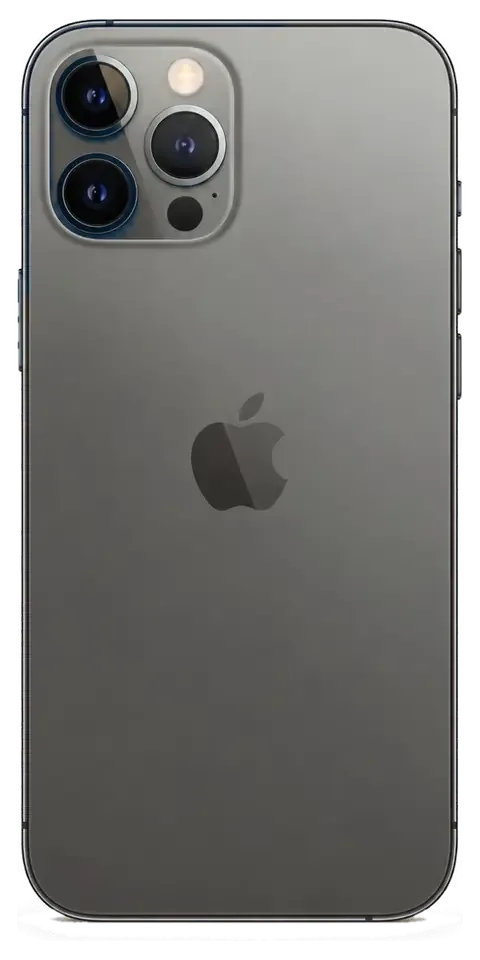
A shattered camera lens cover is a 20-minute job on its own, and it is worth doing early because a broken cover lets dust and moisture reach the optics inside. The sheet of glass sits over the lens, so a crack in it does not mean the module is damaged, and often only that sheet is replaced. If the rear glass is also cracked, the two are handled separately, since the sheet sits over the optics while the back panel is a different surface, so we quote each based on what the diagnostic finds. A scuffed panel with the glass intact is cosmetic and can wait; a splintered sheet over the optics should not, because grit trapped against the lens scratches the surface itself.
How a Visit Works and What You Leave With
From the first message to the moment you walk out, the sequence is short and fixed. Knowing it in advance takes the guesswork out of handing over your phone.
From a WhatsApp photo to a fixed receipt
You send a photo of the damage on WhatsApp, an engineer replies within five minutes with a price, and on arrival the price, part, turnaround and warranty are fixed on the receipt in about two minutes before any work begins. The free diagnostic itself runs fifteen minutes in front of you, even if you decide not to go ahead, and the engineer shows exactly what has failed. Ahead of installation, the new component is opened from its factory packaging so you see the part you are paying for. If you come in person, you can settle the bill by Kaspi, card or cash, or call a courier to collect the device instead. Fixing those four points on paper before the phone is opened is what protects you from a changing quote, so treat the receipt as the agreement rather than a formality.
The 32-point check you do together at handover
- Face ID and True Tone: unlock and display warmth behave as before.
- Cameras and microphones: front, rear and lens clarity, plus voice capture.
- Speakers: call and media audio at normal volume.
- Charging: cable and MagSafe both draw power.
- Network: cellular and Wi-Fi connect and hold.
- What you keep: the receipt, warranty card and the old part.
Why a direct repairer changes the deal
We are the direct repairer with our own technicians and workshop, not an aggregator or middleman, so the person who quotes your iPhone 12 Pro repair in Almaty is the person who does the work and stands behind a warranty of up to 1 year. That matters because the team has handled 46,000+ repairs over eleven years, and 72% of jobs are finished while the customer waits in the seating area with coffee and Wi-Fi. Paying is flexible, by Kaspi, card or cash, and a courier can bring the phone across the city in about 90 minutes. A middleman adds a handoff where accountability blurs, whereas dealing with the workshop itself means the old part comes back to you and the warranty is honoured by the same team that fitted the new one.
Summary: iPhone 12 Pro Repair
A repair that holds up depends less on luck than on a few decisions made before the phone is opened. Here is what is worth settling first.
- Match the fix to the fault: a cracked display can mean glass only or a full module, and only an in-person check tells you which.
- Decide the part on purpose: original and aftermarket differ on True Tone and the parts message, so choose with those outcomes in view.
- Ask what stays intact: Face ID and True Tone should survive a correct repair, and it is fair to confirm this before work starts.
- Get it in writing: price, part, turnaround and warranty belong on the receipt ahead of the phone being opened.
- Check together at handover: run through the functions on the device itself so nothing is discovered later.











 iPad
 MacBook
 iMac
 Mac mini and Studio
 Apple Watch
 AirPods
 Apple Pencil
 Apple TV
 HomePod




