Your city

AstanaAstana, Kabanbay Batyr Ave., 7/2 · +7 727 339-99-12
Eng

MacBook Air M2 Repair in Almaty

MacBook Air M2 overheats without a fan or won't charge — we'll find the cause while you wait and quote the price before repair.

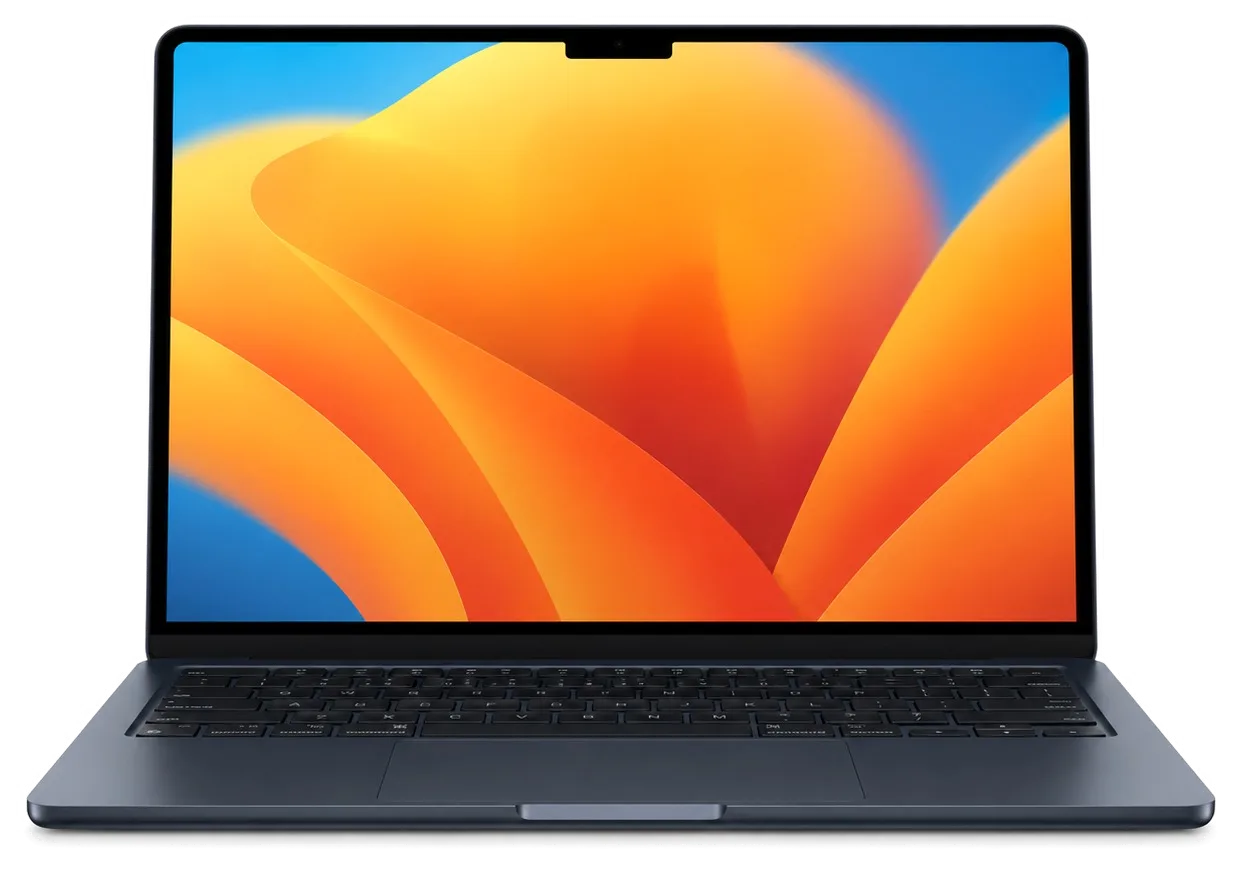
MacBook Air M2 laptop with glowing screen in the dark night
MacBook Air M2, Midnight repair
Logic board repairfrom 16 900 ₸
Liquid damage cleaningfrom 41 900 ₸
Display panel replacementfrom 169 900 ₸
All services and prices

When your MacBook Air M2 needs repair

What usually brings an Air M2 into the workshop: battery, screen, keyboard, trackpad, overheating and the effects of a spill.

01

Battery drains fast

The charge disappears in a couple of hours and the case runs warm while plugged in.

02

Lines or spots on screen

Pressure on the lid or a knock can leave dark patches and vertical lines on the panel.

03

Sticky or dead keys

Letters repeat or do nothing, especially after coffee or juice reached the keyboard.

04

Trackpad won't click

The pad has lifted, the click feels hollow or the cursor jumps around by itself.

05

Dead after a spill

Moisture reached the board: black screen, no charging, sometimes a burnt smell.

06

MagSafe charging fails

The cable light stays off and the Air ignores power even with a known good adapter.

07

Heat and slowdowns

With no fan, dust and dried paste throttle the chip even in light everyday tasks.

08

Bent or dented case

After a fall the lid sits crooked, a corner cracks or the bottom panel pops loose.

09

Touch ID not working

Touch ID stopped responding, you can only unlock with a password.

10

Black camera image

During calls, the image is dark and the green indicator light is off.

11

Headphone jack silent

The 3.5 mm jack doesn't respond to the plug, sound comes from the speakers.

12

No signs of life

No reaction to the button or charging — we look for a board fault.

MacBook Air M2 repair prices

The table lists typical starting prices for the main Air M2 jobs; a technician confirms the final amount after inspecting the laptop.

ServiceOriginalAftermarket
Display panel replacement273 900 ₸169 900 ₸
Battery replacement165 900 ₸95 900 ₸
Keyboard replacement100 900 ₸55 900 ₸
Trackpad replacement49 900 ₸27 900 ₸
Charging port replacement35 900 ₸19 900 ₸
Speaker replacement33 900 ₸18 900 ₸
Other repairsPrice
Logic board repairmicrosoldering · 1–3 days16 900 ₸per job
Liquid damage cleaningcorrosion cleaning · diagnostics up to 2 days41 900 ₸per job
Wi-Fi module repairwireless module · board-level repair41 900 ₸with parts
MacOS installationOS installation, no parts replaced10 900 ₸per job

The final bill depends on board condition, the part you choose and the amount of work, so we confirm it after the checkup.

Original or aftermarket parts for Air M2

Compare the two part options for the screen, battery and keyboard and pick the one that fits your budget and workload.

Original Applewarranty up to 1 year
MacBook Air M2 battery165 900 ₸
MacBook Air M2 battery: original part in Apple packaging
Quality
Native specs, familiar brightness and response
Compatibility
Installs with no warnings in macOS
Lifespan
Keeps capacity and color longer
Cost
Noticeably higher than aftermarket
Chosen by 64% of clients
Book with an original part
Aftermarketwarranty 6 months
MacBook Air M2 battery95 900 ₸−42%
MacBook Air M2 battery: aftermarket part in an antistatic bag
Quality
Solid level for everyday tasks
Compatibility
Works normally, screen tint may differ slightly
Lifespan
Enough for office work, study and video
Cost
Cheaper than the original part
Chosen by 36% of clients
Book with an aftermarket part

Why Air M2 owners bring it to us

Why Air M2 owners leave their laptops with us: experience, a warranty on the work, a decision only after inspection, two cities.

11years

11 years of experience

We have worked on Apple devices for eleven years, so we know where a thin Air tends to fail instead of guessing.

1year

Warranty on the work

Completed work comes with a warranty up to 1 year, and the technician explains the terms before anything starts.

8technicians

Experienced technicians

Boards and fragile ribbon cables go to experienced technicians who handle laptops every working day.

0₸

Cause first, price second

We find the fault first, then name the amount and explain what must be replaced and what can stay.

2cities

Two cities, one service

We receive devices in Almaty and Astana, so your order stays with us even if you move or travel often.

7days a week

Hours that fit a workday

Mon–Fri 10:00–19:00, weekends and holidays 11:00–18:00, so you can drop by after the office.

MacBook Air M2 before and after repair

1 / 2
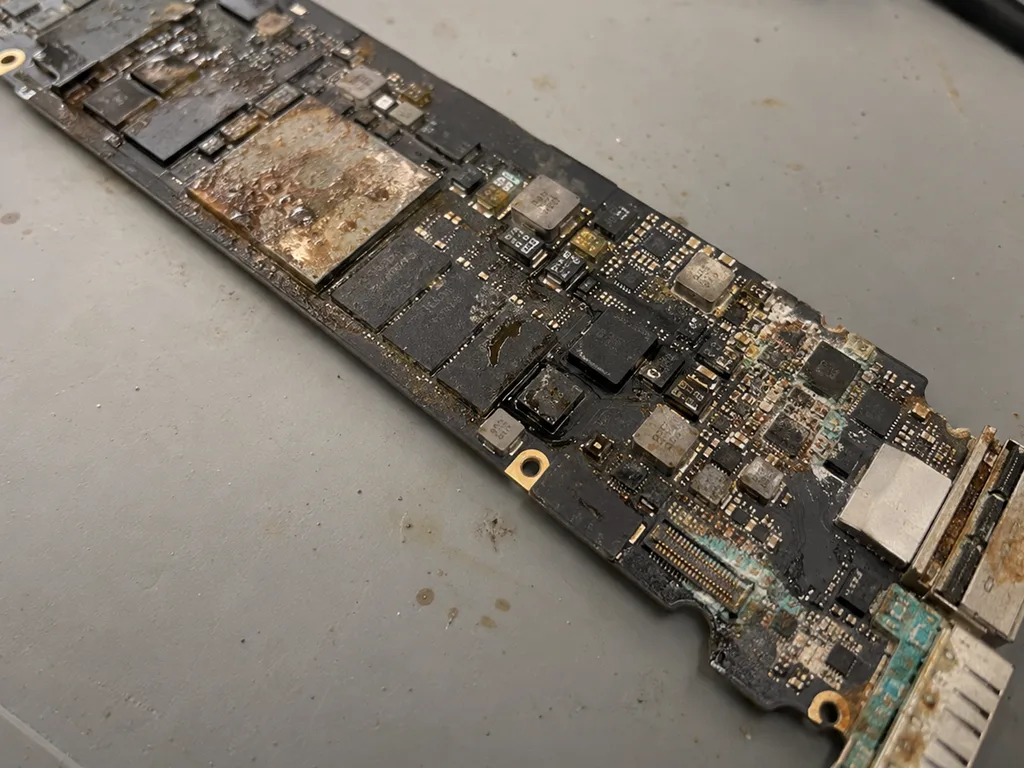
Before photo: MacBook board with corrosion after coffeeBefore: MacBook board with corrosion after coffee
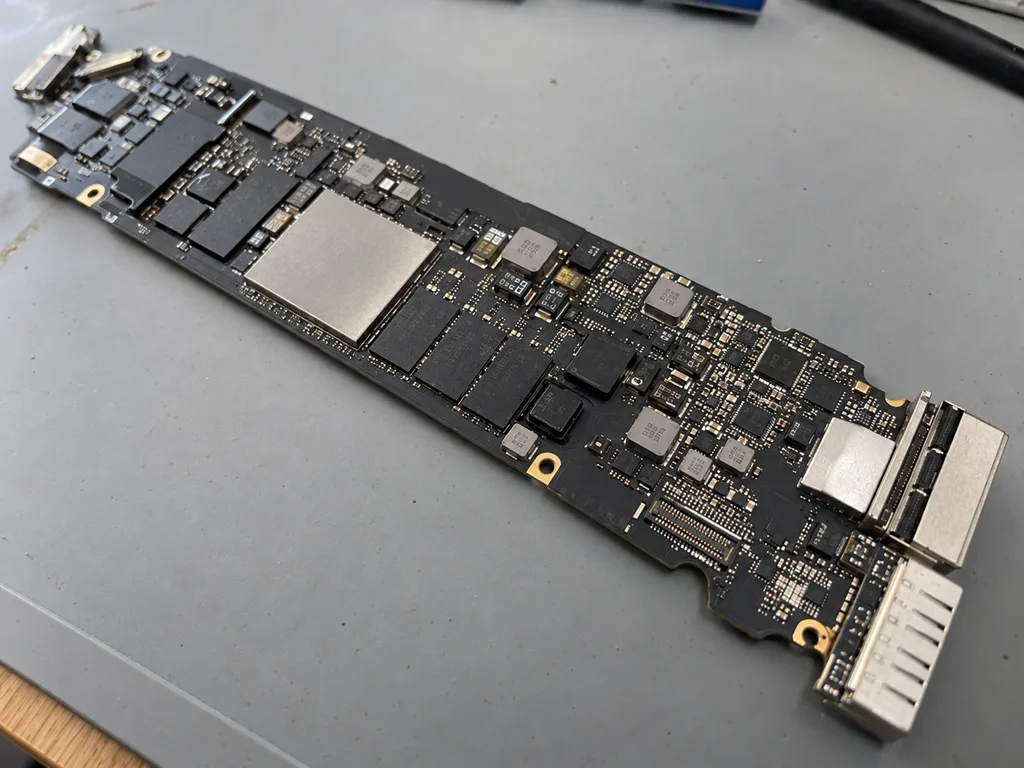
After photo: board after ultrasonic cleaningAfter: board after ultrasonic cleaning
BeforeAfter

MacBook Air M2: coffee spilled on it

2 daysBoard repair6-month warranty
Problem
Coffee spilled on the keyboard, and the laptop won't turn on. Another service centre quoted 520,000 ₸ to replace the board.
What we did
The board was cleaned ultrasonically, 2 power controllers and the top case were replaced. Data was preserved.
−431,000 ₸against board replacement
I want the same
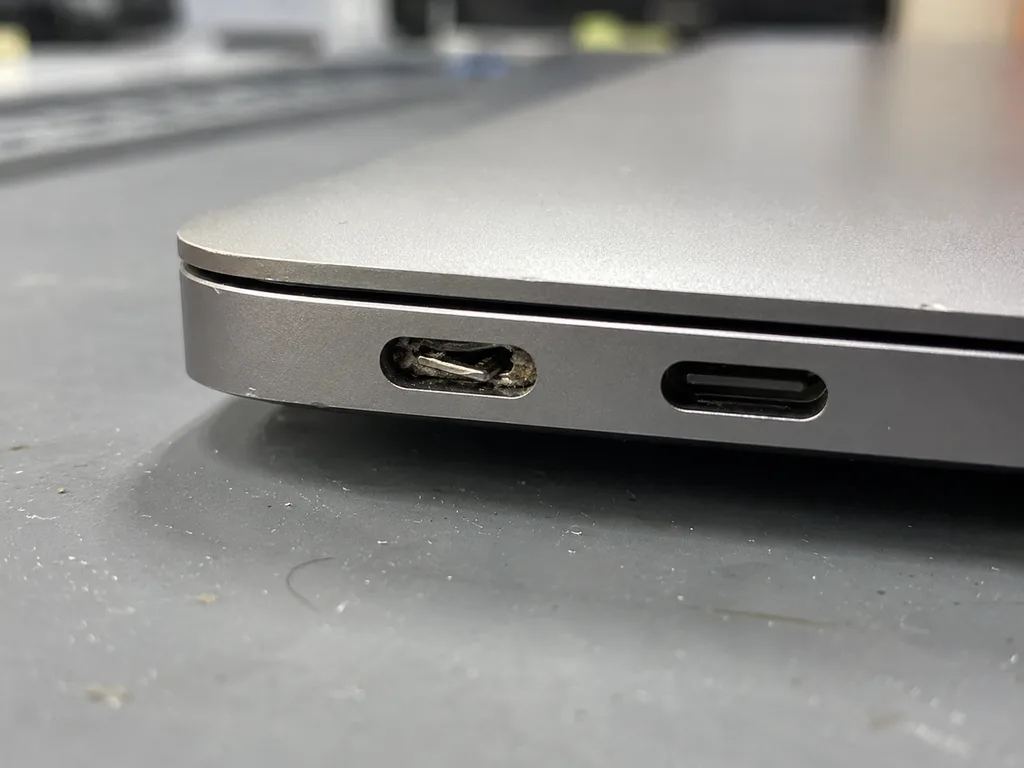
Before photo: loose USB‑C portBefore: loose USB‑C port
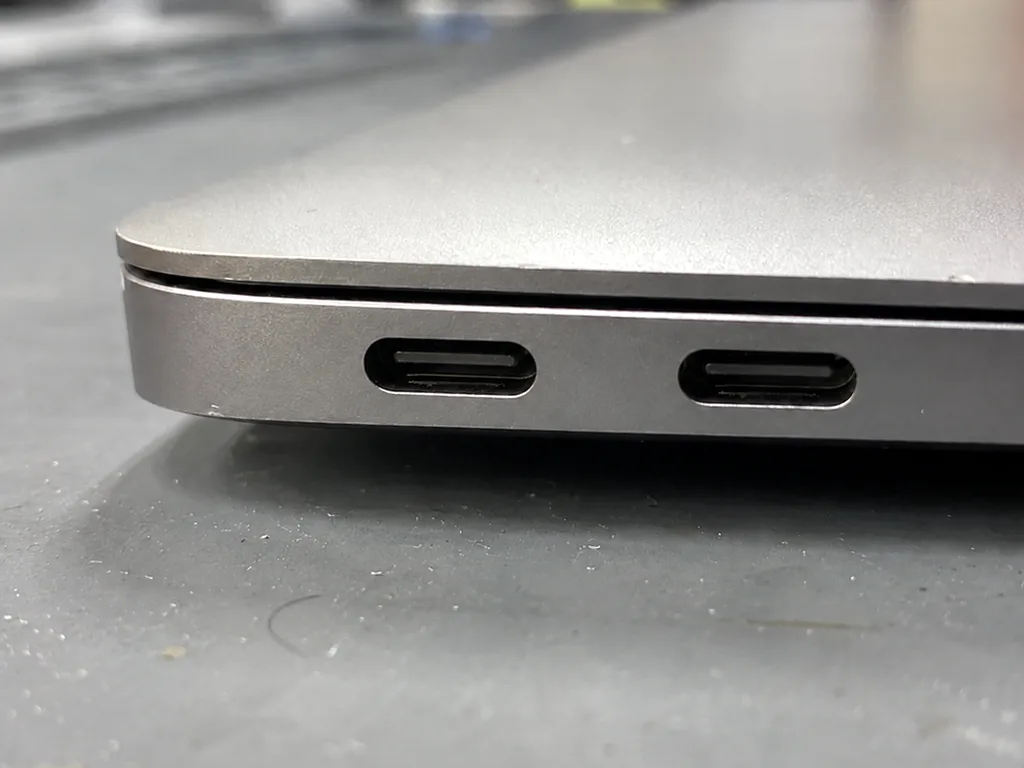
After photo: new USB‑C portAfter: new USB‑C port
BeforeAfter

MacBook Air M2: not charging

1 dayOriginal1-year warranty
Problem
Charging worked only if the cable was held in place. The left USB‑C port is loose.
What we did
Replaced the USB‑C and MagSafe port board, checked charging at 30 and 70 W.
1 daycharges from any port
I want the same

How MacBook Air M2 repair works in Almaty

Usually the whole journey — from message to pickup — takes less than an hour; complex repairs follow the timeline in the receipt.

Book a repair
  1. Step 1

    Message or call

    5 min

    You send a photo of the damage on WhatsApp — we quote the price and available time. Or you call a courier.

  2. Step 2

    Free diagnostics

    15 min

    An engineer checks the device in front of you and shows what is broken. 0 ₸, even if you decline the repair.

  3. Step 3

    Price in the receipt

    2 min

    We fix the price, the part (original or analog), the timeline and the warranty. You sign — we start.

  4. Step 4

    Repair while you wait

    20–40 min

    Before installation we show you the new part in its factory packaging. You wait in the waiting area with coffee and Wi‑Fi.

  5. Step 5

    Post-repair check

    10 min

    Screen, keyboard and trackpad, camera, microphones, speakers, charging, Wi‑Fi. You check together with the engineer.

  6. Step 6

    Pick up your device

    warranty up to 1 year

    Together with the receipt, warranty card and the old part. Payment — Kaspi, card or cash.

Who will fix your MacBook Air M2

Technicians for iPhone, Mac, iPad, Apple Watch and AirPods repair.

1 / 6
MNMukhpilov Nail — smartphone repair technician, iServices service center in AlmatyPhoto: Mukhpilov Nail

Mukhpilov Nail

smartphone repair technician
10years of experience
4.83rating, 83 reviews
MRMolchanov Rinat — Apple repair and diagnostics engineer, iServices service center in AlmatyPhoto: Molchanov Rinat

Molchanov Rinat

Apple repair and diagnostics engineer
10years of experience
4.85rating, 33 reviews
SAShokan A — diagnostics technician, iServices service center in AlmatyPhoto: Shokan A

Shokan A

diagnostics technician
8years of experience
5.0rating, 37 reviews
SBSybanbaev Birzhan — firmware specialist, iServices service center in AlmatyPhoto: Sybanbaev Birzhan

Sybanbaev Birzhan

firmware specialist
7years of experience
4.75rating, 74 reviews
DGDenis Gushchin — display replacement technician, iServices service center in AlmatyPhoto: Denis Gushchin

Denis Gushchin

display replacement technician
20years of experience
5.0rating, 34 reviews
DADuisebaev Azhdar — connector replacement technician, iServices service center in AlmatyPhoto: Duisebaev Azhdar

Duisebaev Azhdar

connector replacement technician
7years of experience
4.3rating, 35 reviews
Gamid K, phone repair technician
“If the repair didn’t suit you or you have a complaint, write to me personally.”
Gamid Kphone repair technician · +7 705 556-07-59

We'll quote a MacBook Air M2 repair in Almaty from a photo in 5 minutes

Send a photo of the fault — an engineer will reply on WhatsApp, give the price and a time you can come in.

  1. 5 minAn engineer replies and names the price
  2. 0 ₸Diagnostics in front of you in 15 minutes
  3. 30 minMost repairs — while you wait

MacBook Air M2 Repair in Almaty with Parts You Can See

In short

For MacBook Air M2 repair Almaty, iServices diagnoses your laptop in front of you in 15 minutes, then fixes most issues in 1 hour to 1 day. You choose an original or aftermarket part; price, part, turnaround and warranty up to 1 year are fixed on the receipt before work starts.

Mukhpilov NailWe reply on WhatsApp within 10 minutes
Ask

What Air M2 Owners Bring In and What Each Symptom Means

Air M2 units arrive with cracked screens after a drop, tired batteries, charging that fails on MagSafe 3 or USB-C, liquid inside the fanless body, and keys that stick. Below is what each symptom points to.

The Five Failures We See Most on the Air M2

Common Air M2 faults matched to their likely cause
SymptomWhat it usually meansWhat we do
Cracked or striped screenDamaged matrix or lid assemblyReplace the display module
Drains fast, trackpad bulgesWorn cells, swellingFit a new battery
Will not charge on MagSafe 3 or USB-CConnector, cable or power controllerTest both paths, then repair
Spilled liquid, then deadCorrosion on the logic boardClean and repair under a microscope
Keys stick or double-typeDebris or worn key mechanismClean or replace the top case

Why an Air M2 "Not Charging" Is Not Always the Port

On the Air M2 we check three things in order — the MagSafe 3 connector, the USB-C path and battery health — because any of them can stop the laptop from charging. The magnetic plug carries its own negotiation chip, so a cable that worked last week can fail to hand power over after a knock, while Thunderbolt keeps working independently. We read cycle count and pull the bottom cover to look for swelling prior to touching the connector. A swollen cell can physically press the trackpad and cut charging before the socket ever fails, so we inspect the trackpad gap and cell shape first — that order saves you a needless replacement.

Keyboard and Trackpad Complaints on the M2 Air

The Air M2 uses a scissor keyboard, not the older butterfly mechanism, so most key faults here come from debris or liquid rather than the design itself. Crumbs and dust collect under the keycap and stop the scissor from snapping back, which reads as a sticky or double-typing key. Liquid is the harder scenario: it reaches the top case and the board beneath, and a single row that dies after a spill usually means corrosion on the membrane rather than a worn switch. The Force Touch trackpad sits on the same top case, so a click that feels stiff or dead often traces back to the same spill or to a swelling cell pressing from below. A single sticky key is often fixed by cleaning the mechanism, while a whole row that fails points to the top case and the board underneath it.

How the M2 Air Is Built and Why That Shapes the Repair

The Air M2 is built unlike the Intel Air: memory and SSD are soldered down, cooling runs without a fan, and charging goes through MagSafe 3. That changes what comes off as a module.

What Is Soldered and What Can Still Be Swapped

On the Air M2 the memory and SSD are soldered to the logic board, so they cannot be upgraded the way storage and RAM were swapped in older MacBook Pro unibody models. The unified memory sits inside the same package as the Apple Silicon chip, and the flash storage is fixed with no slot and no connector. What still comes off as a separate module: the battery, the display assembly, the top case with keyboard and trackpad, the speakers, the camera and the charging port module. A failing SSD is therefore a board-level job under a microscope, not a part swap, and it is one reason to keep a current backup rather than plan a storage upgrade later.

Fanless Cooling and What It Means for Heat and Dust

The Air M2 has no fan, so it never sounds loud the way a Pro does — when it overheats, the cause is usually dust on the heat spreader, a heavy workload or a battery that is failing. Our engineers lift the bottom cover during free diagnostics and show the customer the graphite heat spreader and the passive plates that carry heat away from the chip. Because there is no fan pulling air through a cooler, an Air M2 collects far less dust than an Intel Pro, and a warm chassis on this model is more often a power-cell or software signal than a clogged cooler. If the machine throttles on light tasks, we test health and the thermal path before quoting any board work — that check saves customers from an unnecessary repair more often than not.

Finding the Right Model Number Before Any Repair

The model number is printed in small text on the bottom cover of the Air M2, and that A-number is what tells a technician which display, battery and top case actually fit. The 13.6-inch Air M2 carries the A2681 marking, while the 15-inch Air with the same chip is A2941 — the two share the M2 processor but not the same display assembly, cell or keyboard. "Air M2" as a marketing name is not enough on its own, so the A-number prevents ordering the wrong part and a second visit. Ahead of any MacBook Air M2 repair in Almaty owners should photograph that bottom line and send it with the damage photo — matching the A-number first is what keeps the turnaround at the quoted slot instead of a reorder.

How We Run MacBook Air M2 Repair in Almaty

A MacBook Air M2 repair starts with a photo on WhatsApp and ends with a 32-function check beside the engineer. In between come diagnostics in front of you, a receipt, and the new part shown in its factory packaging.

From a WhatsApp Photo to a Fixed Price on the Receipt

You send a photo of the damage on WhatsApp, an engineer replies within 5 minutes with a price and a free time slot, and the price, part, turnaround and warranty are fixed on the receipt in about 2 minutes prior to work starting. Free diagnostics take 15 minutes at the counter — the engineer opens the laptop with you watching and points at what has failed, even if you decide against the repair. Warranty runs up to 1 year, and the document names the part as original or aftermarket. Fixing those four points on paper ahead of the screwdriver coming out is what stops a "while we were in there" surprise later — that slip is the reference both sides check at pickup.

Turnaround Times and Waiting in Comfort

Most laptop and iPad repairs take from 1 hour to 1 day, board-level work takes 1–3 days, and 72% of our repairs are finished while the customer waits in the waiting area with coffee and Wi-Fi. A display or battery job on the M2 Air usually lands inside that one-day window; a logic board that needs microsoldering under the microscope is the exception. The exact turnaround is named after diagnostics, once the engineer has seen the fault. A board repair is the one case where waiting is not realistic — plan for the device to stay 1–3 days, and ask for the courier across the city (90 minutes, free with a repair) if you would rather not come back twice.

The 32-Point Check and What You Get Back

  • Display and True Tone: brightness, uniformity and True Tone response are confirmed after the panel work.
  • Camera: the webcam is tested, since it sits near the display.
  • Speakers and microphones: playback and recording are checked for distortion.
  • Charging and ports: MagSafe 3 and USB-C are tested for power and data.
  • Network and keyboard: Wi-Fi, Bluetooth and every key are confirmed prior to pickup.
  • Handover: the device returns with the receipt, warranty card and the old part, checked with you present.

Original Part or Aftermarket and How We Choose Together

For the Air M2 we offer either a factory component or an aftermarket one and show the chosen unit in sealed packaging ahead of installation. What goes in depends on the node and the functions you value.

How Original and Aftermarket Parts Differ on the Air M2

Component-by-component differences between factory and aftermarket options
ComponentFactory optionAftermarket option
DisplayExact fit, full True ToneLower cost, check brightness and tone
BatteryMatched capacity and health reportingWorks, verify cycle reporting
Top case and keyboardExact key feel and layoutConfirm key travel prior to fitting
Charging portMatched MagSafe 3 behaviourTest power negotiation after fitting

What Decides the Choice for You

64% of our customers choose a factory component, and the decision usually comes down to which functions you cannot lose, how long you plan to keep the Air M2, and the condition of the rest of the body. A display carries True Tone and colour accuracy, a battery carries health reporting, and a top case carries the exact key feel, so each node weighs differently. The model number on the underside decides which compatible screens, batteries and keyboards even apply, so we read it first. The lid and chassis state often settles the argument before the component does. If the lid is already damaged, an aftermarket display can make sense; if the laptop is otherwise mint and you rely on colour-accurate work, the factory option is the safer long-term call.

Seeing the Part Before It Goes In

We show the new component in its factory packaging ahead of installation, and whatever we fit — factory or aftermarket — is written on the receipt so there is no ambiguity at pickup. The receipt also carries the turnaround and the warranty of up to 1 year, fixed in about two minutes prior to any work starting. An engineer can reply on WhatsApp within 5 minutes and quote from a photo of the damage, so you know which option applies early. Seeing the sealed unit and the receipt line together is the simplest way to confirm you got what you paid for, and the old component comes back to you as proof of the swap.

Liquid Damage, Dead Charging and Data Before You Hand It Over

A spilled drink or an Air M2 that suddenly goes dead is a different scenario: here the first minutes, the length of diagnostics and the fate of your files matter most.

First Aid After a Spill on the Air M2

If liquid gets into the Air M2, shut it down at once and do not plug in the charger, because corrosion on the logic board keeps spreading while power is applied. Tilt the laptop onto its side with the ports facing down so the fluid runs out instead of soaking deeper, wipe the visible drops and leave the lid open to air. Do not shake it, do not dry it with a hairdryer and do not press the power button to check if it still works — each attempt sends current through wet contacts. A fanless body gives liquid nowhere to drain, so it pools against the circuitry — the faster the machine is shut and dried, the more of it is likely to survive. Bring it in the same day, even if it appears to run normally.

Why Water Damage Diagnostics Can Take Longer

After liquid, diagnostics can sometimes take up to two days, and board repair is done under a microscope and takes 1–3 days, because corrosion has to be traced prior to replacing any part. Fluid creeps along the circuitry and leaves a trail of dulled contacts, bridged pins and half-dead components that look fine from above; under magnification we follow that trail and map every weak point first. Our engineers do this work in-house rather than passing the unit along, so the same hands that inspect it also repair it. A spill rarely kills one obvious component — it leaves several weak points, so a rushed quote can miss a cheaper fix that a microscope inspection would find. Ask for the inspection result prior to agreeing to a swap.

Backups, Find My and Your Data Before Repair

  • Back up first: run a full Time Machine backup so your files exist away from the laptop.
  • Sign out of Find My: disable activation lock so the device can be serviced and tested.
  • Note the password: leave your user password so we can verify functions after repair.
  • List the symptoms: write down what fails and when, to speed up diagnosis.
  • Ask about data: tell us if the data matters most, so we plan the repair around it.

Summary: MacBook Air M2 Repair

Five habits decide whether an Air M2 repair goes smoothly — the model number, the symptom, the spill response, the part choice and the backup. Here is the short version to keep.

  • Know your model: the A-number on the bottom cover decides which display, battery and keyboard fit, so quote it prior to ordering anything.
  • Match the symptom to the part: a laptop that will not power on is often a battery or charging fault, not a dead logic board.
  • Respect liquid: power off and stop charging at once, because corrosion spreads while current is still running through the circuitry.
  • Choose parts per component: original and aftermarket trade cost against features such as True Tone, so decide screen by screen, not once for the whole device.
  • Protect your data: back up and sign out of Find My ahead of any microscope work, since such a repair can take one to three days.


Answers to common questions about MacBook Air M2 repair

Did not find an answer? Message us on WhatsApp: an engineer replies, not a bot.

Ask a question
Can the case of a MacBook Air M2 be replaced after a dent?

Yes, a dented bottom cover is a straightforward swap. Damage to the upper part means replacing the top case, which on the Air M2 comes together with the keyboard, so the laptop is fully taken apart. The technician shows which part is affected before quoting.

Is the logic board of a MacBook Air M2 repaired or replaced?

Both are possible, and repairing components on the existing board is tried first. Storage on the Air M2 is soldered to the board, so a full board replacement means your files are gone unless you have a backup.

Why does the base MacBook Air M2 copy large files more slowly?

The entry storage version uses a single flash chip, so its SSD reads and writes slower than the larger configurations. This is a design trait, not a fault, and it does not need repair.

Why are there key marks on my MacBook Air M2 screen?

When the lid is closed, the keys touch the display and leave traces of skin oil on the coating. Wipe the screen with a soft microfibre cloth and slightly damp water only. Avoid thick covers between the keyboard and the screen, as they press on the panel.

Can the MagSafe port on a MacBook Air M2 be fixed without changing the board?

In most cases yes: the technician checks the cable, the connector and the charging path to find where the fault is. If the laptop still charges over USB-C, the board itself is usually fine.

Can scuffs on a Midnight MacBook Air M2 be repaired?

The dark finish shows fingerprints easily and its edges scuff with bag wear. Scratches in the anodised coating cannot be polished out, but a scuffed bottom cover can be replaced.

MacBook Air M2 repair in Almaty owner feedback

1 / 10
4.9

average rating on Google Maps, wikicity and our website · 445 reviews
Google Maps4.438 reviews ›wikicity5.015 reviews ›Reviews on the iServices website5.0392 reviews ›
АД
Алия Д.Order No. IS‑2605‑•••86 · 11 May 2026
MacBook Air 13″ (M2, 2022) · keyboard

MacBook Air 13″ (M2, 2022) подвёл: клавиатура начала пропускать нажатия. В итоге проверили клавиатуру и устранили проблему с клавишами; Спасибо Денис: разобрался с нюансами без лишних разговоров.

iServices customer review, in Russian
ВУ
Вадим У.Order No. IS‑2308‑•••92 · 5 August 2023
MacBook Air 15″ (M2, 2023) · water damage

С MacBook Air 15″ (M2 2023) вышла неприятность: после попадания жидкости устройство вело себя непредсказуемо. После обращения осмотрели плату и устранили обнаруженную неисправность в iservice.

iServices customer review, in Russian
НЧ
Никита Ч.Order No. IS‑2410‑•••45 · 11 October 2024
MacBook Air 15″ (M2, 2023) · screen

У моего MacBook Air 15″ (M2, 2023) после сна появлялся чёрный экран. После обращения разобрались с запуском и изображением.

iServices customer review, in Russian
ДБ
Динара Б.Order No. IS‑2311‑•••00 · 14 November 2023
MacBook Air 13″ (M2, 2022) · battery

У моего MacBook Air 13″ (M2 2022) аккумулятор быстро садился. После обращения проверили состояние батареи и решили вапрос с автономностью.

iServices customer review, in Russian
АД
Алишер Д.Order No. IS‑2306‑•••87 · 28 June 2023
MacBook Air 15″ (M2, 2023) · system

У моего MacBook Air 15″ (M2 2023) машина сильно тормозила на обычных задачах. В итоге нашли причину замедления и стабилизировали работу.

iServices customer review, in Russian
ММ
Мадина М.Order No. IS‑2305‑•••48 · 14 May 2023
MacBook Air 13″ (M2, 2022) · keyboard

S MacBook Air 13″ (M2, 2022) vyshla nepriyatnost: klaviatura nachala propuskat nazhatiya. V servise proverili klaviaturu i ustranili problemu s klavishami.

iServices customer review, in Russian transliteration
ТД
Талгат Д.16 August 2026

Макбук стал жутко греться и тормозить даже от простых задач по работе. Принес на чистку от пыли и замену термопасты. Всё почистили быстро, теперь работает абсолютно бесшумно и больше не зависает. Спасибо большое за оперативность.

AL
Andrey Lunyov18 November 2019

Проблема: не было изображения на экране макбука. Принес в этот сервис на диагностику. На следующий день мне сообщили что нужно восстанавливать материнскую плату, и время работы 2 недели. По прошествии 2х недель со мной ни кто из менеджеров не связался, звонил им сам, ответивший менеджер не знал ситуации с макбуком, якобы в работе. Я попросил узнать почему ещё в работе. Через полчаса мне звонят с сервиса, и говорят, пришли бракованные чипы для замены, и для решения проблемы ждать ещё 2 недели. По прошествии более 2х недель, со мной так же ни кто не связывался, и опять мне нужно было звонить самому. Ситуация повторилась. Менеджер не в курсе состояния, связывался техник который этим занимался. Главный техник который курирует мастеров, говорил что они позвонили все питание на видеочипы, питания на чипы было. Как проводилась диагностика вызывает большой вопрос. И почему все мероприятия продлились месяц, мне так и ни кто не ответил. В итоге, макбук не починен, якобы нужна замена материнской платы и нужно ещё месяц ждать и 250 тысяч тенге, месяц пустых ожиданий, не известно сколько он просто пылился у них на складе в ожидании, пока я его не заберу. Складывается смутное ощущение что они больше нанесли вреда состоянию макбука. П.с. при возврате макбука, оказалось, что диагностика продлилась месяц, и что современные макбуки они быстро не ремонтируют, мой макбук 2016 года, главный техник не в курсе что чем занимаются его подчинённые. Кажется бредом. Потерян месяц, очень разочарован этим сервисом. Ещё и часть креплений потеряли. Не рекомендую обращаться к ним

АС
Александр Ситёв31 October 2019

Недавно поломался у меня макбук. Все-таки знаю, что самому чинить очень сложно, да и опыта толком та и нету. Решил отнести в эту компанию на починку. Починили очень хорошо. Всему рад.

MJ
Maks Jidens30 January 2019

По случайности разлила кофе на Macbook, после чего он стал очень сильно глючить и тормозить. Мне знакомый посоветовал сервисный центр Apple, что там цены приемлемые, все делают качественно и без наценки. При обращении в сервис, менеджер предложил первичную диагностику устройства, через два дня позвонил менеджер и сообщил что все готово и я могу его забрать. Я очень довольна обслуживанием и персонал отличный, мой Macbook работает как новенький.

Showing 10 of 13

Where to get MacBook Air M2 repair in Almaty

Address
Almaty, Zharokov St., 128
Opening hours
Mon–Fri 10:00–19:00Sat–Sun 11:00–18:00
Phone and messengers
+7 705 556-07-59WhatsApp: +7 705 556-07-59
Directions map: iServices Almaty — Zharokov, 128© OpenStreetMapFind us on the maps: Google Maps · 2GIS