MN Photo: Mukhpilov Nail
Mukhpilov Nail
smartphone repair technician
10years of experience
4.83rating, 83 reviews

If your MacBook Pro 14" M4 overheats or won't turn on, we'll diagnose it in front of you, agree on the work, and return it with a warranty and no hidden fees.
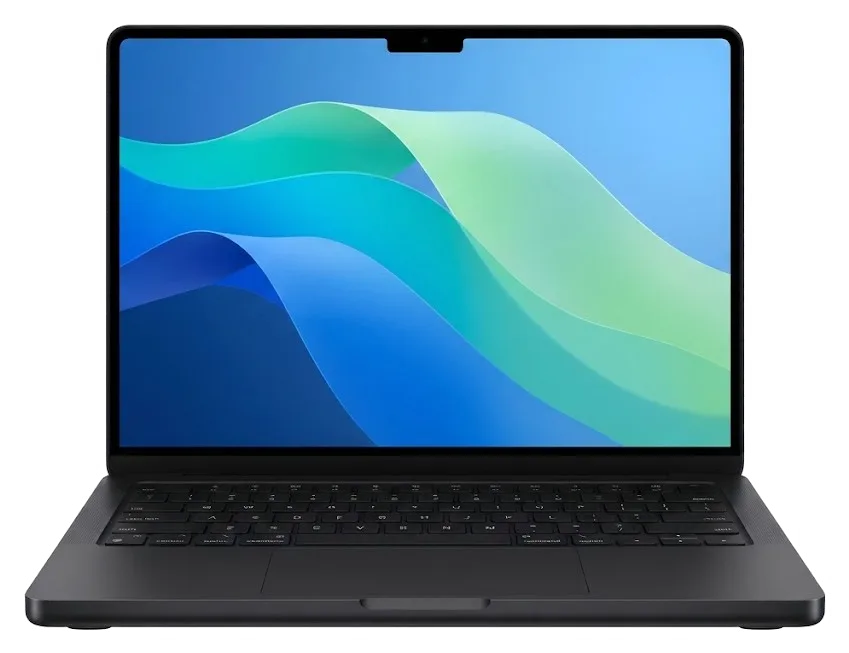
Owners of 14-inch MacBook Pro with M4 come to us with overheating, screen, keyboard issues, and liquid damage.
Coolers hum during simple tasks, and the case near the hinges gets hot — time to clean.
Liquid Retina XDR shows stripes or dark areas after pressure on the lid in a backpack.
Liquid got under the keys or into the connector — urgent disassembly and board cleaning.
The connector doesn't hold the cable or the indicator stays dark when plugged in.
Some buttons type twice, or the key travel feels stiff after crumbs or a sweet drink.
The cursor jumps or Force Touch doesn't work across the entire click area.
Copying large files freezes, and the system takes long to open projects.
During video calls, the image is missing or grainy even in good light.
HDMI or Thunderbolt doesn't transmit signal, although the cable and monitor are working.
Charge drops within an hour of office work, and the case heats up around the battery.
Stains or dark spots appear on the screen after moisture gets on the surface.
The SDXC slot doesn't see the card or constantly disconnects it during operation.
The table lists main works for the 14-inch MacBook Pro with M4; prices are for labor, parts are selected after inspection.
| Service | Original | Aftermarket |
|---|---|---|
| Display panel replacement | 519 900 ₸ | 321 900 ₸ |
| Keyboard replacement | 130 900 ₸ | 72 900 ₸ |
| Charging port replacement | 35 900 ₸ | 19 900 ₸ |
| Speaker replacement | 33 900 ₸ | 18 900 ₸ |
| Fan replacement | 22 900 ₸ | 12 900 ₸ |
| Other repairs | Price | |
| Dust cleaningdisassembly and dust cleaning | 10 900 ₸per job | |
| Water damage repaircorrosion cleaning · diagnostics up to 2 days | 27 900 ₸per job | |
| Logic board repairmicrosoldering · 1–3 days | 16 900 ₸per job | |
| MacOS installationOS installation, no parts replaced | 10 900 ₸per job | |
| Wi-Fi module repairwireless module · board-level repair | 41 900 ₸with parts | |
The final amount depends on the board condition and the chosen part; the exact cost is quoted by the technician after free diagnostics.
For this model, original parts and quality analogs are available; the comparison will help you choose the right option.


Owners of 14-inch MacBook Pro with M4 choose us for experience, warranty, and approval of work before repair starts.
Over eleven years, we've developed a diagnostic procedure that helps find hidden causes of malfunctions, not just external symptoms.
After repair, you receive a warranty up to 1 year. The technician states the terms in advance so you have no questions.
We solder boards, replace batteries and displays only after training — complex operations are entrusted to experienced specialists.
You learn the list of works and cost before repair and decide what to do. No imposed replacements.
If you move between cities, the laptop can be shown at any of our branches — terms are the same.
On weekdays we work from 10:00 to 19:00, on weekends and holidays from 11:00 to 18:00, so you can drop by after work.
Usually the whole journey — from message to pickup — takes less than an hour; complex repairs follow the timeline in the receipt.
Book a repairYou send a photo of the damage on WhatsApp — we quote the price and available time. Or you call a courier.
An engineer checks the device in front of you and shows what is broken. 0 ₸, even if you decline the repair.
We fix the price, the part (original or analog), the timeline and the warranty. You sign — we start.
Before installation we show you the new part in its factory packaging. You wait in the waiting area with coffee and Wi‑Fi.
Screen, keyboard and trackpad, camera, microphones, speakers, charging, Wi‑Fi. You check together with the engineer.
Together with the receipt, warranty card and the old part. Payment — Kaspi, card or cash.
Technicians for iPhone, Mac, iPad, Apple Watch and AirPods repair.
Photo: Mukhpilov Nail Photo: Molchanov Rinat
 Photo: Shokan A
 Photo: Sybanbaev Birzhan
 Photo: Denis Gushchin
 Photo: Duisebaev Azhdar

“If the repair didn’t suit you or you have a complaint, write to me personally.”
Send a photo of the fault — an engineer will reply on WhatsApp, give the price and a time you can come in.
MacBook Pro 14 M4 Repair in Almaty at iServices Center
iServices repairs the MacBook Pro 14 M4 in Almaty with its own experienced technicians, not through an intermediary. We run free 15-minute diagnostics in front of you, fix most units in 1 hour to 1 day, and fit an original or aftermarket part with warranty up to 1 year. Send a photo on WhatsApp for a reply within 5 minutes.
The 14-inch Pro on M4 arrives most often with a damaged screen, a worn battery, a failing top case, charging trouble or a mainboard issue after a spill. Warning signs usually narrow the faulty unit before diagnostics start.
| Symptom | Likely unit | What we do |
|---|---|---|
| Lines, dark patches, no image | Liquid Retina XDR panel | Replace the module |
| Battery drains fast, trackpad lifts | Battery | Fit a new cell pack |
| Keys stick or double-type | Top case with keyboard | Swap the top case |
| Will not charge on MagSafe 3 or USB-C | Charging port, power controller | Test port, repair logic |
| Dead after a spill | Mainboard | Clean and repair under microscope |
| Fans loud, chassis hot | Cooling system | Clean and renew thermal paste |
The 14-inch Pro on M4 has no butterfly keyboard and no removable SSD, so typical faults shift toward the panel, the cooling system and the mainboard. The M4 chip runs cooler than earlier Intel designs, yet the thin chassis leaves little margin, and dust in the fans shows up as heat and noise over time. Memory and storage are soldered to the logic, so a storage fault is a logic fault, not a quick swap. The mini-LED panel is laminated to the glass, which is why a single cracked corner often kills the whole image. Because memory and SSD are soldered, any board job runs one to three days, so plan a longer window than a screen replacement.
Repairing a 14-inch Pro built on M4 differs from the older Intel machines in three areas: power delivery, cooling and upgrade options. Those differences decide which faults are fixable and which are not.
In the 14-inch Pro on M4, memory and SSD are soldered to the logic board, so they are not swapped out separately the way they were on older Intel Pro models. Apple Silicon M4 integrates RAM into the same package as the processor, and the storage chips sit directly on the circuit with no socket, no slot and no connector. A failed drive therefore means micro-level work on the mainboard, not a quick module swap. Screen, battery, top case, fans and ports remain separate serviceable parts, each with its own connector and its own replacement. Upgrade on this machine means renewing worn components, not adding memory or disk space. Buyers who need more RAM or storage should choose the configuration at purchase, because it cannot be expanded later.
The 14-inch Pro on M4 charges through MagSafe 3 or USB-C, and a failure in one channel narrows the search to the port, the cable or the power controller. MagSafe 3 carries the magnetic connector and its own sense pins, while the Thunderbolt ports on the left side route power through a separate path inside the chassis. A known-good MagSafe 3 charger is a valid test unit for this machine. If the laptop charges on USB-C but not on MagSafe, the magnetic port or its cable is the likely culprit; if neither channel works, the controller or the battery is suspect. Before replacing the logic board, test both charging paths with a second adapter — sometimes the connector is at fault, not the controller.
The 14-inch Pro on M4 has active fans, so dust build-up in the cooling system eventually produces noise and overheating. Two blowers push air through a shared heatsink, and the fins clog with fibrous dust faster than most owners expect, especially on a laptop that runs docked with the lid closed. A clogged radiator forces the fans to spin higher for the same temperature, which is why a quiet machine starts to whine under load. Thermal paste also dries and pumps out over time, widening the gap between the die and the cold plate. Preventive cleaning with fresh thermal paste restores quiet operation well before the mainboard suffers, and it costs far less than a replacement after months of sustained heat.
The route runs from a photo on WhatsApp to a handover where you test the laptop yourself and leave with the removed part. Here is each step and what is written down before anyone opens the chassis.
Send a photo of the damage on WhatsApp and an engineer replies within 5 minutes with a price quoted straight from the image. Our intake works from that picture until the laptop arrives: you name a free slot, we hold it. Before any screw comes out, four things go on the document — the price, the part (original or aftermarket), the turnaround and the warranty, which lasts up to 1 year. The new component is shown in factory packaging before installation, so the paperwork never describes something you have not seen. That signed slip protects both sides: once countersigned, the figure and the deadline stop moving mid-repair. This is how a MacBook Pro 14 M4 repair in Almaty stays predictable from the first message to the final check.
Free diagnostics take 15 minutes and happen in front of you, even if you then decide against the repair — the engineer opens the case and points at the failed component. Most MacBook Pro 14 M4 jobs land between 1 hour and 1 day, while board-level work runs 1–3 days under the microscope. You can stay in the waiting area with coffee and Wi-Fi, and most repairs finish while the customer is still sitting there. A courier can collect the laptop anywhere across the city, free with a repair. The waiting option pays off for screen and battery work — bring the charger and plan a couple of hours.
The choice between a factory component and a compatible one belongs to you. Our job is to show the new unit before it goes in and put every detail on paper.
| Option | What you get | Warranty |
|---|---|---|
| Original unit | Factory-made component, every function intact | Up to 1 year |
| Aftermarket unit | Compatible component, lower cost | 6 months |
| Screen assembly | Display with True Tone and brightness | Up to 1 year |
| Battery module | Cell matched to the M4 power draw | Up to 1 year |
Before installation we show you the new unit in its factory packaging, and its type — factory-made or compatible — is already written on the receipt. That slip fixes four things: the price, the exact component, the turnaround and the warranty up to 1 year. So you see what actually goes into the laptop instead of learning about a compatible swap after the job is done. The sensible call depends on the node and the budget. It is best made after free diagnostics, when the engineer has opened the chassis and shown you the failed module, rather than from a WhatsApp photo.
Three emergencies bring the 14-inch Pro to our bench most often: liquid inside the chassis, a laptop that will not start, and heat with fan noise under light load. The first minutes decide the outcome.
We repair logic boards under a microscope, and such work takes 1 to 3 days, while diagnostics after a spill can sometimes take up to two days. Corrosion hides under shields and between BGA balls, so the engineer inspects the board at high magnification, clears residue in an ultrasonic bath and reflows or replaces damaged components. A shorted rail, a burnt charging IC or a corroded connector each need a separate fix, and the microscope shows which one failed before we touch anything. Your files may survive even when the machine does not start, so run a backup before handing the laptop over. Before handing the laptop over, run a Time Machine backup and turn off Find My Mac — that keeps your data and account access from becoming a second problem.
If a 14-inch Pro on M4 will not start or heats up without load, the cause usually sits in the power controller, the battery or a clogged cooling system. A failed controller blocks charging entirely, a swollen battery pushes the top case and cuts supply, and dust packed into the fan fins makes the chip throttle within minutes of light work. Heat without load often points to a shorted rail rather than to macOS, so a software reset rarely helps here. Do not open the chassis yourself — the M4 layout packs ribbon cables tight against the battery and the display flex, and a slipped pry tool turns one fault into two. Free diagnostics in front of you show which of the three is at fault before any part is ordered.
The MacBook Pro 14 M4 leaves little room for guesswork, so the habits around a repair decide the outcome more than the fault itself.
Did not find an answer? Message us on WhatsApp: an engineer replies, not a bot.
Ask a questionIn this model, memory and SSD are soldered to the board, so upgrades are impossible — if the storage fails, components on the board are replaced. The cooling system includes fans that require regular cleaning. The Liquid Retina XDR screen with mini-LED is more difficult to replace than conventional matrices.
You can remove the bottom cover and carefully remove dust from the blades, but you shouldn't unscrew the heatsink fasteners. If the laptop starts making noise under load, it's better to entrust cleaning to a technician — they'll also check the thermal paste condition.
First try another cable and power adapter — sometimes the problem is in the accessories. If the indicator doesn't light up, check the connector for dust and oxidation. If that doesn't help, bring it for diagnostics: the cause may be in the power controller.
When installing an original display, True Tone works as from the factory. With an analog, the function may be unavailable or require software adjustment. The technician will warn you about this before replacement.
When playing 4K or HDR, the load on the chip increases, and fans turn on more often. If the case gets hot without load, the cooling system may be clogged with dust or the thermal paste has dried out. Cleaning and replacing the thermal interface usually solve the problem.
If the storage stops being recognized, data can only be attempted to be extracted at the board level — this is a complex procedure. We don't guarantee recovery, but we'll run diagnostics and tell you if there are chances. Regularly make backups.
С MacBook Pro 14″ (M4 2024) вышла неприятность: аккумулятор быстро садился. По результатам диагностики проверили состояние батареи и решили вопрос с автономностью.
Проблема была такая: компьютер не включался с первого раза — и непонятно, что делать. После обращения проверили питание и вернули стабильный запуск.
MacBook Pro 14″ (M4 Max 2024) подвёл: внешний монитор постоянно терял подключение. После обращения проверили порты и стабильность подключения.
С MacBook Pro 14″ (M4 Max, 2024) вышла неприятность: после попадания жидкости устройство вело себя непредсказуемо. После обращения осмотрели плату и устранили обнаруженную неисправность.
Проблема была такая: на экране появились полосы — и непонятно, что делать. Ребята проверили подключение и дисплей, изображение восстановили.
MacBook Pro 14″ (M4 Max, 2024) подвёл: машина сильно тормозила на обычных задачах. Ребята нашли причину замедления и стабилизировали работу.
На MacBook Pro 14″ (M4 Pro, 2024) зарядка постоянно прерывалась. Ребята проверили кабель, порт и цепь питания.
На MacBook Pro 14″ (M4 Max, 2024) клавиатура начала пропускать нажатия. В итоге проверили клавиатуру и устранили проблему с клавишами.
S MacBook Pro 14″ (M4 2024) vyshla nepriyatnost: zaryadka postoyanno preryvalas. V itoge provereli kabel, port i tsep pitaniya; Denis pokazal, v chyom byla problema.
Макбук стал жутко греться и тормозить даже от простых задач по работе. Принес на чистку от пыли и замену термопасты. Всё почистили быстро, теперь работает абсолютно бесшумно и больше не зависает. Спасибо большое за оперативность.

Replace the battery when macOS reports Service Recommended and runtime no longer covers your workday. A free 15-minute check shows whether the cell is at fault.

Why your MacBook runs hot and loud, and whether cleaning solves it or the board needs repair.

Power it off, unplug the charger and bring the laptop in for a free 15-minute check before corrosion spreads.

Sticky or unresponsive keys usually mean debris, worn mechanisms or liquid damage. A technician can check the keyboard and advise on cleaning or replacement.

Back up your data, turn off Find My, and bring proof of purchase — then the repair starts faster.
 iPad
 iMac
 Mac mini and Studio
 Apple Watch
 AirPods
 Apple Pencil
 Apple TV
 HomePod
