MN Photo: Mukhpilov Nail
Mukhpilov Nail
smartphone repair technician
10years of experience
4.83rating, 83 reviews

The M1 Air won’t charge, double-types keys or has liquid damage — we’ll run a free diagnostic in front of you and lock in the price in advance.
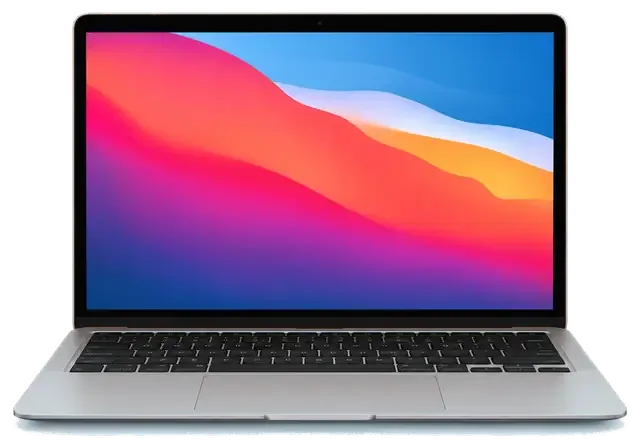
The fanless M1 Air rarely overheats, but drops, spills and a worn USB-C port are where it suffers.
A small object on the keys met the screen as the lid closed and left a web of lines.
It once lasted all day, and now the Air asks for an outlet in the early afternoon.
The connector grips poorly, charging cuts out and an external drive disconnects.
After a drink hit the keys the screen stayed black and no startup chime came.
One key fails while its neighbors feel heavy and uneven under the finger.
The click at the bottom is barely felt and the cursor trembles at a light touch.
Startup stops on the logo screen and repeats the same loop after every restart.
The sensor does not read your finger and the system asks for a password every time.
No icon and no reaction to the cable — we trace the cause in the board’s power circuits.
The network disappears only on this laptop, and Bluetooth headphones disconnect.
The Cyrillic characters on the keys have rubbed off, and some buttons look shiny.
The screen goes dark, and after the restart macOS reports an unexpected error.
The table gives approximate prices for the main A2337 jobs, and the technician states the final amount after inspecting the laptop.
| Service | Original | Aftermarket |
|---|---|---|
| Display replacement | 267 900 ₸ | 165 900 ₸ |
| Battery replacement | 115 900 ₸ | 66 900 ₸ |
| Trackpad replacement | 119 900 ₸ | 66 900 ₸ |
| Charging port replacement | 35 900 ₸ | 19 900 ₸ |
| Speaker replacement | 33 900 ₸ | 18 900 ₸ |
| Other repairs | Price | |
| Logic board repairmicrosoldering · 1–3 days | 55 900 ₸per job | |
| Liquid damage cleaningcorrosion cleaning · diagnostics up to 2 days | 41 900 ₸per job | |
| Wi-Fi module repairwireless module · board-level repair | 41 900 ₸with parts | |
| MacOS installationOS installation, no parts replaced | 10 900 ₸per job | |
The final bill depends on board condition and the chosen part, so we confirm the price only after diagnostics.
Weigh the two part types in four points and choose by budget and the way you use the laptop.


A thin laptop is repaired with care, and the technician first explains the options for your case.
Eleven years of practice built the habit of looking at the cause rather than the symptom, so our diagnoses rarely miss.
The work is covered by a warranty up to 1 year, and the technician states its terms before the laptop is opened.
An Apple silicon board and glued assemblies demand care, so experienced technicians do that part of the job.
We establish what exactly failed and explain which jobs are needed and which ones can wait.
We show how original and aftermarket parts differ so you can pick the one that fits budget and purpose.
Mon–Fri 10:00–19:00 and Sat–Sun and holidays 11:00–18:00, so a visit fits almost any schedule.
Usually the whole journey — from message to pickup — takes less than an hour; complex repairs follow the timeline in the receipt.
Book a repairYou send a photo of the damage on WhatsApp — we quote the price and available time. Or you call a courier.
An engineer checks the device in front of you and shows what is broken. 0 ₸, even if you decline the repair.
We fix the price, the part (original or analog), the timeline and the warranty. You sign — we start.
Before installation we show you the new part in its factory packaging. You wait in the waiting area with coffee and Wi‑Fi.
Screen, keyboard and trackpad, camera, microphones, speakers, charging, Wi‑Fi. You check together with the engineer.
Together with the receipt, warranty card and the old part. Payment — Kaspi, card or cash.
Technicians for iPhone, Mac, iPad, Apple Watch and AirPods repair.
Photo: Mukhpilov Nail Photo: Molchanov Rinat
 Photo: Shokan A
 Photo: Sybanbaev Birzhan
 Photo: Denis Gushchin
 Photo: Duisebaev Azhdar

“If the repair didn’t suit you or you have a complaint, write to me personally.”
Send a photo of the fault — an engineer will reply on WhatsApp, give the price and a time you can come in.
MacBook Air A2337 Repair in Almaty Done While You Wait
For a MacBook Air A2337 repair in Almaty, iServices handles the M1 Air with free 15-minute diagnostics in front of you, a fixed receipt before work starts, and a choice of original or aftermarket parts. Most jobs take from 1 hour to 1 day, backed by a warranty up to 1 year.
The A2337 is the fanless M1 Air, and its failure pattern differs from Intel Airs — most cases we see are screen, battery, charging and liquid, not cooling.
| Symptom | What it usually means | What we do |
|---|---|---|
| Lines or dark patches on screen | Display assembly or flex damage | Replace display module |
| Drains fast, trackpad bulges | Swollen cell pressing the deck | Swap the pack |
| Will not charge over USB-C | Port, cable or charging chip | Test port, then logic board |
| Died after a spill | Corrosion on the mainboard | Clean and inspect under microscope |
A dead A2337 is usually a charging-path fault, so we test the USB-C socket, the cable and the controller chip before touching the power cell. Our engineer runs free diagnostics in front of you in 15 minutes, even if you decide not to repair, and shows on the spot whether the socket is worn, the lead is failing or the chip has died. A swollen unit or a shorted rail can mimic the same black screen, so the port and controller are checked first, then the module is measured under load. A board-level fault looks identical to a flat accumulator from the outside, which is why we isolate the path first instead of swapping parts.
The A2337 runs on Apple Silicon with no fan, and that single fact reshapes what is serviceable, what overheats and what simply cannot be upgraded.
The A2337 has no fan, so the dust-and-paste cleaning that Intel Pros need does not apply here the same way. The M1 chip sits under a passive heatsink, and the aluminium chassis itself is the cooler: heat leaves through the shell instead of being pushed out by a spinning impeller. That removes the classic failure of a clogged vent and a dried-out paste layer, which on older Airs caused throttling after a couple of years. What remains is cell heat and workload. When a fanless Air feels hot near the hinge, we measure the health of the power pack and check the thermal path before touching anything else — a tired cell swells and radiates warmth into the palm rest. A hot A2337 is usually a worn battery or a heavy export job, not a blocked cooler.
On the A2337 the memory and SSD are soldered to the board, so unlike old Pros they cannot be swapped for larger ones. The unified memory is part of the M1 package itself, and the storage lives as NAND chips on the same mainboard — there is no slot, no bracket and no ribbon cable to unplug. That closes the upgrade path entirely: no RAM upgrade, no drive swap, no second SSD. It also changes what a repair can be. If the board stops reading storage, the fix is micro-soldering under a microscope, not a quick drive replacement, and recovery becomes a board-level job. That is why a Time Machine backup before any intervention is worth more than any upgrade you could have planned — it is the only copy of your data you control.
The A2337 marking on the bottom cover is what tells us which display and battery fit, because "Air M1" alone does not pin the part. The 13-inch Air of this generation shares its marketing name with variants that differ in display assembly, power connector and keyboard layout, and a module pulled from the wrong variant will not seat or will not calibrate. When you send us photos, the A-number saves a round of guessing and lets the engineer quote the right module from the first message. Owners often quote the marketing name, but the A-number is the only reliable key when ordering a compatible module. Read it off the small print near the hinge, not from the About window — the software name does not carry the part code.
The path from first message to pickup is short and fixed at every step, so you know the component, the time and the warranty before any tool touches the laptop.
During the free 15-minute diagnostic the engineer opens the device with you watching and points to the exact fault ahead of quoting. On the A2337 that means testing the battery cycle count and swelling, reading display backlight behaviour on a grey screen, and probing the USB-C charge rails on the logic board with a meter. You see the failed piece itself, not a description of it on a printout, and the engineer explains which symptom traces back to which module. A MacBook Air A2337 repair in Almaty follows this same open, in-person check, so nothing is hidden behind a counter. Nothing goes to the bench until you agree on what gets replaced and what stays untouched. Seeing the failed component yourself is the difference between trusting a diagnosis and taking it on faith.
Most A2337 jobs are finished while you wait, and 72% of our repairs are completed in the waiting area rather than held overnight. A display or battery swap on this model typically lands inside the one-hour window from first contact to pickup, while board-level work runs from one to three days under the microscope. If you cannot stay, a courier covers the city in 90 minutes and is free with a repair; you get the device back with the receipt, warranty card and the old module. Booking the courier for a morning slot means the laptop is back on your desk the same day, not the next one.
The choice between an original module and an aftermarket one is yours, and we lay out the trade-offs before the receipt is signed.
| Aspect | Original part | Aftermarket part |
|---|---|---|
| Fit and finish | Matches factory module | Close, minor variation |
| Display color | Factory-calibrated | Can differ slightly |
| Battery life | Full rated cycles | Varies by supplier |
| Best for | Long-term keepers | Budget repairs |
Before work starts we write the price, the part type, the turnaround and the warranty on the receipt, so nothing changes mid-repair. The engineer names the exact module going in — original or aftermarket — and the same line item appears on the document you keep. We show the new part in its factory packaging before installation, and the old component goes back to you with the receipt and warranty card. Our warranty runs up to 1 year, and it is tied to the part actually fitted, not to a general promise. Of the devices that come through our workshop, 64% of customers choose an original part, and the receipt records which one so the warranty matches what was fitted.
Pick an original part if you plan to keep the A2337 for years or resell it, and an aftermarket one if the repair is about keeping a secondary machine alive. A factory-calibrated display holds its color and True Tone behavior, which matters for photo and video work; an aftermarket panel can drift slightly in brightness and tint. Battery choice follows the same logic — a genuine cell keeps its rated cycle count, while a third-party one varies by supplier. Resale value is the quiet factor: a buyer inspecting the Air will ask what was fitted, and a documented original part answers that question without a discount. The part you choose also sets what the warranty covers, so the decision is worth making before the receipt, not after a failure.
How long the job takes and what happens at pickup decide whether the repair actually holds up in daily use.
| Job | Typical time |
|---|---|
| Battery replacement | From 1 hour |
| Display module | From 1 hour |
| Standard MacBook repair | 1 hour to 1 day |
| Logic board repair under microscope | 1–3 days |
Before handing over the A2337, make a Time Machine backup and decide whether to sign out of Find My Mac. The T2 chip keeps the soldered SSD encrypted, so pulling data off it later needs the original password and a working motherboard — neither is guaranteed once a fault spreads to the power rails. Signing out of your Apple ID takes two minutes in System Settings and prevents a locked activation screen after a logic board swap. Tell the engineer the login password if a board-level fix is on the table; without it we cannot boot-test the machine before you collect it. On a laptop that came in after a spill, expect diagnostics to stretch up to two days, so start the backup the moment something feels wrong rather than after it dies.
Five points worth carrying into any decision about this machine, whether you repair it now or weigh the options first.
Did not find an answer? Message us on WhatsApp: an engineer replies, not a bot.
Ask a questionThe A2337 has no fan, so under long heavy loads the M1 chip lowers its speed to stay cool. Short tasks run at full speed, and this slowdown is normal rather than a fault.
Yes, the M1 MacBook Air is on the list of Macs that get Tahoe. Before a big update, make a backup and check that your key apps already support the new version.
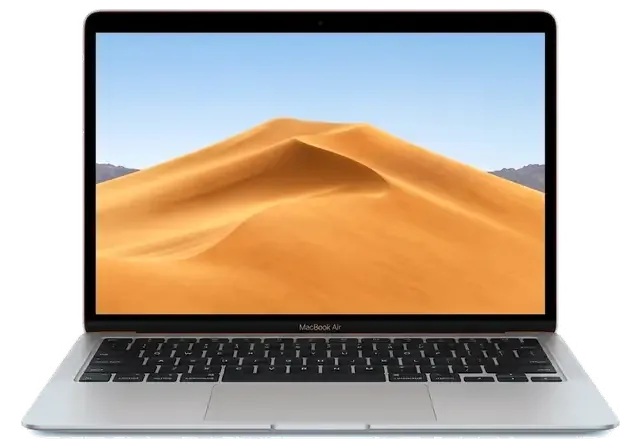
Both have the same wedge-shaped case, but About This Mac on the A2337 shows the Apple M1 chip instead of an Intel processor. The A2337 also has Spotlight, dictation and Do Not Disturb keys in the top row. The parts of the two models do not fit each other.
Not through Boot Camp, because the M1 chip does not support it. Windows for ARM can run inside a virtual machine, which is enough for most office programs.
No, the SSD chips of the A2337 are soldered next to the M1 and the data is encrypted with keys kept in the chip. Data can be reached only if the board is repaired, so keep regular backups.
A flickering screen when the lid moves, a trackpad that stops responding or a dead keyboard can come from a damaged ribbon cable rather than the part itself. The engineer tests the cable first, so you do not pay for a part that is fine.
MacBook Air 13″ (M1, 2020) подвёл: компьютер не включался с первого раза. Ребята проверили питание и вернули стабильный запуск.
У моего MacBook Air 13″ (M1 2020) клавиатура начала пропускать нажатия. В сервисе проверили клавиатуру и устранили проблему с клавишами.
Проблема была такая: периодически пропадал звук — и непонятно, что делать. После обращения проверели аудиотракт и восстановили звук.
U moego MacBook Air 13″ (M1, 2020) kompyuter ne vklyuchalsya s pervogo raza. Posle obrashcheniya proverili pitanie i vernuli stabilnyy zapusk.
Макбук стал жутко греться и тормозить даже от простых задач по работе. Принес на чистку от пыли и замену термопасты. Всё почистили быстро, теперь работает абсолютно бесшумно и больше не зависает. Спасибо большое за оперативность.
Проблема: не было изображения на экране макбука. Принес в этот сервис на диагностику. На следующий день мне сообщили что нужно восстанавливать материнскую плату, и время работы 2 недели. По прошествии 2х недель со мной ни кто из менеджеров не связался, звонил им сам, ответивший менеджер не знал ситуации с макбуком, якобы в работе. Я попросил узнать почему ещё в работе. Через полчаса мне звонят с сервиса, и говорят, пришли бракованные чипы для замены, и для решения проблемы ждать ещё 2 недели. По прошествии более 2х недель, со мной так же ни кто не связывался, и опять мне нужно было звонить самому. Ситуация повторилась. Менеджер не в курсе состояния, связывался техник который этим занимался. Главный техник который курирует мастеров, говорил что они позвонили все питание на видеочипы, питания на чипы было. Как проводилась диагностика вызывает большой вопрос. И почему все мероприятия продлились месяц, мне так и ни кто не ответил. В итоге, макбук не починен, якобы нужна замена материнской платы и нужно ещё месяц ждать и 250 тысяч тенге, месяц пустых ожиданий, не известно сколько он просто пылился у них на складе в ожидании, пока я его не заберу. Складывается смутное ощущение что они больше нанесли вреда состоянию макбука. П.с. при возврате макбука, оказалось, что диагностика продлилась месяц, и что современные макбуки они быстро не ремонтируют, мой макбук 2016 года, главный техник не в курсе что чем занимаются его подчинённые. Кажется бредом. Потерян месяц, очень разочарован этим сервисом. Ещё и часть креплений потеряли. Не рекомендую обращаться к ним
Недавно поломался у меня макбук. Все-таки знаю, что самому чинить очень сложно, да и опыта толком та и нету. Решил отнести в эту компанию на починку. Починили очень хорошо. Всему рад.
По случайности разлила кофе на Macbook, после чего он стал очень сильно глючить и тормозить. Мне знакомый посоветовал сервисный центр Apple, что там цены приемлемые, все делают качественно и без наценки. При обращении в сервис, менеджер предложил первичную диагностику устройства, через два дня позвонил менеджер и сообщил что все готово и я могу его забрать. Я очень довольна обслуживанием и персонал отличный, мой Macbook работает как новенький.
Нужно было срочно увеличить память на рабочем ноутбуке, поставить быстрый накопитель побольше. Сделали всё очень быстро, перенесли всю мою систему со всеми программами без потерь. Скорость работы выросла в разы, супер.
Требовался сложный ремонт материнской платы на ноутбуке после короткого замыкания в сети во время зарядки. Очень переживал за результат, но специалисты справились на отлично. Нашли сгоревший чип и заменили его, всё работает.

Replace the battery when macOS reports Service Recommended and runtime no longer covers your workday. A free 15-minute check shows whether the cell is at fault.

Why your MacBook runs hot and loud, and whether cleaning solves it or the board needs repair.

Power it off, unplug the charger and bring the laptop in for a free 15-minute check before corrosion spreads.

Sticky or unresponsive keys usually mean debris, worn mechanisms or liquid damage. A technician can check the keyboard and advise on cleaning or replacement.

Back up your data, turn off Find My, and bring proof of purchase — then the repair starts faster.

 iPad
 iMac
 Mac mini and Studio
 Apple Watch
 AirPods
 Apple Pencil
 Apple TV
 HomePod
