The mini 6 packs a full-panel screen into a small aluminium body, so the faults we see most come from drops, battery wear and the USB-C port. Here is what usually brings one in.
Cracks, dead touch zones and lines on the display
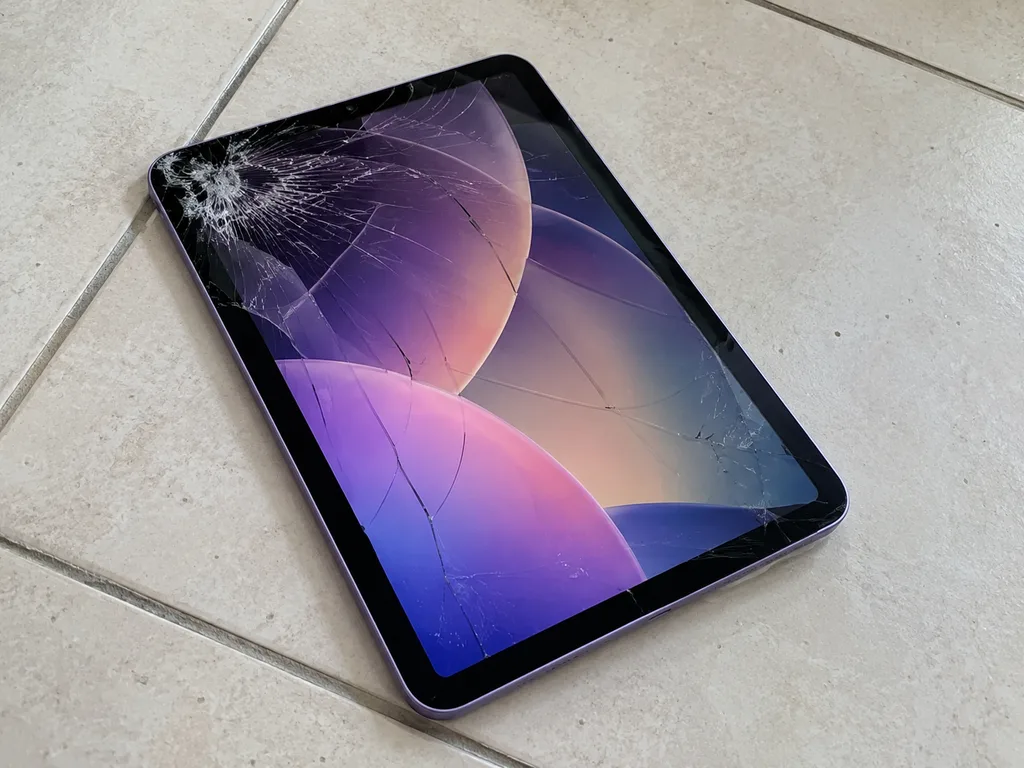
A drop on the mini 6 usually cracks the glass over the LCD, and once touch zones go dead or lines appear, the damage has reached the display layer itself. The panel is a laminated module, so the touch digitizer and the LCD are bonded as one sheet — a hairline crack near the corner often spreads across the whole surface within days. Apple Pencil input is the first thing to suffer: the stylus skips near the fracture line while finger taps still register. Pressure marks, bright spots and vertical bands mean the matrix underneath is already stressed. A crack that still responds to touch is not automatically safe — pressure and dust work their way under the glass and can kill the matrix within weeks, so it is worth having it looked at early.
A battery that swells and pushes the screen up
We see swollen mini 6 batteries more often than dead ones — the cell expands under the screen and lifts the edge of the panel away from the aluminium frame. The battery is glued into the chassis, so as it grows it has nowhere to go but outward, and the first sign is usually a thin gap along the left or right edge. Owners report it as rapid drain and sudden shutdowns at 20–30%, long before the gap is visible. A swollen battery should not be charged or pressed back down; the gas pocket can rupture, so the device is brought in for diagnostics rather than kept in use.
Charging and USB-C faults
- Cable and adapter first: a worn Lightning-to-USB-C cable or a weak wall adapter is checked before anything is opened.
- Port and flex: the USB-C socket and its flex cable take the wear from daily plugging and are inspected under light.
- Battery health: a cell that no longer holds charge makes a healthy port look faulty on the meter.
- Power controller: the charging IC on the board is tested last, since it needs a bench check rather than a visual look.
- Lint and debris: compacted pocket fluff is the most common false alarm, cleared before any part is ordered.
Screen Module or Glass Only in iPad mini 6 Repair
The mini 6 is the first mini with a fully laminated display and Touch ID moved into the top button, and both facts decide what a repair on this generation actually involves.
Why the mini 6 screen is replaced as one module
On the mini 6 the glass and the LCD are bonded into a single laminated module, so we replace the whole assembly rather than swapping glass over a live matrix. The panel is 8.3 inches, the digitizer is fused to the LCD, and the layers are joined with an optically clear adhesive that cures across the full surface. Separating laminated layers by hand leaves micro-scratches and trapped dust that show up as bright specks on a white background — the reason a full swap is the cleaner route here. A glass-only job also risks lifting the backlight film, which then reads as uneven patches in the corners. On this tablet we would rather fit a sealed unit and hand the device back with the same brightness and colour it left the factory with.
Keeping Touch ID in the top button working
The mini 6 fingerprint reader sits in the top button and is paired to the logic board, so we carry the original one over to the new panel instead of fitting a fresh component. The sensor talks to the board through a matched pair of keys burned in at the factory; swap it and the hardware still powers on, but the reader stops recognising prints. That is why every job on this tablet starts with the original component being lifted, tested and re-seated on the replacement. A unit taken from another device will physically fit but never register a fingerprint — if a quote promises a fresh one with full Touch ID, that is the moment to ask how. We test enrolment and lock-screen unlock before the device goes back to the customer.
What each repair covers on the mini 6
Jobs compared by part and handover checks| Job | Part involved | What the work includes | What we check after |
|---|
| Display module | Laminated assembly | Swap, original top button carried over | Touch, True Tone, Pencil response |
|---|
| Battery | Glued-in cell under the glass | Panel lifted, old cell removed, new one seated | Charge level, no swelling, shutdowns |
|---|
| USB-C port | Port and its flex | Port replacement, board inspected | Charging, data link, network |
|---|
| Top-button Touch ID | Sensor paired to the board | Original transferred, sensor seated | Fingerprint enrolment, lock screen |
|---|
How an iPad mini 6 Repair Runs at Our Workshop
The route from a photo on WhatsApp to a checked mini 6 in your hands is short, and every step is built so you can see exactly what is happening to your device.
From a WhatsApp photo to a fixed quote
An engineer replies on WhatsApp within 5 minutes and quotes from a photo, then the mini 6 gets free diagnostics in front of you for 15 minutes before anything is agreed. You watch the engineer open the unit, test the touch layer, run the charging port and read battery health on screen — nothing disappears into a back room. Even if you walk away without a repair, the check costs nothing, and a water-damaged unit can take up to two days to diagnose properly. The quote is only worth comparing once the component is named on it — a figure without "original" or "aftermarket" next to it tells you nothing about what will be fitted. This is how an iPad mini 6 repair in Almaty is quoted before any work begins.
What gets written on the receipt before work starts
- Part type: the receipt states original or aftermarket, so there is no swap once the unit is open on the bench.
- Turnaround: the agreed window is printed in writing — for iPad and MacBook jobs it runs from 1 hour to 1 day, and 1 to 3 days for board work.
- Warranty: coverage up to 1 year starts on the receipt date, not on the day you collect the mini 6.
- Factory packaging: the new component is shown to you sealed before installation, and the old one goes back in the box with you.
Backing up and switching off Find My before handover
Before the mini 6 changes hands, make an iCloud or computer backup and know your Apple ID password, because Find My iPad has to be switched off for a screen or battery job to be tested fully. A repair in Almaty runs on iPadOS, and Activation Lock blocks the post-repair check of True Tone and the cameras until the device is released from the account. Note the passcode on paper or tell the engineer directly rather than taping it to the back. A backup taken the morning of the visit is worth more than one from last month — the last photos and notes are usually what people miss when a board-level fault turns up.
Original Part or Aftermarket for the mini 6
The choice between an original part and an aftermarket one changes how the mini 6 feels in daily use, and it is worth understanding before the receipt is signed.
How an original module and an aftermarket one differ
An original mini 6 module matches the factory colour, brightness and True Tone behaviour, while an aftermarket panel can differ in tint and in how smoothly the Pencil tracks. The display module on this generation carries the digitizer and the touch layer in one unit, so the panel you fit decides both how the picture looks and how precisely the Apple Pencil lands on the glass. We show the new part in factory packaging before installation, so the customer sees the module and its labelling rather than taking the fitter's word for it. True Tone is the quickest tell in daily use — if the screen colour no longer shifts with the room light, the panel is not behaving like the factory one.
What the choice means for the battery
An original mini 6 battery holds its rated capacity for longer, while an aftermarket cell is the cheaper route when the device is already several years old. The battery on this tablet is glued under the screen, so the cell is only reached once the display module comes off — which is why the part fitted at that moment matters more than on a device with a removable cover. We fit both types and let the owner decide, and 64% of customers choose an original part. Battery health in Settings is a rough gauge at best — the honest test is how the mini 6 behaves on a normal day, not a single percentage reading.
How the two options compare side by side
Part types against what owners notice after repair| Parameter | Original part | Aftermarket part |
|---|
| Colour and brightness | Matches factory panel | Can differ in tint |
|---|
| True Tone | Works as designed | May be limited |
|---|
| Pencil response | Smooth tracking | Occasionally less precise |
|---|
| Longevity | Holds up over years | Shorter service life |
|---|
| Warranty | Up to 1 year | 6 months |
|---|
Turnaround, Handover and Warranty
How long the mini 6 spends on the bench, what you get back with it and what the warranty covers are the questions that decide where a repair happens.
How long a mini 6 job takes
- Most tablet jobs: from 1 hour to 1 day, depending on the component and the queue at the bench.
- Board-level work: 1 to 3 days, because every board is repaired under a microscope rather than swapped whole.
- After water contact: diagnostics alone can run up to two days, since corrosion spreads slowly.
- Same-day cases: 72% of our work is finished while the customer waits in the lounge with coffee and Wi-Fi.
- Courier option: collection across the city takes 90 minutes and comes free with a repair.
- Bench rule: a quote of "a day" usually means the component is in stock — ask whether it sits on site, since that tells you more than the estimate.
Checking the device together at handover
After the repair we run a 32-function check of about 10 minutes, and you go through Touch ID, True Tone, cameras, microphones, speakers, charging and network with the engineer. This is not a formality: True Tone and Touch ID both depend on the display assembly and the top button, so a sloppy fit shows up here rather than a week later at home. The engineer hands you the tablet switched on, opens each camera, plays a track through both speakers and asks you to enrol your own fingerprint in front of him. If any function reads wrong, the assembly comes off and goes back to the bench the same visit. Do the check on the spot with your own fingerprint and your own Apple ID — a reader that enrols your finger in the workshop is the only proof that matters.
What comes back with the device and what the warranty covers
The mini 6 goes back with the receipt, the warranty card and the old component, and the warranty runs up to 1 year on the work and the fitted item. The receipt is the document that matters most: price, component type, turnaround and warranty term were written on it before work started, so nothing about the job is settled by memory. Payment is by Kaspi, card or cash, whichever suits you at the counter. The removed piece travels home in the box as well — 64% of our customers pick an original one, and the old item is the clearest record of what was actually inside. Keep it until the replacement has proved itself over a couple of weeks — the simplest way to settle any later question.
Summary: iPad mini 6 repair
The points below decide whether a mini 6 repair holds up months later, and they apply to any workshop a device owner is weighing up.
- Laminated display: the mini 6 screen is bonded as a single unit, so a crack in the glass means a full module swap rather than a glass-only fix.
- Fingerprint reader: the sensor sits in the top key and is paired to the board, so the original button has to travel to the new module.
- Swollen cell: a pack that swells lifts the screen off the frame and should never be charged or pressed back into place.
- Charging faults: these are traced from cable to port to power source to board, in that order, before any part is ordered.
- Paper trail: a named part on the receipt and a hands-on check at handover are what separate a solid repair from a hopeful guess.

















 MacBook
 iMac
 Mac mini and Studio
 Apple Watch
 AirPods
 Apple Pencil
 Apple TV
 HomePod





