MN Photo: Mukhpilov Nail
Mukhpilov Nail
smartphone repair technician
10years of experience
4.83rating, 83 reviews

Mac Studio M1 won’t respond to the button or read cards — we’ll check it free and quote before repair.
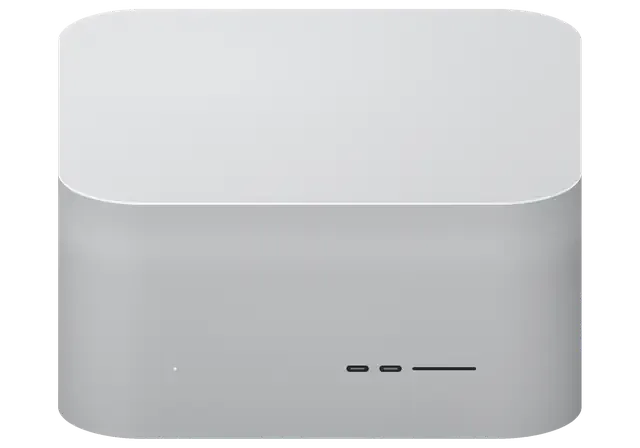
A compact chassis packs a lot of electronics, so Mac Studio faults usually show up as fan noise, dead ports or a flickering display.
No light and no startup sound: power, board protection or the built-in supply.
The two fans sound louder than before: a clogged heat sink or a worn bearing.
The front slot stays silent: worn contacts, a controller or a ribbon fault.
Drives and cameras are not seen at the front while the back works: socket or ribbon.
The picture drops on certain outputs: a Thunderbolt port, HDMI or a video circuit.
The network will not come up or runs slowly: a port, a controller or the cable.
The machine reboots mid-render: heat, power or a system fault.
A drink reached the vent grille: switch off, then bring it in for inspection.
Keyboard and flash drive in the rear USB-A ports are not detected.
After sleep the unit ignores both mouse and keyboard.
Copies stutter and the system complains about low space.
After a fall the case is dented, ports are skewed and the unit won’t start.
The cost of Mac Studio M1 repair is given after diagnostics, once the cause is confirmed; a request can go in by phone or WhatsApp.
| Service | Original | Aftermarket |
|---|---|---|
| Power supply replacement | 80 900 ₸ | 44 900 ₸ |
| Fan replacement | 24 900 ₸ | 13 900 ₸ |
| USB-C / Thunderbolt ports replacement | 37 900 ₸ | 20 900 ₸ |
| Other repairs | Price | |
| SSD installationstorage installation | 39 900 ₸with parts | |
| Dust cleaningdisassembly and dust cleaning | 17 900 ₸per job | |
| Logic board repairmicrosoldering · 1–3 days | 44 900 ₸per job | |
| Wi-Fi module repairwireless module · board-level repair | 33 900 ₸with parts | |
| MacOS installationOS installation, no parts replaced | 12 900 ₸per job | |
The sum depends on the version, the part needed and the complexity, so we do not quote figures beforehand.
In a Mac Studio the usual replacements are fans, connectors and power components, and each option has its own logic.
A studio machine should not sit idle, so we explain the cause of the fault first and back the finished work with a warranty.
11 years with Apple hardware means we understand how compact workstations are built and where they usually misbehave.
Repairs carry a warranty up to 1 year, and if the fault comes back we work out together why it happened.
The case is opened by experienced technicians who know where the thin fan and front-port ribbons run inside the station.
We do not name a sum by guessing: after diagnostics you get a clear explanation and decide yourself whether to repair.
The service works in two cities, so if a studio moves, servicing can continue at the other branch.
We open 10:00–19:00 on weekdays and 11:00–18:00 on weekends and holidays, so you can drop in on a convenient day.
Usually the whole journey — from message to pickup — takes less than an hour; complex repairs follow the timeline in the receipt.
Book a repairYou send a photo of the damage on WhatsApp — we quote the price and available time. Or you call a courier.
An engineer checks the device in front of you and shows what is broken. 0 ₸, even if you decline the repair.
We fix the price, the part (original or analog), the timeline and the warranty. You sign — we start.
Before installation we show you the new part in its factory packaging. You wait in the waiting area with coffee and Wi‑Fi.
Startup and operation under load, ports, Wi‑Fi and Bluetooth, sound. You check together with the engineer.
Together with the receipt, warranty card and the old part. Payment — Kaspi, card or cash.
Technicians for iPhone, Mac, iPad, Apple Watch and AirPods repair.
Photo: Mukhpilov Nail Photo: Molchanov Rinat
 Photo: Shokan A
 Photo: Sybanbaev Birzhan
 Photo: Denis Gushchin
 Photo: Duisebaev Azhdar

“If the repair didn’t suit you or you have a complaint, write to me personally.”
Send a photo of the fault — an engineer will reply on WhatsApp, give the price and a time you can come in.
Mac Studio M1 Repair in Almaty for Machines That Run Your Work
iServices handles Mac Studio M1 repair that Almaty owners rely on when a workstation stops mid-project. Our engineers run free 15-minute diagnostics in front of you, fix boards under a microscope, and fix price, part, turnaround and warranty on the receipt before work starts. Most jobs finish the same day, backed by warranty up to 1 year.
The Mac Studio looks like a sealed box, but its internals decide what a technician can and cannot fix. Knowing the layout helps you understand the estimate you get.
The M1 Ultra joins a pair of M1 Max dies into one package, so it draws more power and carries a heavier cooling assembly than the single-die M1 Max. Both versions sit in the same square chassis with a rear exhaust and blower fans, yet the Ultra pairs a larger heatsink with a stronger power stage to feed both dies at once. The Max runs one die on a lighter sink, which keeps internal temperatures lower during exports and long renders. Because the Ultra runs hotter under sustained load, its fans and heatsink collect dust faster, so a noisy Ultra is more often a cooling problem than a failed chip. For a mac studio m1 repair in Almaty, this difference matters: the Ultra's heavier cooling assembly and hotter sustained load change what the engineer checks first.
Unified memory sits inside the chip package and cannot be added later, while the SSD lives on modules that are tied to the system rather than swappable like a PC drive. On this machine the RAM is part of the M1 Max or M1 Ultra package itself, so a memory fault means working at chip level, not clipping in a new stick. Storage is handled by NAND modules that the system pairs with the logic board through firmware, so a replacement drive is not recognised until that pairing is restored. This is why a storage fault is treated as a board-and-firmware job, not a part swap, and why backing up to Time Machine before any service saves hours.
| Variant | Chip layout | Cooling assembly | Typical heat under load |
|---|---|---|---|
| M1 Max | Single die | Standard heatsink, blower fans | Moderate |
| M1 Ultra | Two dies joined | Heavier heatsink, blower fans | Higher, sustained |
| Common chassis | Sealed, rear exhaust | Shared fan mounts | Dust builds over time |
Most Mac Studio faults show up as a handful of symptoms. Matching the symptom to the likely cause is the first step before any screwdriver touches the case.
When a unit stays dark, we first test the built-in power supply on its own, then trace power delivery to the logic board before assuming the worst. The internal supply sits in a separate bay, so it can be measured with a bench power supply while the main circuitry stays untouched. A dead unit is often a supply or connector fault rather than a destroyed chip, so a bench test at the start saves you from paying for board work you do not need. We run that free diagnostics in front of the customer for 15 minutes, even when the owner later decides against a repair. A machine with no chime but steady current draw usually points to a rail that never comes up, not to a dead M1 Max or M1 Ultra package.
A Mac Studio that hums or whistles under load is usually telling you about dust-packed fans, a choked heatsink or vibrating inductors rather than a failing processor. The two blower fans pull air through the perforated base, and that path is the first thing to block. Dust collects in the fan blades and the heatsink fins, so airflow drops while the fans spin faster to compensate, which raises the pitch you hear. Coil whine from the inductors near the power stages is a separate matter and often follows the load pattern rather than temperature. Because the unit pulls air from underneath, a machine kept on a carpeted floor clogs far faster than one on a hard desk, so placement matters as much as cleaning.
When a monitor, Thunderbolt device or the front SD slot drops out, we check the port, its controller and the cable path before touching the main circuitry. A Thunderbolt or HDMI port that works intermittently is often a solder or contamination issue, and a microscope inspection catches it early, long before it spreads to neighbouring traces. The SD reader sits on its own controller, so a slot that mounts nothing while USB-C still works narrows the search quickly. We repair the logic board under the microscope, and that class of job takes 1 to 3 days depending on what the inspection finds. Testing the same cable and monitor on a second port separates a dead port from a dead display ahead of any work.
Before any repair we open the case and test the machine in front of you. You see the same readings our engineer sees, and you decide with facts rather than guesses.
Our free diagnostics take about 15 minutes and happen in front of you, even if you decide not to go ahead with the repair. The engineer opens the machine, traces power from the built-in supply through the ports to the board, and names each reading out loud as it appears on the meter. Nothing is sent to a back room and no verdict arrives by message later. This is the single step that separates a real diagnosis from a guess: the customer watches the same sequence a technician does. Watching the test lets you see which component fails first, so a second opinion elsewhere cannot quietly reframe a supply fault as a board replacement.
If liquid has reached the internals, diagnostics can stretch to two days because corrosion has to be traced across the board before any repair is quoted. Liquid leaves residue under components that a quick visual pass will never catch, so the board goes under the microscope and each affected trace is checked for a creeping short. Board work itself then runs one to three days, and the price, part and turnaround are fixed on the receipt before anything is replaced. Rushing a liquid-damaged unit is the fastest way to miss a creeping short, so a longer look up front usually shortens the repair that follows.
Some faults live on the board itself, where a part swap will not help. This is where microscope work, firmware recovery and a plan for your files matter most.
Board-level faults are repaired under a microscope, and a job of this kind usually takes one to three days because each trace is checked before power returns. Our technicians work with a soldering station and steady magnification, tracing a short or a broken line down to a single component instead of swapping the entire logic unit. The M1 Max and M1 Ultra variants pack memory and power delivery tightly around the chip, so a failed capacitor, a cracked joint or a burnt regulator can be replaced on its own. We show you the removed part afterwards, the same way we hand back an old screen on a display job. Such precision lets a technician replace one failed element rather than the whole assembly, which keeps more of the original hardware intact.
A Mac Studio that will not boot to macOS can often be revived by restoring its firmware through DFU from a second Mac before any hardware repair is considered. The unit is connected to a host with a USB-C cable, put into device firmware update mode, and the software is rewritten from the host. This clears corrupted boot code that a normal restart cannot touch, and it is the first thing we try when the system shows power but no chime and no display. DFU recovery is non-destructive to your files in most cases, so it is tried early, and only a unit that fails it is treated as a hardware case.
We ask you to back up to Time Machine before service, and we keep your existing storage modules in place wherever the repair allows it. On this model the SSD is soldered to the logic board and tied to the M1 chip through the controller, so it cannot be lifted out and moved to another computer the way an old drive could. A fault that reaches storage is rare, but when it does, only a copy made beforehand saves the work. Take the backup at home, on a drive you own, and keep it until the unit is back in your hands. Because the SSD is tied to the system, a copy taken beforehand is the only reliable safety net if a fault turns out to touch storage.
A workstation that is down costs you hours, so turnaround and paperwork are part of the repair, not an afterthought. Here is how we keep both predictable.
| Job type | Typical turnaround | What we verify at handover |
|---|---|---|
| Cleaning and fan service | Same shift | Fan behaviour, temperatures under load |
| Port or connector repair | Same shift to overnight | Each port with a known-good device |
| Board-level repair | 1–3 days | Power delivery, boot, load test |
| Firmware recovery | Same shift | Boot to macOS, DFU result |
You can send a photo of the damage on WhatsApp, get a price and a free slot within five minutes, or call a courier who reaches you across the city in about 90 minutes. An engineer replies to the message in around five minutes and quotes from the picture alone, so you know the ballpark before anything moves. Courier delivery takes roughly an hour and a half and comes free with a repair, which matters when the machine is too heavy to carry between meetings. We work from branches in Astana and here, and a customer can also walk in during opening hours. Sending a photo first means the engineer already knows which bench and components to prepare, so the unit spends less time waiting once it arrives.
Before work starts we fix the price, the component, the turnaround and the coverage on the receipt, and you leave with that receipt, a warranty card and the replaced module. The new component is shown in factory packaging prior to installation, and the document states whether it is original or aftermarket — 64% of customers pick an original one. Coverage runs up to 1 year, and the old module stays with you as proof of what came out of the chassis. A written record of the exact component fitted is what lets a claim be settled quickly later, so keep the receipt with the machine.
The points below are the ones worth carrying away from this guide, whatever symptom first brought your machine to a stop.
Did not find an answer? Message us on WhatsApp: an engineer replies, not a bot.
Ask a questionYes, the Mac Studio M1 has a built-in power supply that is a separate module, not part of the logic board. If diagnostics show the unit itself has failed, it can be swapped without touching the board. The technician first rules out the mains cable and the socket.
The usual suspects are overheating from a dusty heat sink, an unstable power supply or a software conflict. Look at the restart reports in the Console app: they show whether macOS panicked or the power simply cut out. That narrows the search before the station is opened.
In most cases, yes. The station is put into DFU mode and its firmware is revived or restored from another Mac running Apple Configurator. A revive keeps your files, while a full restore erases them, so it is tried second.
First check whether other devices in the room lose the network too: then the router or interference is to blame. A metal desk, a cabinet or a USB 3 hub right next to the station can weaken the signal. If only the Mac Studio drops the connection, the wireless module and antennas are checked.
Try the device in another port and another computer, and reset the station by unplugging it from the mains for a minute. If both USB-A ports stay silent while the USB-C ports work, the fault is in the port circuit and needs board-level diagnostics.
Connect your own monitor and check every port you use, the SD slot, Wi-Fi, sound and fan noise under load. The engineer goes through these checks with you before handover. The old part and the warranty card up to 1 year are handed over together with the station.
Mac Studio (M1 Max 2022) подвёл: несколько портов перестали распознавать устройства. В итоге проверили разъёмы и цепи подключения в i-service; Денис не отмахнулся от моих вопросов.
S Mac Studio (M1 Ultra, 2022) vyshla nepriyatnost: zvuk na podklyuchyonnuyu akustiku vyvodilsya s pereboyami. Posle obrashcheniya razobralis s nastroykami i audiovykhodom.

 iPad
 MacBook
 iMac
 Apple Watch
 AirPods
 Apple Pencil
 Apple TV
 HomePod
