MN Photo: Mukhpilov Nail
Mukhpilov Nail
smartphone repair technician
10years of experience
4.83rating, 83 reviews

Cracked sapphire on Apple Watch Ultra or a dead battery — we inspect the watch free, confirm price and time, and return the old part.
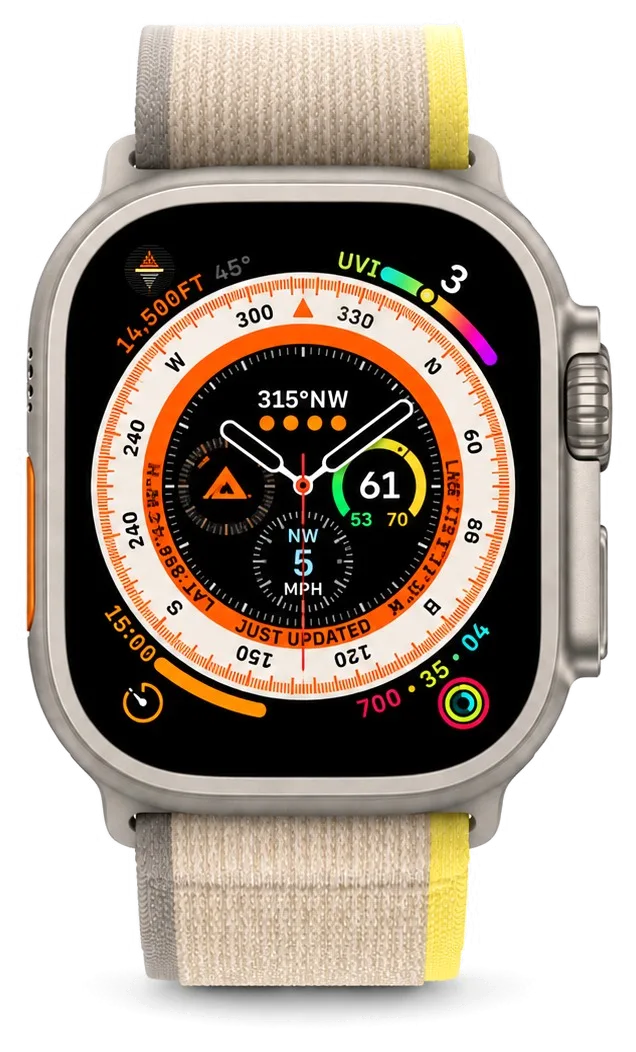
A rugged watch built for mountains and open water still suffers from scratched glass, sticky buttons, moisture and fast battery drain.
The watch runs out of charge before a marathon or triathlon is over.
The glass resists scratches, yet a sharp knock on a rock leaves a chip.
Sand, salt and chalk get under the raised button and slow its travel.
After the sea or a dusty trail the crown turns unevenly or squeaks.
Water or dirt in the grille makes the siren and calls sound dull.
A fall onto stones leaves dark spots or coloured lines on the screen.
Sudden changes in temperature leave condensation under the glass.
Distance and route look jagged after a hard impact.
No charge indicator on the puck, and the percentage stays put for hours.
The screen lights up, but swipes and taps near the edge don't register.
On a dive the watch shows the wrong depth or won't launch the app.
During a workout the pulse jumps or drops out even with the strap snug.
We handle the main jobs for Ultra; the final amount depends on the part chosen and the inspection.
| Service | Original | Aftermarket |
|---|---|---|
| Glass replacement | 55 900 ₸ | 30 900 ₸ |
| Display replacement | 177 900 ₸ | 98 900 ₸ |
| Battery replacement | 28 900 ₸ | 16 900 ₸ |
| Rear cover with sensors replacement | 107 900 ₸ | 59 900 ₸ |
| Digital Crown repair | 24 900 ₸ | 13 900 ₸ |
| Side button replacement | 24 900 ₸ | 13 900 ₸ |
| Speaker replacement | 22 900 ₸ | 12 900 ₸ |
| Microphone replacement | 24 900 ₸ | 13 900 ₸ |
| Other repairs | Price | |
| Board repairmicrosoldering · 1–3 days | 68 900 ₸per job | |
| Firmware flashingsoftware restore, no parts replaced | 5 490 ₸per job | |
We state the exact cost after diagnostics, once the case, battery and seals have been examined — by phone or in WhatsApp.
An Ultra is bought for hard use, so the right part depends on how demanding your routine really is.


A sports watch deserves careful hands, so experienced technicians do the work and every repair carries a warranty up to 1 year.
11 years of repairing Apple devices has shown us how tough cases behave under really hard use.
Our work carries a warranty up to 1 year; if the fault returns through the repair, the watch comes back for another look.
Experienced technicians open the case, and they know how titanium, gaskets and the glass mounting behave.
We find the cause first and do not replace a part when a clean-up of the button or crown, or an update, is enough.
We explain the original and aftermarket difference with examples from hard use and leave the decision to you.
We open 10:00–19:00 on weekdays and 11:00–18:00 on weekends and holidays, so you can stop by after a session.
Usually the whole journey — from message to pickup — takes less than an hour; complex repairs follow the timeline in the receipt.
Book a repairYou send a photo of the damage on WhatsApp — we quote the price and available time. Or you call a courier.
An engineer checks the device in front of you and shows what is broken. 0 ₸, even if you decline the repair.
We fix the price, the part (original or analog), the timeline and the warranty. You sign — we start.
Before installation we show you the new part in its factory packaging. You wait in the waiting area with coffee and Wi‑Fi.
Touchscreen, brightness, Digital Crown, sensors, microphone, speaker, charging. You check them together with the engineer.
Together with the receipt, warranty card and the old part. Payment — Kaspi, card or cash.
Technicians for iPhone, Mac, iPad, Apple Watch and AirPods repair.
Photo: Mukhpilov Nail Photo: Molchanov Rinat
 Photo: Shokan A
 Photo: Sybanbaev Birzhan
 Photo: Denis Gushchin
 Photo: Duisebaev Azhdar

“If the repair didn’t suit you or you have a complaint, write to me personally.”
Send a photo of the fault — an engineer will reply on WhatsApp, give the price and a time you can come in.
Apple Watch Ultra Repair in Almaty with Original or Aftermarket Parts
iServices handles Apple Watch Ultra repair in Almaty as a direct contractor with its own experienced technicians. We run free 15-minute diagnostics in front of you, show the new part in factory packaging, and fix the part, turnaround and warranty up to 1 year on the receipt. Most repairs finish while you wait.
The Ultra departs from the aluminium Series and SE line in three ways that matter for repair: flat sapphire glass, a 49 mm titanium case and the Action Button. Each changes how the watch fails and how we open it.
The Ultra uses flat sapphire over a titanium 49 mm case, so a crack spreads differently than on the Ion-X pane of aluminium Series and SE models. Sapphire sits at roughly 9 on the Mohs scale, which is why a key in the same pocket leaves no scratch, while one sharp impact on a tile edge can split the pane from the contact point outward. Titanium flexes less than aluminium under a drop, so energy transfers into the display module instead of deforming the body. The flat profile also sends a fracture across the touch layer rather than along a curved edge. Sapphire resists scratches but is brittle under impact, so inspect the impact point, not the surface wear.
| Part or node | What it affects | How we approach it |
|---|---|---|
| Display module | Image, touch, Always-On | Replace pane or full module |
| Battery | Runtime, swelling | Swap cell, re-seal case |
| Charging coil | Wireless charging | Check coil and rear contacts |
| Digital Crown | Scroll, haptics | Clean or replace assembly |
| Action Button | Custom shortcut | Replace its own flex |
| Board | Boot, sensors, radio | Microscope repair, 1–3 days |
After an Ultra repair we check 32 functions in about 10 minutes, including touch, Always-On, the pulse sensor, charging and the Action Button, together with you. The check runs in the waiting area before you leave, so you see the result rather than reading it on a slip. Always-On and the pulse sensor live on separate paths from the display, so a module swap should not touch them — if either fails after repair, it points to a connector, not the new part. We also confirm the Action Button still fires its assigned shortcut, since that flex is easy to pinch during reassembly. If Always-On dims or a heart-rate reading drops out days later, bring the watch back: a reseated connector usually explains it.
A crack is not always a new screen. On the Ultra the front pane and panel are bonded, so the symptom — image or touch — decides whether we re-glass or replace the whole assembly.
On Apple Watch the protective pane and the panel are bonded, so a crack with a clean image can be re-glassed, while stripes, blotches or dead touch mean a full module swap. The top pane sits on the digitiser, and that grid sits on the OLED panel; a flex carries every signal from the stack to the board. A hairline break in the top pane leaves the digitiser and OLED intact, so only that pane is renewed. Once damage reaches the digitiser, touch stops registering along the break line, and the whole assembly is swapped because the layers cannot be separated cleanly. The OLED degrades differently: pressure or moisture shows up as coloured stripes or dark blotches that spread over weeks. For an Apple Watch Ultra repair in Almaty, the symptom on the screen is what decides between re-glassing and a full module swap.
| What you see | Likely cause | What we do |
|---|---|---|
| Crack, image fine | Broken front pane only | Re-glass the assembly |
| Stripes or blotches | Damaged OLED | Replace full module |
| Touch dead in spots | Digitiser grid | Replace full module |
| Black screen, still buzzes | Display flex | Check and replace flex |
| Flicker on Always-On | Connector or module | Diagnose, then decide |
A DIY screen swap on the Ultra usually ends in a torn flex or a lost seal, because the front pane is bonded and the cable is thinner than on a phone. The flex is a ribbon of fine traces folded tightly behind the panel; prying from the wrong corner cuts it, and a new cable alone rarely restores touch. The adhesive holding the top pane is a pressure-sensitive film, not soft glue, so the opening tool must follow the frame contour at a shallow angle. Reassembly matters as much as removal: the gasket that keeps water out sits in a narrow channel and deforms if reused after the case is opened. The heat window for softening that film is narrow — too little and the pane shatters further, too much and the OLED is damaged, which is why re-glassing runs at controlled temperature.
Fast drain, a screen lifting at the edge and a watch that will not charge are the three power complaints we see most on the Ultra. Each points to a different node.
We replace the Ultra battery when runtime drops sharply and the watch shuts down in cold or under load, and we show the new cell in factory packaging before fitting it. A healthy Ultra holds well over a day of mixed use; if it dies by mid-afternoon on the same routine, the power pack has aged past its useful life. Cold mornings make the drop obvious first, since a worn unit loses voltage faster at low temperature. We test capacity under load rather than trusting the percentage on screen, and we confirm the charging circuit feeds the pack correctly before blaming it alone. A swollen unit lifts the screen from the case — stop charging such a watch and bring it in, because a cell under pressure is a safety issue, not just a runtime one.
A dead Ultra is usually a deeply discharged power pack, a failed charging circuit or board damage, and the order of checks decides whether it is a quick fix or a board repair. We start with a known-good charger and a forced restart, then measure whether the pack takes any charge at all. If current reaches it but the watch stays dark, the fault sits on the board, and that means microscope work on the circuit rather than a simple swap. Water exposure changes the picture: a unit that went into liquid can power on days later with corroded contacts, so we inspect the internals before promising a timeline. Leave a dead watch on the charger for a full hour before panicking — a deeply drained pack sometimes needs time to wake, and a forced restart is worth trying first.
The Ultra is built for water, but any repair opens the case. We explain what happens to the seal, how we treat a water-damaged watch, and how the Crown and Action Button are serviced.
We re-seal the case after every Ultra repair, but we cannot promise the factory water resistance once the watch has been opened, so we advise against swimming afterward. The seal is a thin gasket plus a bead of case adhesive that sit between the sapphire crystal and the titanium shell, and both compress on first assembly. Opening the case breaks that compression — the gasket takes a set and the adhesive film tears along the seam. Our technicians fit a fresh gasket and lay new adhesive before the case closes, then check the seam by eye under magnification. The gasket and adhesive are single-use — reusing them is what lets water in, so a proper repair always means a fresh seal, not a re-pressed old one.
After water contact we run diagnostics that can take up to two days, because corrosion on the board shows up slowly and a quick look can miss it. Salt water, pool chlorine and soapy shower water all leave residue that keeps eating at solder joints and flex connectors long after the watch dries. Our engineer opens the case under a microscope, inspects the board, the Crown flex and the speaker membrane, and cleans the corrosion before judging whether a part needs replacing. Do not charge a wet watch to "test" it — power plus moisture is what corrodes the board, so dry it and bring it in before plugging anything in.
A stiff Digital Crown is often debris in the gap and can be cleaned, while a dead Action Button usually needs its own flex replaced. Grit, dried sweat and sunscreen pack into the narrow gap around the Crown and stop it turning smoothly; the button's flex cable, in turn, sits close to the case edge where a knock or water ingress can break a trace. We clean the Crown assembly, then test rotation and press feel before deciding on a swap. Rinse the Crown under warm fresh water and turn it as you do — that clears most grit without opening the watch, and it is the first thing to try before booking a repair.
The component you choose and the way the visit runs decide how the Ultra feels afterward. We fix both on paper before any work starts, so there are no surprises at handover.
We offer an original or an aftermarket component for the Ultra, and 64% of our customers choose the original because brightness, touch and Always-On behave closest to factory. An aftermarket display can match the picture on day one but drift in brightness or touch response over months, and an aftermarket battery may report health differently in watchOS settings. Both options are shown in factory packaging before installation, and the warranty — up to 1 year — is fixed on the receipt before work starts. The real question is how long you plan to keep the watch: a two-year horizon favors the original, while a stopgap fix on a device you will trade in favors the aftermarket. Tell the engineer your plan and they will match the option to it rather than to the price list.
| Stage | What happens | Time |
|---|---|---|
| Photo on WhatsApp | Engineer quotes a price | Reply in 5 min |
| Free diagnostics | Checked in front of you | 15 min |
| Receipt | Price, part, turnaround, warranty fixed | 2 min |
| Repair | Done while you wait | Under an hour |
| Final check | 32 functions tested with you | ~10 min |
Before the visit, unpair the Ultra from your iPhone so the backup stays on the phone, and at handover we test touch, pulse, charging, vibration and the speaker together with you. Unpairing also clears Activation Lock, which otherwise blocks any test after repair, so do it yourself rather than handing over a locked watch. Bring the unit charged enough to power on, since a dead one slows diagnostics and hides faults that appear only under load. At the counter the engineer runs the 32-function check in about ten minutes and returns the receipt, the warranty card and the old module. This final pass catches more than a bench test ever does — a customer tapping the screen finds a soft spot the machine scores as passing.
The Ultra rarely fails for one reason — glass, power pack, seals and charging faults overlap, and the right fix depends on the symptom you see. Here is what to carry into your decision.
Did not find an answer? Message us on WhatsApp: an engineer replies, not a bot.
Ask a questionUsually sand, salt or dirt has got underneath. Rinse the watch with fresh water while pressing the button, then dry it. If it stays stiff, have a technician look at it.
Not at once. The new adhesive seam needs time, and water resistance depends on the work and on the seals. The technician will tell you whether it is safe for your watch.
It is very hard and rarely scratches, but it is brittle, and a sharp point impact can chip it. Protect a chip and show it to a technician before it grows.
Most often the grille is blocked by dirt or water. Clean it with a soft brush and let it dry. If the sound does not return, the speaker should be checked.
If capacity in the Watch app is well below the original, replace it beforehand. A weak battery fails first on long sessions, especially in the cold.
An original part is the better choice there, because it is brighter and more reliable with gloves and in the cold. Aftermarket suits city use.
Yes, every time. Salt wears the seals and clogs the button and crown. Rinse with fresh water, wipe and dry the watch before charging.
У моего Apple Watch Ultra часы перестали нормально держать заряд. В сервисе проверили батарею и работу питания.
Забрала эпл вотч с ремонта, поменяли стекло на часах, супер, а то сколы глаза мазолили постоянно и красоту портили
Добрый день, Гульнура. Благодарим Вас за обратную связь. Мы рады, что Ваше обращение в наш сервис оставило положительные эмоции. Если потребуется квалифицированный совет, мы всегда готовы оказать необходимую помощь.
На смарт-часах треснуло защитное стекло на задней панели, где стоят датчики. Боялся, что внутрь попадет пот или влага при тренировках. Принес ребятам, деталь оперативно заменили на новую. Всё работает корректно, часы как новые.
Умные часы перестали ловить домашний вай-фай и постоянно теряли связь с телефоном. В сервисе обновили внутреннее программное обеспечение и устранили ошибку модуля связи. Теперь всё подключается моментально, уведомления приходят.

A cracked screen does not always mean a new display. Here is how to tell what broke and what to do next.

Most fast drains come from a worn cell or background settings, and a 15-minute check shows which one you have.

The red bolt means the watch is receiving power but not charging. Here is how to tell a cable fault from a watch fault.

Decide whether your older Apple Watch is worth fixing: what breaks, what a repair costs and how long it takes.

Back up your data, turn off Find My, and bring proof of purchase — then the repair starts faster.
 iPad
 MacBook
 iMac
 Mac mini and Studio
 AirPods
 Apple Pencil
 Apple TV
 HomePod