

If your Apple Watch battery is draining fast in Almaty, the cause is usually either settings or a worn cell, and a free 15-minute check in front of you tells the two apart. iServices tests the battery, explains the result, and replaces a worn cell in about 25 minutes with a warranty up to 1 year.
Why Your Apple Watch Battery Draining Started Happening Faster
A fast drain is rarely sudden. In most cases it is either a battery that has physically lost capacity or background load pulling power. Below is how to tell the two apart before spending anything.
Service details: “Apple Watch repair”.
Settings Load Versus a Worn Cell
A sudden drop in runtime usually points to software load, while a slow decline over months points to a battery that has lost capacity. When a watch that used to last two days starts dying by mid-afternoon, the first suspect is what runs on it: workout tracking, always-on display, notifications from a dozen apps, and watchOS background tasks. A worn cell behaves differently — it gives less each week, and the curve is gradual rather than sharp. Battery Health reports maximum capacity as a percentage, and that figure moves down with every charge cycle the lithium unit completes. Watch the pattern, not the number: if the watch reaches evening on a light day but dies on a workout day, the hardware is likely fine. If you notice apple watch battery draining in Almaty conditions, the same logic applies: check the load first, then the cell.
Why Updates and Heat Change the Picture
A watchOS update can raise power draw for a few days while the system re-indexes, and noticeable warmth during that window is normal. After a major version lands, the watch rebuilds photo caches, re-sorts Siri data and re-indexes apps, all of which run in the background and pull from the same small pack. That is why a device that ran cool for months suddenly feels warm on the wrist and loses charge faster than usual. The effect is temporary in most cases and settles once indexing finishes. If warmth and fast drain persist past roughly a week after an update, treat it as a hardware question and get the cell checked rather than waiting for another update.
The Signs That Point to the Battery Itself
- Low maximum capacity: Battery Health reads well below the original figure and keeps sliding.
- Shutdowns before zero: the watch dies at 15–20 percent, then restarts showing charge left.
- Swelling or heat: the case back bulges, the screen lifts, or the watch runs hot while idle.
- Fast drop under light load: runtime collapses even with always-on display off and notifications trimmed.
Checking Apple Watch Battery Draining and Health on the Watch Yourself
Before booking anything, you can read the watch's own battery health in under a minute. Here is where that value lives and how to interpret what it shows.
Where the Maximum Capacity Figure Lives
Open Settings, then Battery, then Battery Health on the watch, and read the Maximum Capacity percentage shown there. The same screen lists Peak Performance Capability, which reports whether watchOS has throttled the chip to prevent an unexpected shutdown. On older units the menu path is identical, though the wording of the second line may differ slightly between watchOS versions. The reading refreshes after each charging round, so a number taken minutes after unplugging reflects the previous cycle rather than the current one. Peak Performance Capability usually shows a support message once the cell has degraded enough to affect power delivery. Read the percentage on a day the device behaved normally — a value taken right after a heavy workout or a hot charge can look worse than the cell actually is.
What the Percentage Actually Tells You
A maximum-capacity reading in the low 80s or below is the usual point where a cell stops carrying a full day, though how you use the device matters as much as the number. Lithium cells lose capacity with every charge round, and a unit charged nightly for two years typically lands somewhere in the high 80s. The percentage is an estimate, not a measurement: watchOS recalculates it from voltage behaviour over time, so it drifts by a point or two in either direction. Workout tracking, always-on display and GPS pull far more current than notifications and timekeeping, which is why two owners at the same level report different runtime. A device at 85 percent that dies during a workout is a worse candidate for "wait and see" than one at 82 percent that still lasts a light day — judge by your day, not the number alone.
Recalibrating So the Percentage Reads True
- Full discharge: let the watch run to shutdown on its own instead of topping it up early, so the system sees the true bottom.
- Uninterrupted charge: connect it to the charger and leave it until it reaches 100 percent without taking it off midway.
- Repeat once: a single round is usually enough for watchOS to redraw the estimate; a second confirms the trend.
- Recheck the health screen: compare Battery Health before and after — a jump of several points means the old reading was stale.
Settings That Buy You More Runtime When Apple Watch Battery Draining
A handful of settings changes can add hours to a day without touching the hardware. These are the ones that make the biggest difference and cost you the least.
Always-On Display and Workout Tracking
Turning off Always-On Display and trimming workout tracking to the sessions you actually log are the two biggest settings savings on a watch. Always-On keeps the screen dimly lit every time you lower your wrist, so on a cell that has already lost capacity that constant glow drains a charge by early evening. Workout tracking runs GPS, heart-rate sampling and motion sensors together, so a watch set to log every walk stays in high-power mode far longer than the activity itself. Restrict workouts to real training blocks and many owners recover two to three hours the same day. Keep Always-On for the hours you glance at the watch most and switch it off for the rest — a schedule beats an all-or-nothing toggle.
Background Apps and Notifications
- Background App Refresh: disable it for apps you do not open daily, since each one wakes the processor on a schedule.
- Mirrored notifications: turn off phone alerts that do not need to reach your wrist, such as social feeds and shopping apps.
- Live complications: keep two or three on the face and remove the rest, as each refreshes on its own timer.
- Third-party fitness apps: close them after a session instead of leaving them running in the background.
- Handoff and Siri: switch off Handoff if you never move tasks between devices, and limit Siri wake on wrist raise.
When Settings Stop Helping
We see watches where every setting is already trimmed and the cell still dies by mid-afternoon, and that is the point where settings have done all they can. At that stage the Battery Health figure under Settings usually sits in the low 80s or below, and no toggle brings back capacity the chemistry has already lost. Our engineers run free diagnostics in front of you: a 15-minute check that reads the cell, confirms whether the drain comes from software or from wear, and shows you the result on the spot — even if you decide not to repair. That separates "you can still tune this" from "the cell is done" before you spend anything on a replacement, and it tells you plainly whether a new battery is the answer.
Original Cell or Aftermarket and the Warranty Behind It
Once a replacement is on the table, the two real questions are which cell goes in and what backs it up. Both are settled before any work starts, and both are written down.
How the Two Options Differ
| Option | Capacity match | Best for |
|---|---|---|
| Original part | Closest to factory | Watches kept long-term |
| Aftermarket part | Good, slightly lower | Older watches, budget focus |
| Either option | Fixed on receipt | Certainty before work |
Why Most Customers Pick the Original
64% of our customers choose the original part, mostly because it behaves closest to the one the watch shipped with. An original part matches factory capacity, so charge cycles, drain rate and the percentage the watch reports stay predictable over time. Aftermarket cells cost less and work, but their slightly lower capacity shows up as a shorter day once the watch is a couple of years old. In our practice the choice usually follows how long the owner plans to keep the device: a watch bought for the long run gets the closer match, an older model heading for retirement gets the simpler one. The part is fixed on the receipt before work starts, so the choice you make at the counter is the one that goes in — nothing is swapped mid-repair.
What the Warranty Covers
Every battery replacement we do carries a warranty up to 1 year, written on the receipt alongside the part and turnaround. The same paperwork records whether the cell is original or aftermarket, so there is no ambiguity later about what was fitted. If the new cell starts draining faster than it should within that period, the receipt is what turns a vague complaint into a straightforward claim. We hand back the old part with the device for the same reason — it is proof of what came out and what went in. Keep the receipt and the old part together: both make a warranty claim simple if the cell ever misbehaves.
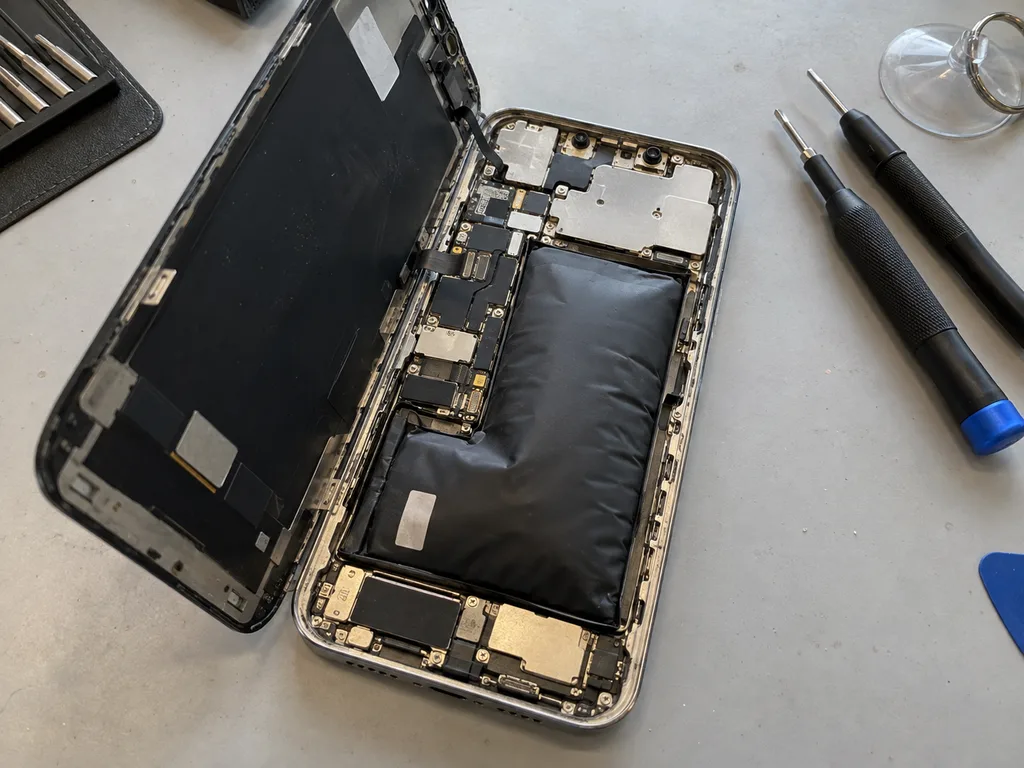 Before: the battery is swollen
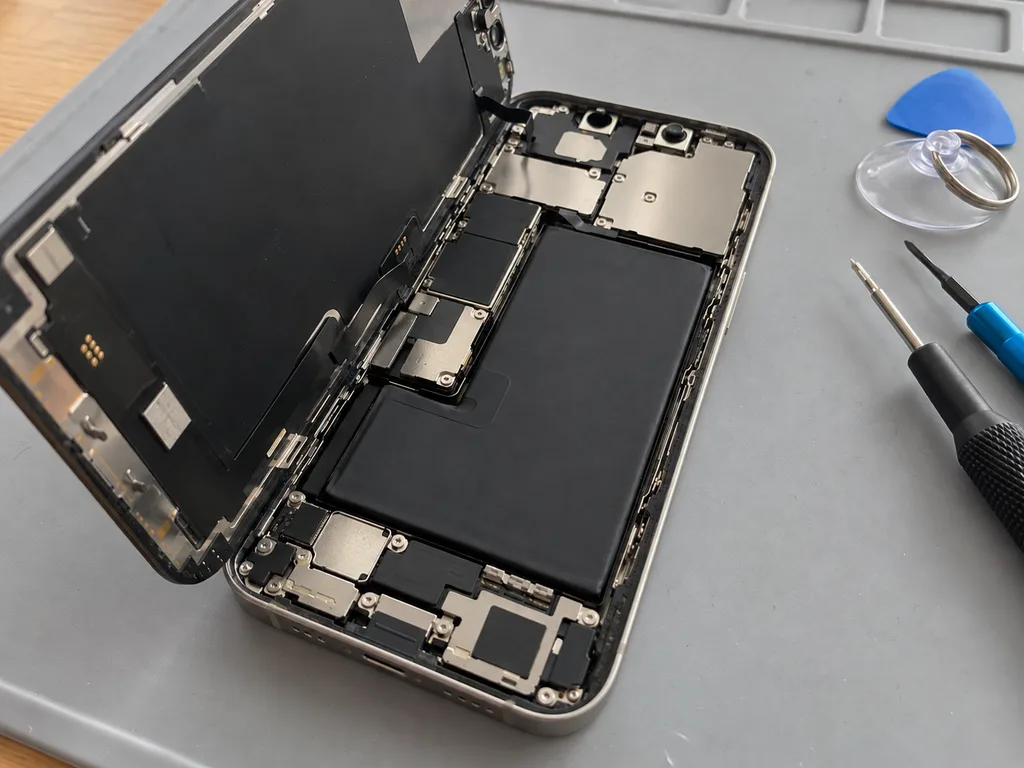 After: a new battery
How the Replacement Runs and How Long You Wait
A battery swap is one of the quicker jobs on an Apple Watch, and the format is built around not leaving the watch behind. Here is what happens from handover to pickup.
The Steps From Handover to Pickup
We check the watch in front of you, fix the price, part, turnaround and warranty on the receipt in about two minutes, then fit the new battery while you wait. Diagnostics take 15 minutes and cost nothing, even if you decide against the repair, and the engineer shows you what the test flagged rather than handing back a verdict. The new part is shown in its factory packaging before it goes in, so you see exactly what is being fitted rather than taking it on trust. Once the work is done you get the watch back with the receipt, the warranty card and the old battery — useful if you want to compare wear for yourself.
How Long a Battery Swap Takes
| Job | Typical time | While you wait |
|---|---|---|
| Battery replacement | 25 minutes | Yes |
| Screen replacement | 40 minutes | Yes |
| Board-level repair | 1–3 days | No |
The Checks Before You Get It Back
After the swap we run a 32-function check over about 10 minutes and go through the results with you before the watch leaves the bench. The list covers the display, touch, microphone, speaker, charging and connectivity — the parts most likely to be disturbed when a case is opened. You test the watch yourself alongside the engineer, and charging, speakers and the screen are the ones worth confirming with your own eyes before you walk out. A battery replacement rarely touches those systems, but the check is the same for every device that comes off the bench, which is why 72% of jobs finish while the owner is still in the waiting area with coffee and Wi-Fi.
Getting Your Watch to Us in Almaty
There is more than one way to hand the watch over, and none of them needs a long trip across the city if you would rather not make one.
Sending a Photo on WhatsApp First
Send a photo of the watch on WhatsApp and an engineer replies within 5 minutes with a price and a free time slot, so no separate booking is needed. The picture does the job of a first inspection: the model and the condition of the case are read from it, and the part and turnaround are named before you commit to anything. We keep that channel open after the quote, so a change of plan is a message rather than a phone queue. A photo taken in good light with the watch face on saves a round of questions — a quote can be given from it before you leave the house.
Calling a Courier Across the City
A courier can be called to collect the watch anywhere in the city, with a 90-minute pickup window and no charge when it comes with a repair. The route covers the whole of the city rather than a central radius, so a device sitting in a flat on the edge of town reaches the workshop on the day it is collected. Handover is confirmed by message at both ends, which means you know when the watch leaves your hands and when it lands on the bench. Pack the watch as you would for a trip and note the passcode situation in advance — it keeps the pickup quick and the handover clean.
Walking In and When We Are Open
- Weekday hours: Monday to Friday 10:00–19:00, the widest window for a swap while you wait.
- Weekend and holiday hours: 11:00–18:00 on Saturday, Sunday and public holidays.
- Seven days a week: watches are accepted every day at both branches, in Almaty and in Astana.
- Free diagnostics first: the device is checked in front of you for 15 minutes.
- Waiting area: coffee and Wi-Fi while the work runs, since most swaps finish in 20–40 minutes.
When the Battery Is Not the Whole Story
Sometimes a fresh cell does not fix the drain, because the cause sits deeper than the battery. These are the cases worth knowing about before you commit to service.
Water Damage and Slow Diagnostics
After water contact, diagnostics can take up to two days, because corrosion on the board shows up slowly and a quick reading can miss it. We run this check in front of you at no cost, even if you decide against the service. Moisture reaches the connectors and the charging circuit long before it reaches the battery, so a watch that took a splash may read a healthy capacity while the logic quietly shorts. Do not charge a watch that has been in water — bring it in dry and let the engineer open it, since current on a wet circuit is what turns a fix into a full replacement.
Board-Level Causes of Fast Drain
A watch that runs warm and drains even with a healthy battery often has a logic-level fault, which we trace under a microscope rather than guessing at the power source. The pattern is consistent: the case feels hot on the wrist within minutes of a charge, capacity still shows a reasonable figure, and a swap alone changes nothing. Under magnification the cause is usually a shorted component or a lifted contact near the power path. This kind of job takes 1–3 days, so it is worth knowing early whether you are looking at a 25-minute swap or a longer one — our engineer confirms which you face during the free check.
Repair the Watch or Replace It
- Sound watch, tired cell: if the display, sensors and case are intact, a new battery restores normal runtime and the unit serves for years more.
- Failing logic plus worn display: two fixes stacked together make the decision harder and stretch the downtime.
- Older model, good condition: age alone is a poor reason to replace; a well-kept unit with a fresh battery keeps pace with daily use.
- Heat and swelling: a swollen case points to the cell and needs attention before the screen or seals take damage.
- Weigh remaining life, not the calendar: judge the fix against how long the watch will still serve, not how long it has already run.
Summary: Apple Watch battery draining fast
Fast drain has an order of checks, and following it turns a vague worry into a decision you can act on without guessing.
- Battery Health first: the Maximum Capacity figure tells you whether the battery itself has aged, so read it before touching a single setting.
- Always-On and workouts: these two settings pull the most runtime, and trimming them is the fastest test of whether software is the cause.
- Original or aftermarket: the part you fit decides how long the fix lasts, and the warranty on paper decides what happens if it does not.
- A visible diagnosis: watching the reading being taken in front of you removes the guesswork that makes people postpone a repair.
- The final call: a clear view of the part, the turnaround and the warranty is what separates a confident repair from an expensive experiment.






