Your city

AstanaAstana, Kabanbay Batyr Ave., 7/2 · +7 727 339-99-12
Eng

MacBook Battery Replacement in Almaty

Your MacBook battery only lasts a couple of hours — we'll replace it in an hour and show you the new one in its factory packaging.

Open MacBook with fully dark screen without backlight or imageMacBook with large gray circular restart icon centered on blue wallpaperMacBook with black screen and no image but faint backlight glow at edges
Open silver MacBook laptop with screen on showing dark blue wave wallpaper
BeforeAfter
Battery low
Price incl. labor
from 32 900 ₸
Warranty
up to 1 year
  • Battery diagnostics
  • Opening the case
  • Removing the old battery

Signs you need a MacBook battery replacement

A laptop battery ages quietly, then makes itself known through sudden shutdowns and a swelling under the trackpad.

Charge vanishes in two hours

The laptop used to last half a day, and now it asks for an outlet before lunch: battery capacity has dropped sharply.

The MacBook shuts off by itself

The indicator shows charge in reserve, yet the computer goes dark under load or when a heavy app opens.

A service warning appears

The battery details now show a service recommendation, and its condition is falling faster than usual.

The trackpad is lifting

The keyboard bows, the case rocks and the trackpad clicks stiffly: the battery has swollen and needs urgent replacement.

MacBook battery replacement prices in Almaty

The cost depends on the model and generation, since every laptop has its own battery type and its own case disassembly difficulty.

ServiceOriginalAftermarket
MacBook Air battery replacement56 900 ₸32 900 ₸
MacBook Pro battery replacement56 900 ₸32 900 ₸
MacBook Pro A1708 battery replacement96 900 ₸55 900 ₸
MacBook Pro Retina A1534 battery replacement126 900 ₸72 900 ₸
MacBook Pro Retina A1502 battery replacement96 900 ₸55 900 ₸
MacBook Pro Retina A1398 battery replacement115 900 ₸66 900 ₸
MacBook Pro A2485 battery replacement171 900 ₸98 900 ₸
MacBook Pro A2289 battery replacement96 900 ₸55 900 ₸
MacBook Pro A2251 battery replacement120 900 ₸69 900 ₸
MacBook Pro A2159 battery replacement96 900 ₸55 900 ₸
MacBook Pro A1990 battery replacement126 900 ₸72 900 ₸
MacBook Pro A1989 battery replacement115 900 ₸66 900 ₸
MacBook Pro A1707 battery replacement145 900 ₸83 900 ₸
MacBook Pro A1706 battery replacement96 900 ₸55 900 ₸
MacBook Pro A1297 battery replacement75 900 ₸43 900 ₸
MacBook Pro A1286 battery replacement77 900 ₸44 900 ₸
MacBook Pro A1278 battery replacement56 900 ₸32 900 ₸
MacBook Air A2941 battery replacement140 900 ₸80 900 ₸
MacBook Air A2681 battery replacement165 900 ₸95 900 ₸
MacBook Air A2337 battery replacement115 900 ₸66 900 ₸
MacBook Air A2179 battery replacement96 900 ₸55 900 ₸
MacBook Air A1932 battery replacement96 900 ₸55 900 ₸
MacBook Air A1466 battery replacement68 900 ₸39 900 ₸
MacBook Air A1465 battery replacement56 900 ₸32 900 ₸
MacBook Pro A2780 battery replacement195 900 ₸112 900 ₸
MacBook Pro A2338 battery replacement155 900 ₸89 900 ₸
MacBook Pro 14" M3 battery replacement214 900 ₸123 900 ₸
MacBook Air 15" M4 battery replacement230 900 ₸132 900 ₸
MacBook Air 13" M4 battery replacement264 900 ₸152 900 ₸

The price is for the job with an aftermarket cell, an original costs more, and the technician names the exact amount for your model.

MacBook battery swap in Almaty step by step

The work follows a clear order, from checking the battery to calibration and cleaning inside, so everything runs smoothly afterwards.

MacBook Air battery replacement
from32 900 ₸
A new battery gives the MacBook its familiar runtime back.
Price for my model
  1. Step 1

    Battery diagnostics

    We read the cycle count, actual capacity and power errors to be sure the battery is really the cause.

  2. Step 2

    Opening the case

    We remove the bottom cover with pentalobe screws and disconnect power before touching anything inside.

  3. Step 3

    Removing the old battery

    On Retina models the cells are glued: we separate them carefully so neighboring cells and cables are not damaged.

  4. Step 4

    Fitting the new module

    We place a suitable battery, secure it, connect the cable and check that the board sees it without errors.

  5. Step 5

    Calibration and testing

    We charge fully and test: the system should show a correct percentage and runtime on power and on battery.

  6. Step 6

    Reassembly and cleaning

    We close the case, refit the cover, wipe dust inside and test the keyboard and trackpad.

Should a MacBook battery replacement use an original or aftermarket cell

MacBooks take both original batteries and aftermarket ones, and the choice depends on the model, budget and your plans for the laptop.

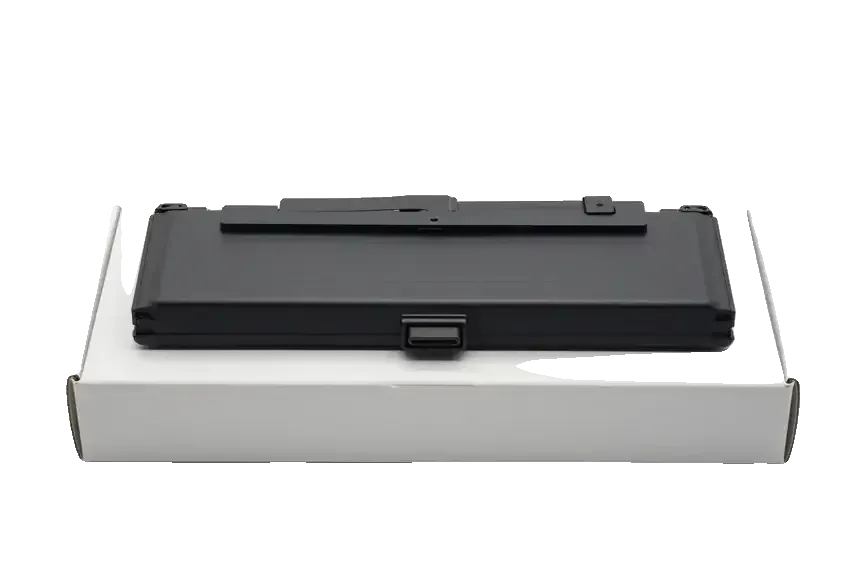
Original Applewarranty up to 1 year
MacBook battery replacement56 900 ₸
Original: MacBook battery on a white box
Capacity
Matches the factory spec and holds rated time
Compatibility
The system shows percent with no warnings
Lifespan
More charge cycles before visible wear
Best when
the MacBook is your main one and runtime matters
Chosen by 64% of clients
Book with an original part
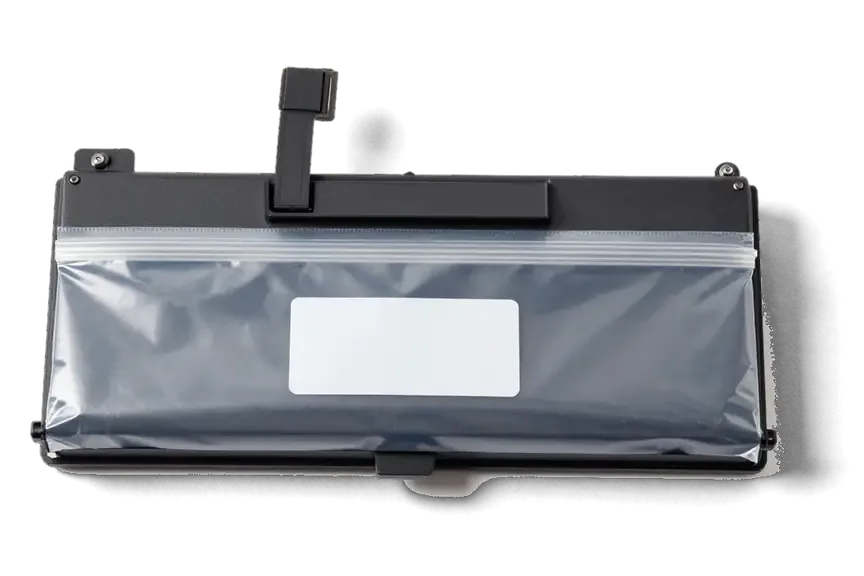
Aftermarketwarranty 6 months
MacBook battery replacement32 900 ₸−42%
Analog: MacBook battery in an antistatic bag
Capacity
Usually a little below the factory value
Compatibility
Service warnings may appear in the system
Lifespan
Shorter, depends on the cell maker
Best when
you need a cheap fix for an older model
Chosen by 36% of clients
Book with an aftermarket part

What makes our battery swaps convenient

A battery belongs in a Mac we know inside out, after first making sure that the battery really is the culprit.

11years

We know Macs inside

Eleven years of Apple repairs taught us how batteries differ across generations and how not to harm the thin cables.

1year

Warranty up to 1 year

The work and the installed part carry a warranty up to 1 year, with terms explained before the repair.

8technicians

Experienced technicians

Batteries are replaced by experienced technicians who know how to detach glued cells safely and keep the case undamaged.

2options

Cause first

If a laptop drains because of the board or charger and not the battery, we say so instead of swapping a part for nothing.

5min

A clear choice

We explain how an original differs from an aftermarket cell for your model and let you decide without pressure.

7days a week

Weekend reception

We work Mon to Fri from 10:00 to 19:00, and Sat, Sun and holidays from 11:00 to 18:00, so drop by when you can.

MacBook battery replacement in Almaty before and after

1 / 1
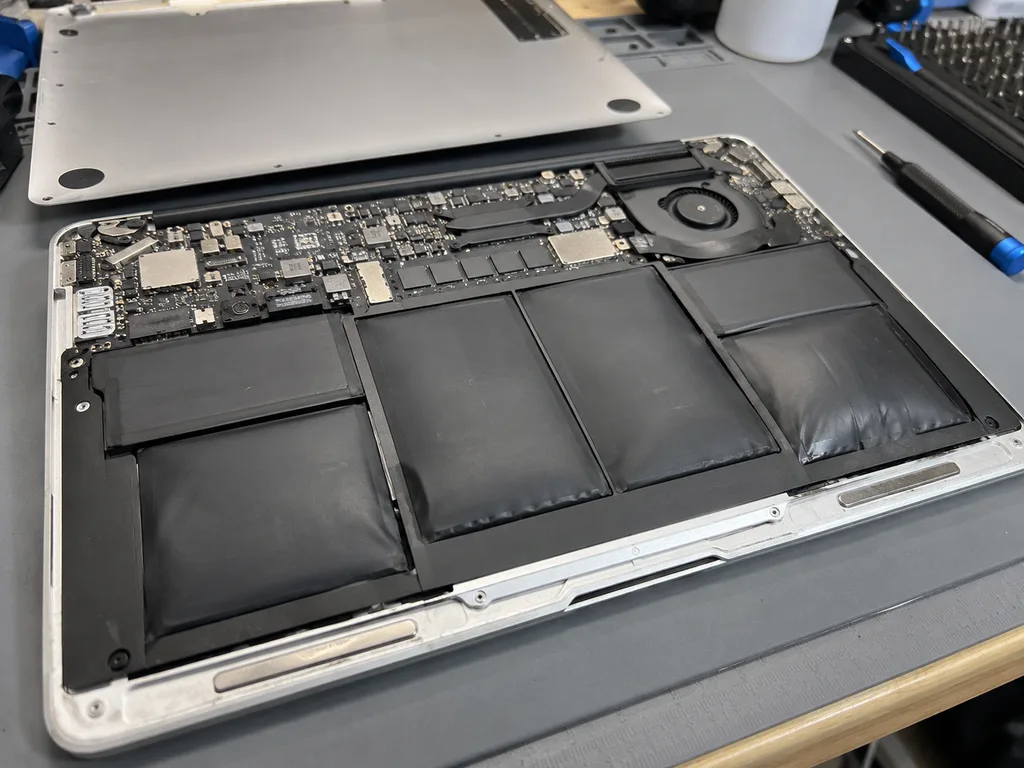
Before photo: swollen battery lifted the bodyBefore: swollen battery lifted the body
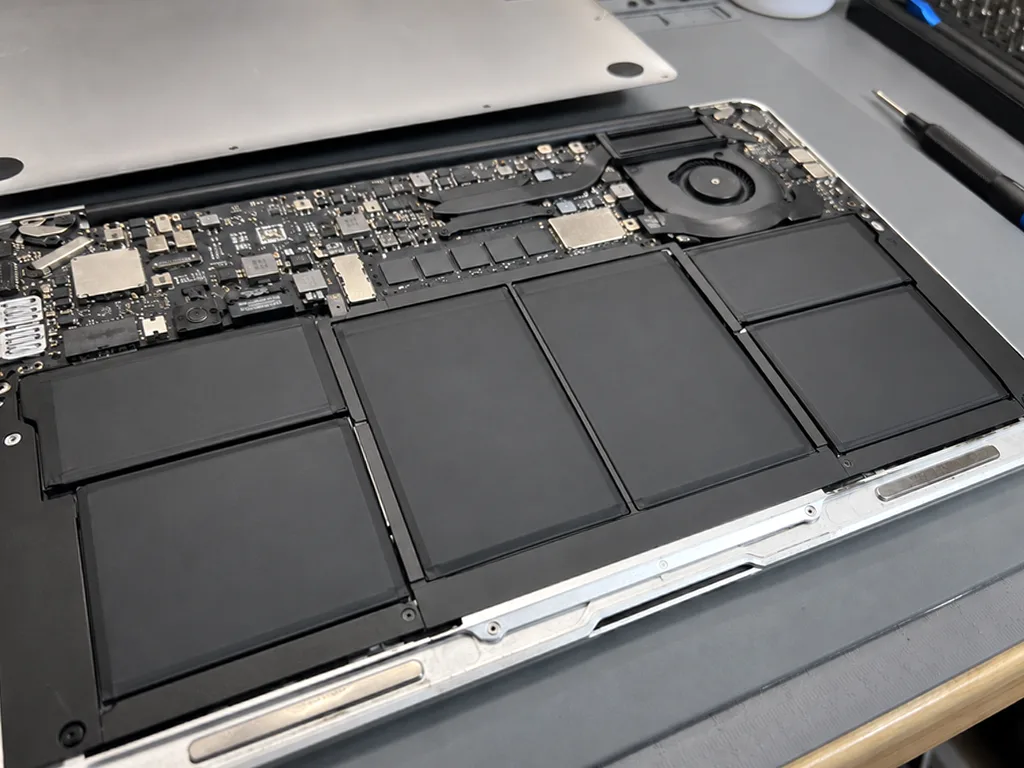
After photo: new battery, even bodyAfter: new battery, even body
BeforeAfter

MacBook Air M1: swollen battery

1 hourOriginalWarranty up to 1 year
Problem
The trackpad stopped clicking, the body rocks on the table. Inside — swollen battery cells.
What we did
Replaced the battery, checked the trackpad and charge cycles. Recycled the old battery.
17 hbattery life
I want the same

How MacBook battery replacement works in Almaty

Usually the whole journey — from message to pickup — takes less than an hour; complex repairs follow the timeline in the receipt.

Book a repair
  1. Step 1

    Message or call

    5 min

    You send a photo of the damage on WhatsApp — we quote the price and available time. Or you call a courier.

  2. Step 2

    Free diagnostics

    15 min

    An engineer checks the device in front of you and shows what is broken. 0 ₸, even if you decline the repair.

  3. Step 3

    Price in the receipt

    2 min

    We fix the price, the part (original or analog), the timeline and the warranty. You sign — we start.

  4. Step 4

    Repair while you wait

    20–40 min

    Before installation we show you the new part in its factory packaging. You wait in the waiting area with coffee and Wi‑Fi.

  5. Step 5

    Post-repair check

    10 min

    Screen, keyboard and trackpad, camera, microphones, speakers, charging, Wi‑Fi. You check together with the engineer.

  6. Step 6

    Pick up your device

    warranty up to 1 year

    Together with the receipt, warranty card and the old part. Payment — Kaspi, card or cash.

Who will install a new battery in your MacBook

Technicians for iPhone, Mac, iPad, Apple Watch and AirPods repair.

1 / 6
MNMukhpilov Nail — smartphone repair technician, iServices service center in AlmatyPhoto: Mukhpilov Nail

Mukhpilov Nail

smartphone repair technician
10years of experience
4.83rating, 83 reviews
MRMolchanov Rinat — Apple repair and diagnostics engineer, iServices service center in AlmatyPhoto: Molchanov Rinat

Molchanov Rinat

Apple repair and diagnostics engineer
10years of experience
4.85rating, 33 reviews
SAShokan A — diagnostics technician, iServices service center in AlmatyPhoto: Shokan A

Shokan A

diagnostics technician
8years of experience
5.0rating, 37 reviews
SBSybanbaev Birzhan — firmware specialist, iServices service center in AlmatyPhoto: Sybanbaev Birzhan

Sybanbaev Birzhan

firmware specialist
7years of experience
4.75rating, 74 reviews
DGDenis Gushchin — display replacement technician, iServices service center in AlmatyPhoto: Denis Gushchin

Denis Gushchin

display replacement technician
20years of experience
5.0rating, 34 reviews
DADuisebaev Azhdar — connector replacement technician, iServices service center in AlmatyPhoto: Duisebaev Azhdar

Duisebaev Azhdar

connector replacement technician
7years of experience
4.3rating, 35 reviews
Gamid K, phone repair technician
“If the repair didn’t suit you or you have a complaint, write to me personally.”
Gamid Kphone repair technician · +7 705 556-07-59

We'll quote MacBook battery replacement in Almaty from a photo in 5 minutes

Send a photo of the screen and the MacBook model. An engineer will reply on WhatsApp, give the price and today's available time.

  1. 5 minAn engineer replies and names the price
  2. 0 ₸Diagnostics in front of you in 15 minutes
  3. 30 minMost repairs — while you wait

MacBook Battery Replacement in Almaty With Original or Aftermarket Choice

In short

For macbook battery replacement in Almaty, iServices is a direct contractor with its own technicians, not an agency. We offer a genuine or aftermarket block, fix the part, turnaround and warranty on the receipt before work starts, and back the job with a warranty up to 1 year. Most jobs take 1 hour to 1 day.

Mukhpilov NailWe reply on WhatsApp within 10 minutes
Ask

Can Your MacBook Battery Replacement Actually Be Done

The battery is replaceable on every MacBook Air and MacBook Pro, but the fastening differs by generation, and that difference decides how the job is approached.

Yes, Every MacBook Air and Pro Takes a New Battery

We replace the battery on every Air and Pro generation, from older Intel machines to Apple Silicon, and the part is always a full pack of cells rather than single cells. The pack sits inside the lower case, held by screws on early models and by adhesive on later unibody and Retina designs, so the technician's route depends on what holds it in place. Across 46,000+ repairs over 11 years, our experienced technicians have handled both layouts, and 64% of customers pick an original part while the rest choose an aftermarket one. The real variable is not whether it can be done but how the pack is fastened, so the same job takes a different route on a screw-fixed older model and on a glued Retina topcase — knowing which one you own tells you what to expect before you book.

Screws, Glue or Tabs and How Each Generation Differs

Fastening type across MacBook generations
GenerationHow the battery is fixedWhat usually comes out with it
MacBook Pro before RetinaScrews, some early models removableBattery block only
MacBook Pro RetinaGlued cells in the topcaseTrackpad, speakers on some models
MacBook Pro with Touch BarGlued cells, keyboard flex cables nearbyTrackpad, keyboard flex cables
MacBook Air on Apple SiliconAdhesive pull-tabsLower case, trackpad on some models

Reading the Wear Signs Before Booking MacBook Battery Replacement

Wear shows up both in the figures macOS reports and in how the laptop behaves through a normal working day. Not every symptom, though, points at the battery itself.

Cycle Count, Maximum Capacity and the Service Status

Open About This Mac, then System Report and Power, and you will see the cycle count, the maximum capacity and a status line that reads Normal or Service Recommended. That first figure tracks full discharge-and-recharge equivalents, the second compares the present full charge against the design value, and the status line is macOS flagging that the pack has drifted far enough from spec to warrant attention. Read all three in one sitting rather than one at a time, because a high tally with the reading still near the design value describes a very different situation from a modest tally with that metric already sagging. A high tally alone does not condemn the pack, so read it together with the reading and with how fast the charge actually drops during your normal work.

When the Fault Is the Adapter or the Power Controller

A laptop that will not charge, or shuts down while the percentage still looks healthy, may have a failing adapter or power controller rather than a worn battery, so we test the charging current before quoting a replacement. The same confusion appears when the battery cable is loose or the controller misreads the pack: the menu bar shows a plausible percentage while the machine cuts out under load. Our engineer measures the actual current reaching the pack and compares it with what the adapter should deliver, which separates a tired cell from a supply-side fault in a few minutes. Replacing a good battery because the adapter was at fault wastes the part, which is why the free 15-minute check in front of you comes before any decision.

A Swollen Battery and What to Do Right Now

A swollen battery is not a cosmetic issue. The cells push up against the trackpad and the lid, and the safest thing you can do before the swap is power the laptop down and stop feeding it charge.

The Signs Most People Miss

  • Stiff trackpad: the surface no longer clicks evenly because the cells push up from below.
  • Bulging lower case: the bottom panel rocks on a flat desk instead of sitting flush.
  • Lid gap: the display does not close tight and a thin line of light shows at the seam.
  • Uneven keyboard: keys sit at a slight angle where the pack presses through the frame.
  • Sudden shutdowns: the machine dies at a charge level that used to be perfectly fine.

What to Do Before the Repair and How to Move the Laptop

Power the device down, stop charging it and do not press the swollen area, then bring it in or call our courier across Almaty, who reaches you in 90 minutes and rides free with a repair. Unplug the adapter at the wall first, not at the port, and leave the lid open so the cells are not squeezed against the display. If you are carrying it yourself, keep the laptop flat and alone in a bag rather than wedged under books. Our engineer runs a free 15-minute check in front of you and shows exactly which cells have lifted, so you see the problem before anything is opened. A swollen battery is safest moved flat and unplugged, so skip the backpack squeeze and hand it over in the position it already sits in.

How the Replacement Runs From First Message to Pickup

The job starts with a photo on WhatsApp and ends with the old battery handed back alongside the receipt. Between those two points sit fixed terms, a part you choose yourself, and a turnaround we name in advance.

Photo, Quote and the Receipt That Locks the Terms

You send a photo of the damage on WhatsApp, an engineer replies within five minutes with a price from the photo, and the price, part, turnaround and warranty are fixed on the receipt in two minutes before any work starts. The same engineer runs free diagnostics in front of you for fifteen minutes, pointing at the wear reading on screen, and you can walk away from a battery replacement in Almaty without paying for that check. For a MacBook battery replacement in Almaty, the terms are agreed the same way before the laptop is opened. Payment lands at the end by Kaspi, card or cash, and the device leaves with the receipt, the warranty card and the old cell in a bag. Locking the terms on paper first means the number you agreed to is the number you pay, even if the disassembly turns up a surprise.

Original Pack or Aftermarket and What Changes

Two battery options compared by cell type and owner fit
OptionWhat you getBest fit
Original packGenuine cells, longest expected lifeMachines you plan to keep for years
Aftermarket packCompatible cells, lower entry pointOlder laptops on a tighter budget
Your pick on the benchNew part shown in factory packagingAnyone who wants to see it first

How Long It Takes and Whether You Can Wait

A laptop battery job runs from 1 hour to 1 day, and 72% of our repairs finish while the customer waits in the waiting area with coffee and Wi-Fi. The courier option covers the whole city in 90 minutes and comes free with a repair, so you can hand the laptop over from home or office instead of travelling. Most of the clock goes on opening the chassis and cleaning old adhesive, not on seating the new part. Because the power cell sits under the trackpad on glued models, the extra time is disassembly and cleanup rather than the swap itself, so a same-day pickup is realistic for most machines.

What the Warranty Covers and How We Check the Result

Once the new battery is seated, the laptop goes through a joint test with the engineer, and the warranty of up to 1 year covers both the part and the labour. Here is what that looks like in practice.

The Checks We Run Together After the Swap

  • Charging: the adapter goes in and the percentage climbs as it should, with no drop-outs at the connector.
  • Trackpad: clicks land evenly across the whole surface, with no dead corners or stiff spots.
  • Keyboard: every key registers and none sit at an angle above the new pack.
  • Sound and camera: the speakers play clean and the camera opens without a fault.
  • Network: Wi-Fi and Bluetooth connect before the laptop leaves the bench, together with the other functions we test.

Making the New Battery Last and What the Warranty Covers

Our warranty runs up to 1 year and covers the battery and the work, and you leave with the receipt, the warranty card and the old part in hand. Across 46,000+ repairs over 11 years, the failures we see most are not from the cell itself but from heat and charging habits. Optimized charging, which macOS switches on by default, holds the charge below full during long desk sessions and measurably slows capacity loss. Keeping the laptop off soft surfaces and out of a hot backpack matters just as much, because a pack that runs at high temperature ages faster than its cycle count suggests. On the models with a glued battery, the adhesive strips are the first thing to give way after a knock. The habits after the repair matter as much as the part you chose.

Summary: MacBook Battery Replacement

A battery swap is a routine job on every MacBook Air and Pro, provided you read the wear numbers, act fast on swelling and lock the terms before work starts.

  • Every generation takes a new cell: the fastening differs across models, but the battery itself is replaceable on all Air and Pro machines.
  • Read the numbers first: cycle count, maximum capacity and the service status tell you more than a single symptom such as short runtime.
  • Swelling is urgent: power down, stop charging and keep the laptop flat until a fresh battery goes in.
  • The part drives the outcome: original or aftermarket changes both the cost and how long the replacement holds its capacity.
  • The result is verifiable: a proper job ends with a function check, a written warranty and the old component handed back.


Questions about MacBook battery replacement

Did not find an answer? Message us on WhatsApp: an engineer replies, not a bot.

Ask a question
What does «Service Recommended» mean for a MacBook battery?

It means macOS has detected that the battery's capacity has dropped well below its original level or that the cell reports a fault. The laptop still works, but runtime is shorter and it may switch off under load. It is a signal to plan a replacement rather than an emergency.

How many charge cycles is a MacBook battery rated for?

Batteries in MacBooks made in the last decade are rated for roughly a thousand cycles before capacity drops noticeably. You can see the current count in System Information under Power. Heat and constant full charge wear the cell faster than the count suggests.

Can a MacBook run without a battery, just from the charger?

Many Intel MacBooks will start from the adapter with a dead or disconnected battery, but they run slower and turn off the moment the cable is pulled. It is a temporary workaround, not a replacement for a working battery.

Why does my MacBook battery drain while the lid is closed?

First check settings such as Power Nap and wake for network access, and look for apps that keep the laptop awake. If it still loses a lot of charge overnight with those off, the battery or the power circuit should be checked.

Is it safe to leave a MacBook on the charger overnight?

Yes, the charging controller stops at full charge, and Optimised Battery Charging keeps the level lower until you usually unplug. Keeping it on mainly protects the cell from heat, so avoid charging under a blanket or pillow.

Why does my MacBook battery percentage drop from a third to zero?

A sudden drop like that is typical of a worn cell whose voltage sags under load. The laptop reads the low voltage as empty and shuts down. A new battery fixes this, while recalibration only hides it for a short time.

What happens to the old MacBook battery after the replacement?

It is returned to you together with the laptop, the receipt and the warranty card. A swollen or damaged cell should not be stored at home for long, so hand it in at a battery recycling point.

Almaty feedback on battery swaps for MacBook

1 / 9
4.9

average rating on Google Maps, wikicity and our website · 445 reviews
Google Maps4.438 reviews ›wikicity5.015 reviews ›Reviews on the iServices website5.0392 reviews ›
ПЯ
Павел Я.Order No. IS‑2301‑•••82 · 26 January 2023
MacBook Pro 14″ (M2 Max, 2023) · battery

На MacBook Pro 14″ (M2 Max, 2023) аккумулятор быстро садился. После обращения проверили состояние батареи и решили вопрос с автономностью; Денис показал, в чём была проблема.

iServices customer review, in Russian
ЖЗ
Жанна З.Order No. IS‑2607‑•••33 · 28 July 2026
MacBook Pro 14″ (M4, 2024) · battery

С MacBook Pro 14″ (M4 2024) вышла неприятность: аккумулятор быстро садился. По результатам диагностики проверили состояние батареи и решили вопрос с автономностью.

iServices customer review, in Russian
ДЧ
Динара Ч.Order No. IS‑2206‑•••11 · 22 June 2022
MacBook Air 13″ Retina (2019) · battery

Нужна была именно диогностика, а не совет сразу покупать новое. MacBook Air 13″ Retina (2019) подвёл: аккумулятор быстро садился; в сервисе проверили состояние батареи и решили вопрос с автономностью.

iServices customer review, in Russian
ГЭ
Гульмира Э.Order No. IS‑2101‑•••65 · 10 January 2021
MacBook Pro 13″ (2016, 2 порта) · battery

Не ожидала, что вопрос решится так спокойно. У моего MacBook Pro 13″ (2016, 2 порта) аккумулятор быстро садился. По результатам диагностики проверели состояние батареи и решили вопрос с автономностью. Денис показал, в чём была проблема.

iServices customer review, in Russian
ВЮ
Вадим Ю.Order No. IS‑2402‑•••04 · 3 February 2024
MacBook Air 13″ Retina (2018) · battery

На MacBook Air 13″ Retina (2018) аккумулятор быстро садился. Ребята проверили состояние батареи и решили вапрос с автономностью.

iServices customer review, in Russian
ДБ
Динара Б.Order No. IS‑2311‑•••00 · 14 November 2023
MacBook Air 13″ (M2, 2022) · battery

У моего MacBook Air 13″ (M2 2022) аккумулятор быстро садился. После обращения проверили состояние батареи и решили вапрос с автономностью.

iServices customer review, in Russian
ЕБ
Ерлан Б.Order No. IS‑2301‑•••04 · 9 January 2023
MacBook Pro 13″ (M2, 2022) · battery

MacBook Pro 13″ (M2, 2022) подвёл: аккумулятор быстро садился. Ребята проверили состояние батареи и решили вопрос с автономностью.

iServices customer review, in Russian
ОВ
Ольга В.Order No. IS‑2503‑•••55 · 1 March 2025
MacBook Pro 13″ Intel (2020, 4 порта) · battery

На MacBook Pro 13″ Intel (2020, 4 порта) аккумулятор быстро садился. В севрисе проверили состояние батареи и решили вопрос с автономностью.

iServices customer review, in Russian
НШ
Наталья Ш.Order No. IS‑2301‑•••51 · 4 January 2023
MacBook Pro 14″ (M1 Max, 2021) · battery

U moego MacBook Pro 14″ (M1 Max 2021) akkumulyator bystro sadilsya. Rebyata proverili sostoyanie batarei i reshili vopros s avtonomnostyu; Azhdar potom eshchyo utochnil, vsyo li rabotaet.

iServices customer review, in Russian transliteration
Showing 9 of 9See all reviews

Where to get MacBook Battery replacement in Almaty

Address
Almaty, Zharokov St., 128
Opening hours
Mon–Fri 10:00–19:00Sat–Sun 11:00–18:00
Phone and messengers
+7 705 556-07-59WhatsApp: +7 705 556-07-59
Directions map: iServices Almaty — Zharokov, 128© OpenStreetMapFind us on the maps: Google Maps · 2GIS