MN Photo: Mukhpilov Nail
Mukhpilov Nail
smartphone repair technician
10years of experience
4.83rating, 83 reviews

MacBook Pro M1 won't charge or has liquid damage — we'll diagnose it free and quote before repair.
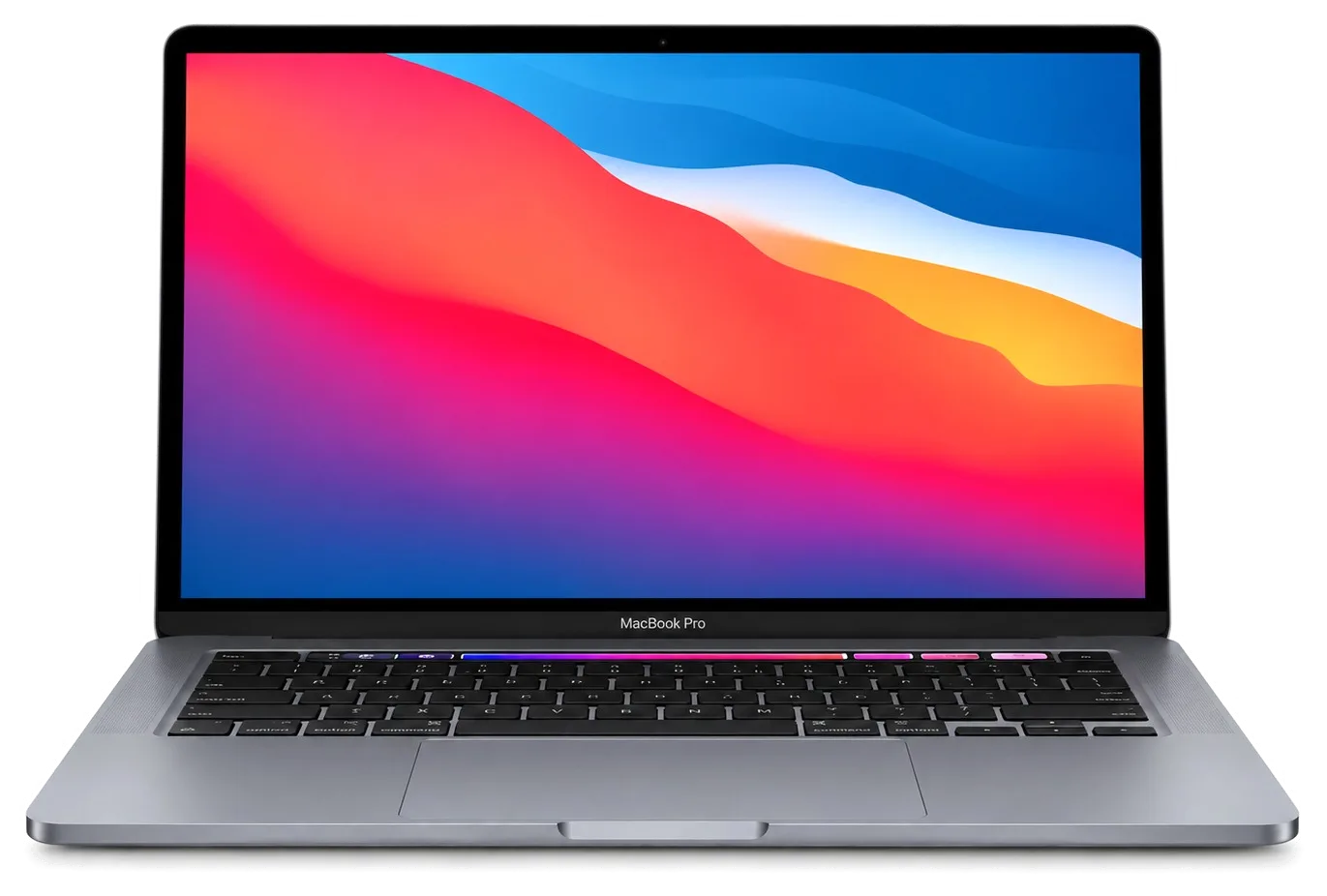
A Pro with an Apple chip rarely dies without warning; the screen, ports, keyboard and battery wear usually show first.
Light halos around bright objects or dark patches that appeared after pressure on the lid.
A cell that used to last the workday now empties by lunch and the percentage jumps.
The magnetic cable will not seat or the light blinks while no power reaches the laptop.
The monitor is not detected and cards do not mount, though the cable and card are fine.
The click feels hard or fails in the corners, which is how a swollen battery shows itself.
A few keys type twice or react late after a drink was spilled on the keyboard.
Fans hit their maximum within a minute and performance starts falling.
Moisture got below the keyboard; the screen is dark and charging shows no sign of life.
Apple logo and endless progress bar, then restarts in a loop.
Network disconnects while working, even though the router is nearby and fine.
Plug feels loose, external drive disconnects at the slightest touch.
Built-in microphones record with noise or don't work at all.
Typical jobs for the MacBook Pro M1 with indicative labor prices, before any details of your specific case.
| Service | Original | Aftermarket |
|---|---|---|
| Display replacement | 301 900 ₸ | 186 900 ₸ |
| Battery replacement | 155 900 ₸ | 89 900 ₸ |
| Charging port replacement | 35 900 ₸ | 19 900 ₸ |
| Speaker replacement | 33 900 ₸ | 18 900 ₸ |
| Fan replacement | 26 900 ₸ | 14 900 ₸ |
| Other repairs | Price | |
| Logic board repairmicrosoldering · 1–3 days | 16 900 ₸per job | |
| Dust cleaningdisassembly and dust cleaning | 10 900 ₸per job | |
| Liquid damage cleaningcorrosion cleaning · diagnostics up to 2 days | 42 900 ₸per job | |
| Wi-Fi module repairwireless module · board-level repair | 41 900 ₸with parts | |
| MacOS installationOS installation, no parts replaced | 10 900 ₸per job | |
The technician states the final amount after diagnostics, since it depends on the board condition and the part you choose.
Batteries and keyboards are available both ways, and the better option follows your workload.


A work laptop cannot sit idle for long, so we name the cause up front and the choice of part stays with you.
Finished work comes with a warranty up to 1 year, and the technician talks through the terms for your part before the job starts.
11 years around Apple hardware lets us tell a standard fault from a rare one, without guessing at expensive parts.
Laptops built on Apple chips are opened by experienced technicians who know where the flex cables and adhesive strips are.
We find the cause and show what failed first, and only then state the total cost of the repair.
We explain how original and aftermarket parts differ and let you decide without any pressure.
Devices are accepted in both cities. Weekdays 10:00–19:00, weekends and holidays 11:00–18:00.
Usually the whole journey — from message to pickup — takes less than an hour; complex repairs follow the timeline in the receipt.
Book a repairYou send a photo of the damage on WhatsApp — we quote the price and available time. Or you call a courier.
An engineer checks the device in front of you and shows what is broken. 0 ₸, even if you decline the repair.
We fix the price, the part (original or analog), the timeline and the warranty. You sign — we start.
Before installation we show you the new part in its factory packaging. You wait in the waiting area with coffee and Wi‑Fi.
Screen, keyboard and trackpad, camera, microphones, speakers, charging, Wi‑Fi. You check together with the engineer.
Together with the receipt, warranty card and the old part. Payment — Kaspi, card or cash.
Technicians for iPhone, Mac, iPad, Apple Watch and AirPods repair.
Photo: Mukhpilov Nail Photo: Molchanov Rinat
 Photo: Shokan A
 Photo: Sybanbaev Birzhan
 Photo: Denis Gushchin
 Photo: Duisebaev Azhdar

“If the repair didn’t suit you or you have a complaint, write to me personally.”
Send a photo of the fault — an engineer will reply on WhatsApp, give the price and a time you can come in.
Professional MacBook Pro M1 Repair in Almaty by iServices
For MacBook Pro M1 repair in Almaty, iServices covers the 13-inch Pro on the M1 chip (A2338) with Touch Bar, fan and soldered memory. Free 15-minute diagnostics run in front of you, most units are fixed in 1 hour to 1 day, and every job carries a warranty up to 1 year.
The 13-inch M1 Pro (A2338) is the Touch Bar model with an active fan and memory soldered to the logic board. Here is what owners actually bring to the workshop and how each fault shows up in daily use.
The most common M1 Pro failures are a cracked or flickering display, a swollen battery pushing on the trackpad, and input faults after liquid or dust. Display damage usually starts at the lid: a closed laptop with an object left inside cracks the matrix, while a failing flex cable shows as flicker or vertical lines. A swollen cell lifts the chassis and stiffens the Force Touch pad until clicks stop registering. Typing faults arrive after spills or grit under the caps, and the Touch Bar strip often dies ahead of the main buttons. A swollen cell also warps the aluminium frame and pad, so the sooner it is replaced the fewer components need swapping.
If a MacBook Pro M1 gets wet, power it off and do not charge it — we then run diagnostics that can take up to two days because corrosion develops while current is applied. Liquid reaches the logic board through the caps and the fan grille, settles around the power controller, and starts eating traces within hours. A sudden shutdown without liquid usually points to a thermal trip or a failing power rail, and both need a microscope inspection rather than a parts swap. Charging a wet unit is the single fastest way to turn a repairable short into a dead mainboard, so unplug first and ask questions later.
| Symptom | Likely part | What we do |
|---|---|---|
| Flickering or cracked screen | Display assembly | Replace matrix or full lid |
| Swollen body, stiff trackpad | Battery pack | Swap pack, check chassis |
| Buttons stick or double-type | Keyboard module | Clean or replace module |
| Will not charge | USB-C port, controller | Test port, repair mainboard |
| Hot and loud under load | Fan, thermal paste | Clean, renew thermal paste |
| Dead after liquid | Logic board | Microscope repair |
The 13-inch M1 Pro and the Air M1 share a chip but not a body. Differences in cooling, memory and input hardware change what can be fixed and how.
On the M1 Pro the memory and SSD are soldered to the logic board, so unlike older unibody Pros they cannot be swapped or upgraded — a storage fault becomes a mainboard-level repair. The M1 chip sits in the same package as the unified memory, and the flash storage is fixed with no socket or slot. That removes the classic upgrade path — no adding RAM and no dropping in a larger drive. Every storage or memory symptom — a laptop that will not boot, a drive that vanishes from Disk Utility, repeated kernel panics — points to the mainboard, which we test under a microscope prior to quoting anything. Because there is no separate drive to replace, back up ahead of any mainboard work; data recovery on a soldered chip is far harder than on a removable one.
The 13-inch M1 Pro has an active fan and a Touch Bar with Touch ID in the power button, while the Air M1 is fanless — so the Pro benefits from cleaning and its strip is a separate module we can service. The cooler pulls air across a heatsink above the chip, and dust builds on those fins over a couple of years of daily use. The fingerprint sensor lives in its own button and connects through a separate flex, so a dead reader or an unresponsive strip is a replaceable module rather than a full top case. We clear the fan and heatsink and renew thermal paste as part of heat-related service. A fanless Air rarely needs dust cleaning, but a Pro that runs hot and loud usually just needs the fins cleared and fresh paste.
The path from a photo on your phone to a laptop back in your hands follows a few clear steps. Here is what happens at each stage and what you get on paper before any work begins.
Send a photo of the damage on WhatsApp and an engineer replies within 5 minutes with a quote and a free time slot. About 2 minutes go into writing the cost, the part, the turnaround and the warranty onto the receipt, and that happens ahead of anyone lifting a screwdriver. Bring the laptop charged if it still turns on, and note the password so the technician can test it properly. Getting the sum and component on paper ahead of anyone opening the machine protects you if the diagnosis shifts mid-repair, because the agreed figure holds even when the fault is deeper than the photo suggested. This is how a macbook pro m1 repair in Almaty stays predictable from the first message to pickup — the terms are fixed before anyone opens the machine.
Diagnostics cost nothing and take about 15 minutes in front of you, even if you decide not to repair, and 72% of jobs are finished as the customer waits in the waiting area with coffee and Wi-Fi. The technician opens the device at the bench and points to the failed component rather than describing it in the abstract, so nothing is hidden behind a counter. For MacBook and iPad the turnaround is longer than for a phone — from 1 hour to 1 day — and the exact time is named after diagnostics. Watching the unit being opened and the broken module being shown removes the guesswork: you see the fault before you agree to anything, and you can ask questions as the engineer is still at the bench.
| Work type | Typical turnaround | Notes |
|---|---|---|
| Battery, keyboard, port | from 1 hour to 1 day | Exact time named after diagnostics |
| Display replacement | 1 hour to 1 day | Depends on stock |
| Board-level repair | 1–3 days | Done under the microscope |
| Courier across the city | 90 minutes | Free with a repair |
We look at how factory parts and aftermarket equivalents differ for the 13-inch M1 Pro, what each one changes in daily use, and how your decision is locked in before any work begins.
We show the replacement part in its factory packaging prior to installation and record on the receipt whether it is genuine or aftermarket, along with the price, turnaround and warranty. The sealed box is opened in front of you, not in a back room, and the serial markings stay visible until you nod. Two minutes at the counter is all it takes to write the type, turnaround and coverage term onto the receipt, and that sheet is the reference point for the whole job. Nothing gets swapped mid-repair without a new line on paper. Seeing the sealed component ahead of installation is the simplest way to confirm you are getting what you paid for, genuine or not.
64% of our customers pick a factory part, and the decision usually comes down to how long you plan to keep the laptop and which component is being replaced. A screen or battery carries the daily wear, so owners who expect another three or four years of use lean toward the genuine item. Cosmetic items such as a bottom case or a keyboard surround rarely justify the premium, and an aftermarket unit holds up fine there. We quote both options side by side and let the intended service life decide, not the label on the box. For a screen or battery you intend to live with for years, the factory one is the safer bet; for a cosmetic item, aftermarket often does the job.
Every repair carries coverage up to 1 year, and the laptop is returned with the receipt, warranty card and the old part so you can see what was replaced. The card names the item fitted and the term that covers it, which matters if a display develops a dead pixel or a battery loses capacity early. Handing back the removed element closes the loop: you know the swap actually happened and you keep the evidence. Our technicians log the serial of the new one against your receipt, so a claim never turns into a guessing game about what was installed. Keeping the old spare is useful — it is proof of the swap and, for a board, a record of what failed if the same fault returns.
What to check at pickup, how to prepare your data before handing the device in, and which habits lower the risk of repeat faults on an M1 Pro.
After the repair we check 32 functions in about 10 minutes together with you — True Tone, cameras, microphones, speakers, charging and network — ahead of the device leaving the workshop. You sit at the bench while our engineer walks the list: opens System Information, plays a test tone, records a voice memo, toggles True Tone, joins Wi-Fi and plugs in the charger to confirm the battery reports a charge. Battery health is read from the system report, and each USB-C port is tested with a real device rather than a glance. Testing with the customer present catches a loose connector or a dead port on the spot, as the machine is still on the bench — a ten-minute check at pickup saves a second trip across the city.
Ahead of handing the laptop in, make a Time Machine backup, note your password and decide whether to turn off Find My Mac, since mainboard work can affect access to the soldered drive. A full backup to an external drive takes under an hour over USB-C, and a second copy in iCloud covers the files you would miss most. Write the firmware password down separately if one is set — without it a board-level fix stalls at the first step. Find My Mac is worth switching off ahead of service so the engineer can complete a full boot test without an activation lock blocking the login screen. On the M1 Pro the SSD is part of the board, so a backup is not optional — it is the only copy of your data that survives a mainboard repair.
A repair on this generation rewards a clear head more than speed. The notes below gather what actually decides the outcome, from the first symptom to the moment you walk out with the laptop.
Did not find an answer? Message us on WhatsApp: an engineer replies, not a bot.
Ask a questionNo, they are different laptops: the thirteen-inch M1 has a Touch Bar and two USB-C ports in the older case, while the fourteen-inch has an XDR screen, MagSafe, HDMI and an SD slot. Their parts are not interchangeable, so tell the technician which one you have.
A thirteen-inch M1 supports one external monitor, the M1 Pro supports two and the M1 Max supports up to four. If a second screen stays black on a thirteen-inch M1, that is a chip limit, not a fault.
Usually it is not a good idea: a used board can be tied to someone else's Apple ID, and Touch ID is paired with the original board. That is why the engineer repairs your own board whenever possible.
The fourteen- and sixteen-inch models use a mini-LED panel with many local dimming zones, which is a complex and delicate part. Aftermarket screens rarely match its brightness and HDR, so for this model an original display is usually advised.
Open About This Mac: the chip name is shown on the first line. It matters for repair, because board-level parts and memory differ between the M1 Pro and M1 Max versions.
Many hubs pass through less power than the laptop needs, especially under load, so macOS shows it is not charging. Connect the charger directly to the laptop. If it still does not charge, the port or the cable is checked.
С MacBook Pro 16″ (M1 Pro 2021) вышла неприятность: компьютер не включался с первого раза. Ребята проверили питание и вернули стабильный запуск; Денис подсказал, что действительно надо проверять.
У моего MacBook Pro 16″ (M1 Pro 2021) после попадания жидкости устройство вело себя непредсказуемо. В итоге осмотрели плату и устранили обнаруженную неисправность в iservice.
MacBook Pro 14″ (M1 Max, 2021) подвёл: после попадания жидкости устройство вело себя непредсказуемо. В итоге осмотрели плату и устранили обнаруженную неисправность.
На MacBook Pro 14″ (M1 Max, 2021) периодически пропадал звук. По результатам диагностики проверили аудиотракт и восстановили звук.
MacBook Pro 13″ (M1 2020) подвёл: компьютер не включался с первого раза. После обращения проверили питание и вернули стабильный запуск.
U moego MacBook Pro 14″ (M1 Max 2021) akkumulyator bystro sadilsya. Rebyata proverili sostoyanie batarei i reshili vopros s avtonomnostyu; Azhdar potom eshchyo utochnil, vsyo li rabotaet.
Na MacBook Pro 16″ (M1 Pro, 2021) zaryadka postoyanno preryvalas. Po rezultatam diagnostiki proverili kabel, port i tsep pitaniya v i-service.
Na MacBook Pro 16″ (M1 Pro, 2021) mashina silno tormozila na obychnykh zadachakh. V servise nashli prichinu zamedleniya i stabilizirovali rabotu.
Макбук стал жутко греться и тормозить даже от простых задач по работе. Принес на чистку от пыли и замену термопасты. Всё почистили быстро, теперь работает абсолютно бесшумно и больше не зависает. Спасибо большое за оперативность.
Проблема: не было изображения на экране макбука. Принес в этот сервис на диагностику. На следующий день мне сообщили что нужно восстанавливать материнскую плату, и время работы 2 недели. По прошествии 2х недель со мной ни кто из менеджеров не связался, звонил им сам, ответивший менеджер не знал ситуации с макбуком, якобы в работе. Я попросил узнать почему ещё в работе. Через полчаса мне звонят с сервиса, и говорят, пришли бракованные чипы для замены, и для решения проблемы ждать ещё 2 недели. По прошествии более 2х недель, со мной так же ни кто не связывался, и опять мне нужно было звонить самому. Ситуация повторилась. Менеджер не в курсе состояния, связывался техник который этим занимался. Главный техник который курирует мастеров, говорил что они позвонили все питание на видеочипы, питания на чипы было. Как проводилась диагностика вызывает большой вопрос. И почему все мероприятия продлились месяц, мне так и ни кто не ответил. В итоге, макбук не починен, якобы нужна замена материнской платы и нужно ещё месяц ждать и 250 тысяч тенге, месяц пустых ожиданий, не известно сколько он просто пылился у них на складе в ожидании, пока я его не заберу. Складывается смутное ощущение что они больше нанесли вреда состоянию макбука. П.с. при возврате макбука, оказалось, что диагностика продлилась месяц, и что современные макбуки они быстро не ремонтируют, мой макбук 2016 года, главный техник не в курсе что чем занимаются его подчинённые. Кажется бредом. Потерян месяц, очень разочарован этим сервисом. Ещё и часть креплений потеряли. Не рекомендую обращаться к ним

Replace the battery when macOS reports Service Recommended and runtime no longer covers your workday. A free 15-minute check shows whether the cell is at fault.

Why your MacBook runs hot and loud, and whether cleaning solves it or the board needs repair.

Power it off, unplug the charger and bring the laptop in for a free 15-minute check before corrosion spreads.

Sticky or unresponsive keys usually mean debris, worn mechanisms or liquid damage. A technician can check the keyboard and advise on cleaning or replacement.

Back up your data, turn off Find My, and bring proof of purchase — then the repair starts faster.



 iPad
 iMac
 Mac mini and Studio
 Apple Watch
 AirPods
 Apple Pencil
 Apple TV
 HomePod
