MN Photo: Mukhpilov Nail
Mukhpilov Nail
smartphone repair technician
10years of experience
4.83rating, 83 reviews

The MacBook 12 with a single USB-C won't charge or the keys stick — we'll fix the port in a day and confirm the price upfront.
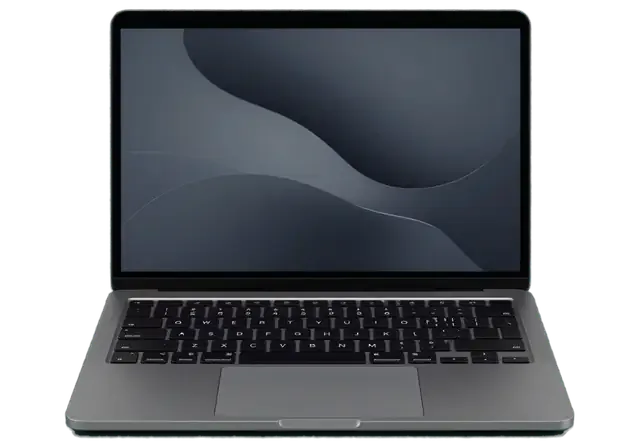
Typical troubles of the slim MacBook 12" A1534: sticky keys, the USB-C port, a swollen battery, overheating and the aftermath of liquid.
One key refuses to press or types twice because dust got under the mechanism.
The cable feels loose, charging drops out or accessories are not recognized.
The case flexes slightly and the trackpad feels stiff or stops pressing.
With no fan, the laptop overheats under load and cuts its own speed.
Horizontal stripes or flicker usually point to the display cable.
Dark screen and silent indicator: we test power, board and battery.
The pointer jumps and the Force Touch click works only part of the time.
The thin board corrodes fast, so it should be cleaned as soon as possible.
The network drops when it heats up and Bluetooth loses the mouse.
Sound distorts at volume and one channel is quieter.
The Retina display has marks where the keys touch it.
The laptop hangs on the Apple logo or shows a folder with a question mark.
These are the jobs most often ordered for the thin Retina; the amounts cover labor, and the part is priced separately.
| Service | Original | Aftermarket |
|---|---|---|
| MacBook Pro Retina A1534 display panel replacement | 378 900 ₸ | 234 900 ₸ |
| MacBook Pro Retina A1534 battery replacement | 126 900 ₸ | 72 900 ₸ |
| MacBook Pro Retina A1534 keyboard replacement | 38 900 ₸ | 21 900 ₸ |
| MacBook Pro Retina A1534 charging port replacement | 35 900 ₸ | 19 900 ₸ |
| MacBook Pro Retina A1534 speaker replacement | 33 900 ₸ | 18 900 ₸ |
| MacBook Pro Retina A1534 backlight repair | 364 900 ₸ | 225 900 ₸ |
| Other repairs | Price | |
| MacBook Pro Retina A1534 logic board repairmicrosoldering · 1–3 days | 129 900 ₸per job | |
| MacBook Pro Retina A1534 liquid damage cleaningcorrosion cleaning · diagnostics up to 2 days | 25 900 ₸per job | |
| MacBook Pro Retina A1534 Wi-Fi module repairwireless module · board-level repair | 41 900 ₸with parts | |
| MacBook Pro Retina A1534 macOS installationOS installation, no parts replaced | 15 900 ₸per job | |
The technician agrees the final estimate with you after inspection because it depends on the board and the part chosen.
Parts in this laptop are packed tightly, so component quality matters more than it does in classic designs.


How we help A1534 owners: we are used to slim hardware, take it apart carefully and diagnose instead of guessing.
11 years of Mac repair taught us to handle fragile ribbon cables and the adhesive that holds thin cases together.
Work comes with a warranty up to 1 year, and the technician explains beforehand what the repair covers and where limits apply.
Experienced technicians lift the cover and battery without bending anything, so the thin cable and the case stay intact.
Before swapping a keyboard or a port we test power and board, so we treat the cause rather than the symptom.
Mon–Fri 10:00–19:00, weekends and holidays 11:00–18:00: bring the laptop in on whichever day suits you.
We work in two cities, which helps people who travel between them with the laptop in their bag.
Usually the whole journey — from message to pickup — takes less than an hour; complex repairs follow the timeline in the receipt.
Book a repairYou send a photo of the damage on WhatsApp — we quote the price and available time. Or you call a courier.
An engineer checks the device in front of you and shows what is broken. 0 ₸, even if you decline the repair.
We fix the price, the part (original or analog), the timeline and the warranty. You sign — we start.
Before installation we show you the new part in its factory packaging. You wait in the waiting area with coffee and Wi‑Fi.
Screen, keyboard and trackpad, camera, microphones, speakers, charging, Wi‑Fi. You check together with the engineer.
Together with the receipt, warranty card and the old part. Payment — Kaspi, card or cash.
Technicians for iPhone, Mac, iPad, Apple Watch and AirPods repair.
Photo: Mukhpilov Nail Photo: Molchanov Rinat
 Photo: Shokan A
 Photo: Sybanbaev Birzhan
 Photo: Denis Gushchin
 Photo: Duisebaev Azhdar

“If the repair didn’t suit you or you have a complaint, write to me personally.”
Send a photo of the fault — an engineer will reply on WhatsApp, give the price and a time you can come in.
MacBook Pro Retina A1534 (12") Repair in Almaty by iServices
For MacBook Pro Retina A1534 repair in Almaty, iServices uses its own technicians, not an agency. We confirm the A-number first, run free 15-minute diagnostics in front of you, and fix most units in 1 hour to 1 day with a warranty up to 1 year.
The A1534 is the 12-inch MacBook in our catalog's Pro Retina section. Before repair we confirm the A-number, since its single USB-C port, fanless cooling and butterfly keyboard change what we order.
The model number is printed in small text on the lower aluminium cover, and on this machine it reads A1534, which maps to the 12-inch MacBook rather than a 13- or 15-inch Pro. The same bottom cover carries the regulatory markings and the serial number, which identifies the exact build and the parts that fit it. A 12-inch chassis is noticeably thinner than a Pro and has no fan vents along the hinge, a quick visual confirmation when the print has worn off. Owners often quote the marketing name, but the A-number is what the parts catalog matches, so a photo of the bottom cover speeds up quoting more than a description of the fault.
We treat the A1534 as its own platform because it charges and connects through a single USB-C port, cools passively without a fan, and uses the low-travel butterfly keyboard. That one port carries power, video and data at once, so a fault that looks like a dead logic board is sometimes just a worn connector or a tired cable. With no fan to push dust through, heat builds up quietly and the machine slows down instead of getting loud. The butterfly mechanism sits very close to the deck, and a single crumb under a key stops it registering or makes it repeat. We check the port, the thermal path and the key mechanisms before quoting, since all three fail far more often than the main circuitry itself.
| Component | Replaceable as a unit | Typical work |
|---|---|---|
| Battery | Yes | Cell pack swap, trackpad check |
| Display assembly | Yes | Full lid and matrix replacement |
| Keyboard top case | Yes | Butterfly key mechanism and top case |
| Trackpad | Yes | Force Touch surface and cable |
| USB-C port board | Yes | Port and charge controller check |
| Memory and SSD | No | Board-level repair under microscope |
The faults we see most on the A1534 follow from its design: a keyboard that traps debris, a battery glued under the click surface, a single charge port and passive cooling.
We separate a display fault from a logic-board fault by driving an external monitor through the USB-C port; if the image is clean, the problem sits in the lid assembly or its cable. Vertical lines, a washed-out half, flicker at certain angles or a backlight that dies while the picture survives all point to the same area. A dark panel showing a faint image under a flashlight means the backlight has failed, while a dead screen with a working external output narrows it to the matrix or the display flex. On this model the panel is bonded into the upper half, so a cracked matrix or failing backlight cable means replacing the whole assembly, which is why an external-monitor test saves guesswork before ordering.
A swollen cell pack lifts the click surface, makes the lower case bulge and can stop the pointer responding, so it should be replaced before the cells press further into the chassis. The first sign is usually a pad that no longer clicks evenly or a lid that will not close flush, followed by a bulge across the palm rest. Force Touch has no travel of its own, so once the pack pushes against it the click disappears. Continuing to use or charge a swollen pack risks the cells rupturing against the internal cable, so stop charging, keep the display open and bring it in rather than pressing the case back down.
The butterfly keyboard on the A1534 is prone to debris under the key caps, which shows up as keys that stick, feel mushy or register two characters from one press. Crumbs, dust and grit lodge in the shallow mechanism, and a single key that repeats or skips is the classic early symptom. We test each key in a text field and check the whole row, because the fault often spreads from one cap to its neighbours. A single affected key is not always a full top-case job, but repeated double presses across several keys usually mean the mechanism is worn, and compressed air at home pushes debris deeper rather than clearing it.
Liquid and a machine that stays dark: the first minutes matter most. We start with first aid, then explain how we trace a no-power fault and what happens to your data.
After a spill, power the device off, unplug the USB-C cable and do not try to charge it, because corrosion spreads on the logic board while current flows through it. Turn the laptop upside down so liquid drains away from the keyboard and circuitry, and keep it off even if it seems to work. Coffee, juice and sweet drinks leave residue that keeps eating copper traces long after the surface looks dry, and the thin USB-C socket gathers moisture that shortens the charge controller. Rice and a warm radiator do not stop corrosion inside, and a unit that switches on a day later can still fail once residue bridges a circuit, so keep it off and get it opened.
We check the USB-C socket, the charge controller and the battery in that order, because on a single-port machine a dead socket or a tired battery mimics failed main circuitry. Diagnostics take 15 minutes in front of you and stay free even if you decide not to repair, and the engineer shows what is broken rather than describing it. A worn socket often refuses to hold the cable firmly, so the laptop charges only at a certain angle, while a degraded battery may accept power and still not boot. A charger that lights up tells you power reaches the socket but not that the controller passes it on, so we measure at the circuitry, and a loose socket usually needs the port board rather than a full logic-board repair.
Circuit-level work on the A1534 is done under a microscope and takes 1 to 3 days, and because the storage is soldered to that circuitry, data recovery depends on the main circuitry itself coming back to life. Corroded traces, blown power rails and shorted capacitors are located and reworked by hand, and every job is quoted with the exact part and turnaround fixed on the receipt before work starts. After water contact, diagnostics can stretch to two days, since residue keeps shifting the readings until the circuitry is cleaned. That is why we ask for a backup before work starts and warn that a logic board that will not revive may take the data with it, so a Time Machine copy made while the machine still runs is worth more than any recovery attempt later.
From first message to pickup, the process is short and fixed in writing, so you know the component, turnaround and warranty before anyone opens the machine, and can watch diagnostics.
You send a picture of the damage on WhatsApp, an engineer replies within 5 minutes with a price from that image, and the quote, component, turnaround and warranty are fixed on the receipt in about 2 minutes before work starts. The message thread stays as a record of what was agreed, and the paper copy repeats it in the same words, so nothing shifts once the machine is on the bench. We work as a direct contractor with our own technicians and workshop, so the person quoting from the image is responsible for the result. This keeps the MacBook Pro Retina A1534 repair in Almaty process predictable from the first photo to the final receipt.
Diagnostics are free and take about 15 minutes in front of you, even if you decide not to repair, and the engineer shows what is broken rather than describing it. The bottom cover comes off at the counter, the main circuitry, battery and port are inspected under light, and you see the same thing the technician sees. Our workshop has 11 years of experience and more than 46,000 repairs behind it, and the free check is part of how that number was built. Seeing the fault on the bench changes the decision for many owners, because a symptom that felt like a dead logic board often turns out to be a port or battery.
Most A1534 repairs take from 1 hour to 1 day, logic-board work takes 1 to 3 days, and after the repair you check the ports, charging, keyboard, trackpad, screen, camera, sound and Wi-Fi with the engineer. The waiting area has coffee and Wi-Fi, and 72% of jobs are finished while the customer waits, so a battery or port swap rarely costs a second trip across town. A courier across the city arrives within 90 minutes and is free with a repair, so a laptop that will not start need not be carried in, and the old component comes back with the receipt and warranty card. The new one is shown in factory packaging before installation, and the warranty runs up to 1 year.
Your choice changes how the machine feels, so we explain what original and aftermarket options mean for the A1534, what the warranty covers, and how to prepare the laptop before handover.
| Component | What it means for the A1534 | Fixed on receipt |
|---|---|---|
| Original battery | Matches charge behaviour and cycles | Yes |
| Aftermarket battery | Lower cost, shorter service life | Yes |
| Original display assembly | Full brightness and colour match | Yes |
| Aftermarket display | Works, may differ in tint | Yes |
| Port board | Charge and data through USB-C | Yes |
Every job carries cover up to 1 year, and the warranty card is issued with the receipt and the old component when you collect the device. The warranty term is written on the receipt and the warranty card, so keeping both papers matters if a replaced battery or display misbehaves. That is also why we fix the component and turnaround in writing before work starts rather than quoting loosely — you leave with the old unit, the receipt and the card in hand, and a written record of exactly what was swapped. The receipt and the warranty card record exactly what was done, so store both documents together the moment you get home.
Before handing the device over, make a Time Machine backup, note your login password and decide whether to turn off Find My Mac, since a logic-board repair may need the machine to boot. A backup made while the machine still runs is the only reliable protection when storage is soldered down, and leaving Find My Mac on can block a test boot after a logic-board job. Because the SSD is soldered to the logic board on this model, data recovery from dead circuitry is far harder than a backup taken in advance. Sorting both ahead of the repair avoids a delay at pickup, and writing the password on a note saves a call.
A short recap of what decides the outcome on this model: the exact A-code, the soldered internals, and how quickly a spill or a swollen battery is caught.
Did not find an answer? Message us on WhatsApp: an engineer replies, not a bot.
Ask a questionBecause the name was carried over from the old catalog: A1534 is the model number of the 12-inch MacBook, printed on the underside of the case. Parts and repair methods are chosen for the MacBook 12".
Sometimes: if dust is the cause, the key can be cleaned and its cap carefully refitted. If the mechanism itself is broken, the keyboard is replaced together with the top case that also holds the battery.
The hub may not pass power through, or a weak adapter may not supply enough current. Plug the charger straight into the port first; if it still does not charge, the socket and power controller need testing.
There is no fan, so heat leaves through the bottom of the case, and a soft surface blocks it. Use the laptop on a hard surface; if it stays hot and slow, have the thermal paste and power circuit checked.
First check the trackpad options in System Preferences and restart the laptop. If that does not help, the usual cause is a swollen battery pressing from below, so the technician checks it first.
Make a Time Machine copy to an external drive through a USB-C adapter or upload what matters to iCloud. Storage is soldered to the board, so pulling data off a failed board is difficult.
С MacBook 12″ (2017) вышла неприятность: внешний монитор постоянно терял подключение. В итоге проверили порты и стабильность подключения; Аждар потом ещё уточнил всё ли работает.
На MacBook 12″ (2015) внешний монитор постоянно терял подключение. Ребята проверили порты и стабильность подключения; Аждар подсказал что действительно надо проверять.
У моего MacBook 12″ (2016) периодически пропадал звук. В итоге проверели аудиотракт и восстановили звук; Аждар потом ещё уточнил, всё ли работает.
С MacBook 12″ (2016) вышла неприятность: на экране появились полосы. Ребята проверили подключение и дисплей, изображение восстановили.
У моего MacBook 12″ (2016) зарядка постоянно прерывалась. После обращения проверили кабель, порт и цепь питания.
На MacBook 12″ (2017) на экране появились полосы. В итоге проверили подключение и дисплей, изображение восстановили в айсервис.
У моего MacBook 12″ (2017) машина сильно тормозила на обычных задачах. После обращения нашли причину замедления и стабилизировали работу.
Проблема была такая: компьютер не включался с первого раза — и непонятно что делать. В итоге проверели питание и вернули стабильный запуск.
Макбук стал жутко греться и тормозить даже от простых задач по работе. Принес на чистку от пыли и замену термопасты. Всё почистили быстро, теперь работает абсолютно бесшумно и больше не зависает. Спасибо большое за оперативность.
Проблема: не было изображения на экране макбука. Принес в этот сервис на диагностику. На следующий день мне сообщили что нужно восстанавливать материнскую плату, и время работы 2 недели. По прошествии 2х недель со мной ни кто из менеджеров не связался, звонил им сам, ответивший менеджер не знал ситуации с макбуком, якобы в работе. Я попросил узнать почему ещё в работе. Через полчаса мне звонят с сервиса, и говорят, пришли бракованные чипы для замены, и для решения проблемы ждать ещё 2 недели. По прошествии более 2х недель, со мной так же ни кто не связывался, и опять мне нужно было звонить самому. Ситуация повторилась. Менеджер не в курсе состояния, связывался техник который этим занимался. Главный техник который курирует мастеров, говорил что они позвонили все питание на видеочипы, питания на чипы было. Как проводилась диагностика вызывает большой вопрос. И почему все мероприятия продлились месяц, мне так и ни кто не ответил. В итоге, макбук не починен, якобы нужна замена материнской платы и нужно ещё месяц ждать и 250 тысяч тенге, месяц пустых ожиданий, не известно сколько он просто пылился у них на складе в ожидании, пока я его не заберу. Складывается смутное ощущение что они больше нанесли вреда состоянию макбука. П.с. при возврате макбука, оказалось, что диагностика продлилась месяц, и что современные макбуки они быстро не ремонтируют, мой макбук 2016 года, главный техник не в курсе что чем занимаются его подчинённые. Кажется бредом. Потерян месяц, очень разочарован этим сервисом. Ещё и часть креплений потеряли. Не рекомендую обращаться к ним

Replace the battery when macOS reports Service Recommended and runtime no longer covers your workday. A free 15-minute check shows whether the cell is at fault.

Why your MacBook runs hot and loud, and whether cleaning solves it or the board needs repair.

Power it off, unplug the charger and bring the laptop in for a free 15-minute check before corrosion spreads.

Sticky or unresponsive keys usually mean debris, worn mechanisms or liquid damage. A technician can check the keyboard and advise on cleaning or replacement.

Back up your data, turn off Find My, and bring proof of purchase — then the repair starts faster.

 iPad
 iMac
 Mac mini and Studio
 Apple Watch
 AirPods
 Apple Pencil
 Apple TV
 HomePod
