KS Photo: Kudiret S.
Kudiret S.
iCloud unlock specialist
10years of experience
4.37rating, 100 reviews

Spilled or dropped your A2991 — we'll find the fault for free and quote before any work.
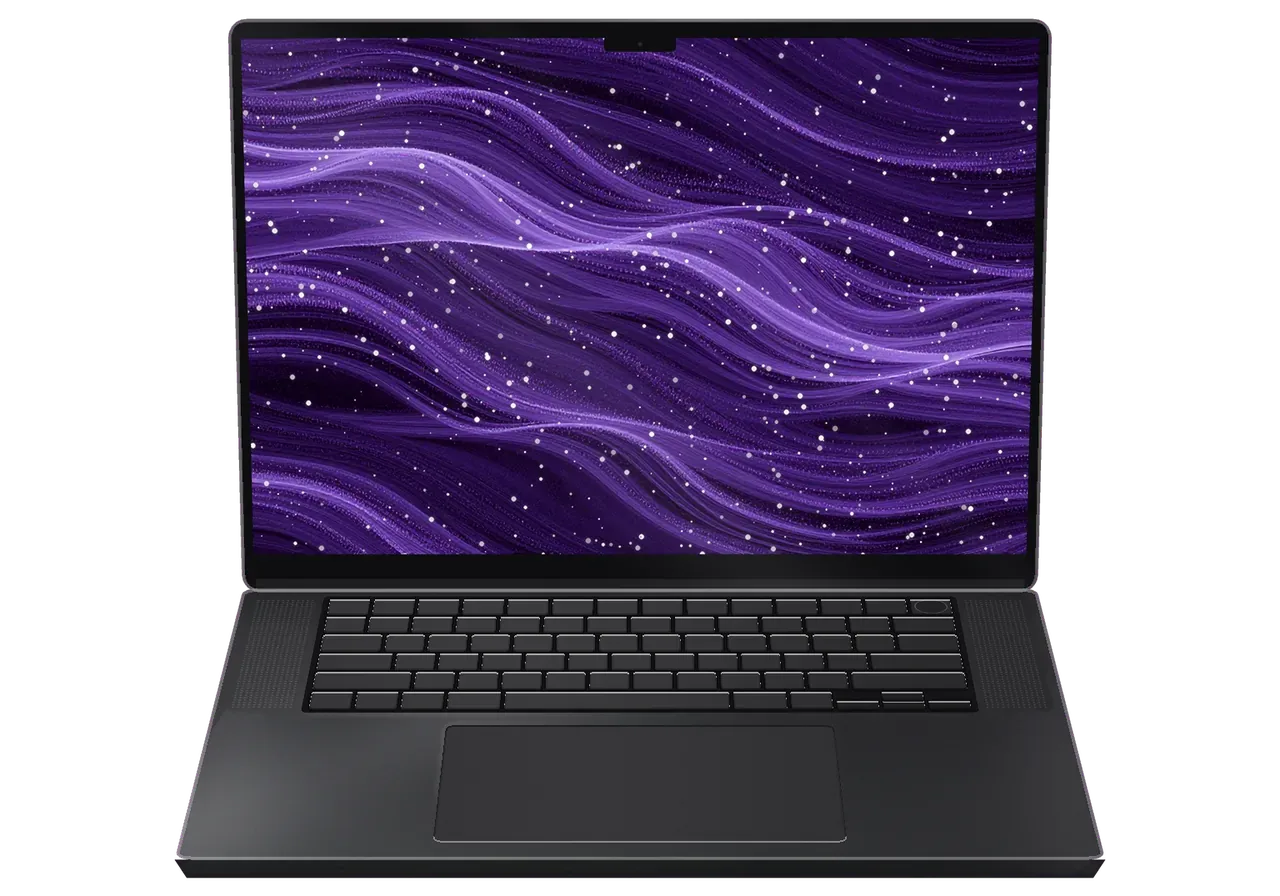
After business trips and long journeys, a damaged screen, a sticking trackpad, a tired battery and dust in the cooling path are the usual finds.
After a flight the case is dented and the screen shows patches or lines.
Frost to a warm hall brings condensation, and the Mac glitches or stays off.
The trackpad does not respond and the bottom case has lifted slightly.
After a stranger's adapter the Mac no longer recognises the power supply.
A drink spilled in a lounge: the keys need urgent cleaning.
The picture blinks as the lid tilts and dark scenes show faint bands.
Fans roar, speed drops and the chassis is warm on a clear desk.
One port will not hold a cable, so charging or the monitor cuts out.
The slot doesn't see a camera card or interrupts copying.
A TV or monitor over HDMI gets no picture.
The sensor in the power button fails, so you unlock with a password only.
The network disappears mid-task, and Bluetooth headphones lose connection.
The core A2991 jobs for Astana are in one table; each price is for the work, with parts chosen after inspection.
| Service | Original | Aftermarket |
|---|---|---|
| Display panel replacement | 548 900 ₸ | 339 900 ₸ |
| Charging port replacement | 35 900 ₸ | 19 900 ₸ |
| Speaker replacement | 33 900 ₸ | 18 900 ₸ |
| Fan replacement | 26 900 ₸ | 14 900 ₸ |
| Other repairs | Price | |
| Logic board repairmicrosoldering · 1–3 days | 16 900 ₸per job | |
| Dust cleaningdisassembly and dust cleaning | 10 900 ₸per job | |
| Liquid damage cleaningcorrosion cleaning · diagnostics up to 2 days | 16 900 ₸per job | |
| Wi-Fi module repairwireless module · board-level repair | 41 900 ₸with parts | |
| MacOS installationOS installation, no parts replaced | 10 900 ₸per job | |
The total depends on board condition and the chosen part, and the technician confirms it after diagnostics.
You can fit an original part or an aftermarket one; here is how they differ in practice on this model.


What matters to owners of this Pro in Astana is a warranty up to 1 year and experienced technicians who take the whole machine in.
Eleven years of repairs means a tested diagnostic routine and causes explained in plain language.
A one-year warranty covers completed repairs. The technician explains what it includes before work begins.
Boards, batteries and trackpads are repaired by experienced technicians used to working with delicate electronics.
After diagnostics you see the list of jobs and decide. Replacing costly parts is discussed with you in advance.
11 years of working with Apple devices has led to a diagnostic routine that leaves no hidden causes unchecked.
Weekdays: 10:00 to 19:00; on Saturdays, Sundays and public holidays the shop opens at 11:00 and closes at 18:00.
Usually the whole journey — from message to pickup — takes less than an hour; complex repairs follow the timeline in the receipt.
Book a repairYou send a photo of the damage on WhatsApp — we quote the price and available time. Or you call a courier.
An engineer checks the device in front of you and shows what is broken. 0 ₸, even if you decline the repair.
We fix the price, the part (original or analog), the timeline and the warranty. You sign — we start.
Before installation we show you the new part in its factory packaging. You wait in the waiting area with coffee and Wi‑Fi.
Screen, keyboard and trackpad, camera, microphones, speakers, charging, Wi‑Fi. You check together with the engineer.
Together with the receipt, warranty card and the old part. Payment — Kaspi, card or cash.
Technicians for iPhone, Mac, iPad, Apple Watch and AirPods repair.
Photo: Kudiret S. Photo: Kamran A.

“If the repair didn’t suit you or you have a complaint, write to me personally.”
Send a photo of the fault — an engineer will reply on WhatsApp, give the price and a time you can come in.
MacBook Pro A2991 Repair in Astana With Parts You Can See
In Astana, MacBook Pro A2991 repair is handled by iServices — a direct repair shop with in-house technicians, not an agency. Diagnostics take 15 minutes and cost nothing, done while you watch. Most repairs are completed within 1 day. You choose between an original component and an aftermarket equivalent. Warranty lasts up to 1 year.
This 16-inch Pro runs on Apple Silicon, so its repair approach is not the same as that of older Intel models. Here is what the model identifier tells us and which faults we see most often.
You will find the model identifier on the laptop's bottom cover; A2991 denotes the 16-inch Pro with Apple Silicon. Turn the machine over, read the small text near the hinge and look for the A-code next to the regulatory marks — that string, not the marketing name on the box, is what identifies the chassis and every part inside it. The A2991 pairs a mini-LED panel with MagSafe 3 charging and Thunderbolt ports, and it shares almost no service parts with the Intel 16-inch that came before it. Before ordering any spare component, quote that code—it determines the compatible display, battery and keyboard.
| Symptom | What usually causes it | What we check |
|---|---|---|
| Lines or dark zones on screen | mini-LED panel or lid flex | Panel, flex cable, external monitor test |
| Battery drains fast | Cell wear, high cycle count | Cycle count, swelling, trackpad pressure |
| Will not charge | Power controller, MagSafe 3 or USB-C port | Both ports, charger, controller |
| Dead after liquid | Corrosion on the mainboard | Microscope, ultrasonic clean |
| Random shutdowns | Cooling, battery or mainboard | Fan, thermal paste, rail voltages |
Memory and SSD on the A2991 are soldered to the mainboard, so they are not upgraded the way older Pro units were. Unified memory sits in the same package as the Apple Silicon chip, and the flash storage is fixed to the printed circuit, which means a failing drive is a board-level job rather than a quick swap. That single design change reshapes the whole repair conversation: a storage fault, a memory fault and a power fault all lead to the same component, and the data lives on that component. Plan storage before you buy, and treat any such repair as data-critical, because the drive travels with that component.
Liquid and a dead start-up are the two cases where minutes matter. This section covers what to do prior to reaching us and how we trace the fault.
After liquid contact, diagnostics can take up to two days, because we clean the logic board and watch it under the microscope prior to promising a result. The first step is ultrasonic cleaning, which lifts residue out from beneath the shields and around the connectors. Then the engineer inspects the circuit under the microscope and solders any traces that corrosion has eaten through. Our free diagnostics in front of the customer takes 15 minutes and shows what is damaged, but the full liquid verdict needs the circuit clean first. A machine that looks fine can still hide corrosion beneath a shield, so we test it again after cleaning rather than on arrival.
We test both the MagSafe 3 and the USB-C inputs, the charger and the power controller prior to blaming the battery. A 16-inch Pro and an Air M2 both take MagSafe 3, yet plenty of owners charge through Thunderbolt and never touch the magnetic port, so the fault can sit in either path. The engineer checks the charger under load, inspects the USB-C contacts for bent pins and burnt plastic, and reads the controller to see whether it passes current to the cell. Only then does the battery itself get tested. A unit that charges on one port but not the other points to a port or controller fault, not a dead cell, and replacing the battery in that case fixes nothing.
From a photo to a working unit, the path is short and fixed in writing. Here is each step, from the first WhatsApp message to the moment you pick the device up.
Share a picture showing the damage via WhatsApp — within 5 minutes an engineer will answer with the cost and offer a free slot. The engineer quotes from the picture itself, so a cracked lid or a swollen battery needs no visit to get a figure. Before any screwdriver touches the case, the receipt records the price, the component, the turnaround and the warranty. That paperwork step takes about 2 minutes, and it happens at the start rather than after the fact. The number you agree to is the number you pay, and the component type is named on the same slip — original or aftermarket, spelled out. Ask for your copy of the receipt early — it is the only document that settles a dispute later.
The engineer inspects the device in your presence and points out what is broken; diagnostics take about 15 minutes and cost nothing. While you watch on the bench, not behind a closed door, we inspect the logic board, battery health, charging circuit and display cable. If liquid got inside, the same session can stretch to two days, because corrosion under the shields needs cleaning before any verdict is honest. The diagnosis remains yours even if you choose not to proceed with repair, so a second opinion costs only time. On this model the battery and the mainboard are the two components most often blamed for the wrong fault — insist on seeing the test, not hearing the conclusion.
| Job | Typical time | Can you wait |
|---|---|---|
| Battery replacement | From 1 hour up to 1 day | Usually |
| Display or lid swap | Between 1 hour and 1 day | Usually |
| Charging port fix | From 1 hour up to a full day | Usually |
| Board repair under microscope | 1 to 3 days | No, drop-off |
| Liquid clean and diagnostics | Up to 2 days | No, drop-off |
The component you choose changes how the device behaves afterwards. Before fitting, the replacement is presented in sealed manufacturer packaging, and your selection is recorded on the receipt.
A genuine component is picked by 64% of our clients, and before you decide we walk through how the options differ. On the A2991 the display is a mini-LED panel, so an aftermarket screen can shift colour and peak brightness in HDR content, while a non-original battery often reaches its cycle limit sooner under the same daily load. We lay both options out for you — what the component is, where it comes from and how it behaves in real use — and let the decision stay yours. With a screen, colour and brightness are at stake; with a battery, cycle life — so your pick should match how many years you intend to use the device.
You are shown the replacement still sealed in manufacturer packaging before it is fitted, so the exact part going into the unit is visible. We open the box in front of you, check the label against the model, and only then hand the device to the technician — the same step applies whether the component is original or aftermarket. If you are not at the workshop, the courier brings the device back with the packaging slip so you can match the component to the receipt. Ask to compare the old and new component side by side at pickup, since the old one comes back with the device.
A repair is not finished when the part is in. This section covers the checks we run with you, what the warranty covers and how to prepare the laptop ahead of the handover.
After the repair we check 32 functions in about 10 minutes, and you go through them with the engineer. On this MacBook Pro A2991 repair in Astana, the list spans True Tone, both cameras, microphones, speakers, charging, network, and Wi-Fi with Bluetooth pairing. You watch each result on the screen rather than reading a summary afterwards — the engineer opens the panels and lets you confirm the colours, the sound and the charge indicator yourself. Testing with the owner present catches a fault while the unit is still on the bench, not after you get home. Beyond that, before any work is approved, a technician spends 15 minutes running free diagnostics right in front of you, so the fault is clear prior to ordering a replacement.
Coverage lasts up to 1 year, and the device comes back with the receipt, the warranty card and the old part. The receipt already carries the component type, the turnaround and the coverage terms fixed prior to work starting, so nothing about protection is decided at pickup. You leave with four things in hand: the working laptop, the receipt, the warranty card and the piece that was removed. Keep the removed piece until the coverage period ends, it is the simplest proof of which element was replaced. Ask the specialist to mark the serial number on the card if you plan to travel with the laptop.
Five points decide whether a MacBook repair ends well: the exact model, your backup, quick action on liquid, a written receipt and a shared test at pickup.
Did not find an answer? Message us on WhatsApp: an engineer replies, not a bot.
Ask a questionIt is shown in About This Mac and printed in small text on the bottom cover. Have it ready when you contact the Astana branch, since it identifies the exact configuration of your laptop.
Make sure the projector is on the right input, try mirroring in Displays settings and plug into the HDMI port directly instead of an adapter. If no external screen ever works, the port and its circuit are tested.
It is better not to. A replacement sensor has to be paired with the board, and without that step Touch ID stays disabled even with a new button.
Usually yes. The engineer checks whether only the socket is damaged or the board around it as well, and replaces the port accordingly.
It is better not to: the gap between the lid and the keyboard is very small, and a cover can press on the screen and crack it when the lid closes. Use the camera indicator light and app permissions for privacy instead.
Tilt the laptop and blow along the key at an angle with compressed air, without prying the cap off, since its clips are fragile. If it still sticks, the cap or its mechanism is replaced, often without changing the whole keyboard.
Мастер бірден қарап шықты. Достарыма айтамын. Жақсы сервис.
Техника рабочая, терять её надолго нельзя. Работал в жару, и вот — шумит кулер. Приняли, объяснили, что и почему. Нужна была новая деталь: матрица. Отдал 38 000 и не жалею. Полёт нормальный.
Залил кофе, и через день — залили водой. Камран А. принял без вопросов, хотя был без записи. Позвонил, описал проблему, сказали привозить — посмотрят. Позвонил в i-service по номеру из объявления. Пользуюсь и вспоминаю добрым словом.
Техника рабочая, терять её надолго нельзя. После переезда — не включаеться. Камран А. всё сделал при мне, за пятнадцать минут. Полёт нормальный.
Было важно, чтобы сделали до конца недели. Честно, готовился услышать приговор. Проблема — не роботает клавиатура. Оплату взяли после ремонта. Вскрытие показало: кулер. Ни шума, ни запаха, всё штатно)
Кот скинул со стола, теперь — вздулась батарея. Перезвонили на следующий день, уточнили детали. Всё чётко, без сюрпризов.
Позвонил по объявлению, приехал на следующий день. Принёс с мороза, открыл — залили водой. Перезвонили на следующий день, уточнили детали. Вышло из строя: кулер. Скажу знакомым. Вернули — проверил, всё ок
Друг посоветовал, у него после воды ноут подняли. Работал в жару, и вот — залили водой. Оплату взяли после ремонта. Обошлось заменой: матрица. Итог — 13 500 тенге, ничего сверху. Ни разу не пожалел)
Искала сервис, где дадут гарантию и чек. Проблема — шумит кулер. Работает, как будто и не ломалось)
Честно, готовился услышать приговор. Проблема — шумит кулер. Камран А. разобрался в редкой модели. Всё оформили по договору, с печатью. Нужна была новая деталь: плата. 70 500, и гарантия в комплекте. Сделали так, что и не придерёшься.

Replace the battery when macOS reports Service Recommended and runtime no longer covers your workday. A free 15-minute check shows whether the cell is at fault.

Why your MacBook runs hot and loud, and whether cleaning solves it or the board needs repair.

Power it off, unplug the charger and bring the laptop in for a free 15-minute check before corrosion spreads.

Sticky or unresponsive keys usually mean debris, worn mechanisms or liquid damage. A technician can check the keyboard and advise on cleaning or replacement.

Back up your data, turn off Find My, and bring proof of purchase — then the repair starts faster.

 iPad
 iMac
 Mac mini and Studio
 Apple Watch
 AirPods
 Apple Pencil
 Apple TV
 HomePod
