The SE 2 pairs the body of an older generation with the Home button and Touch ID, so its weak points differ from the notch models. Below are the faults owners most often bring in and what causes each.
The Most Common Faults and What Causes Them
Symptom, root cause and the fix we apply| Symptom | Likely cause | What we do |
|---|
| Cracked or flickering screen | Broken glass or damaged LCD module | Fit new glass or full module |
|---|
| Battery drains fast | Worn cell, low health reading | Swap the cell |
|---|
| Won't charge | Lint, oxide or worn Lightning port | Clean or renew the charging flex |
|---|
| Blurry photos | Scratched or shattered camera lens | Swap the lens cover |
|---|
| Home button unresponsive | Worn Touch ID button or flex | Test and renew the button assembly |
|---|
Battery and Charging Problems
We replace an SE 2 battery in about 25 minutes, and we first read the battery health screen to confirm the cell is worn rather than the port being at fault. A Lightning connector collects pocket lint and oxidises over time, so the charging flex is the second suspect whenever the phone dies early or refuses a cable. Our engineer checks both the connector and the power pack during the free 15-minute diagnostics, with the phone open in front of you, before any component is quoted. Only then does the work order name the component we will swap. If the health figure still looks healthy but the handset dies early, the drain usually comes from the charging flex or a background app, so a fresh battery alone would not fix it.
Camera Glass and the Rear Panel
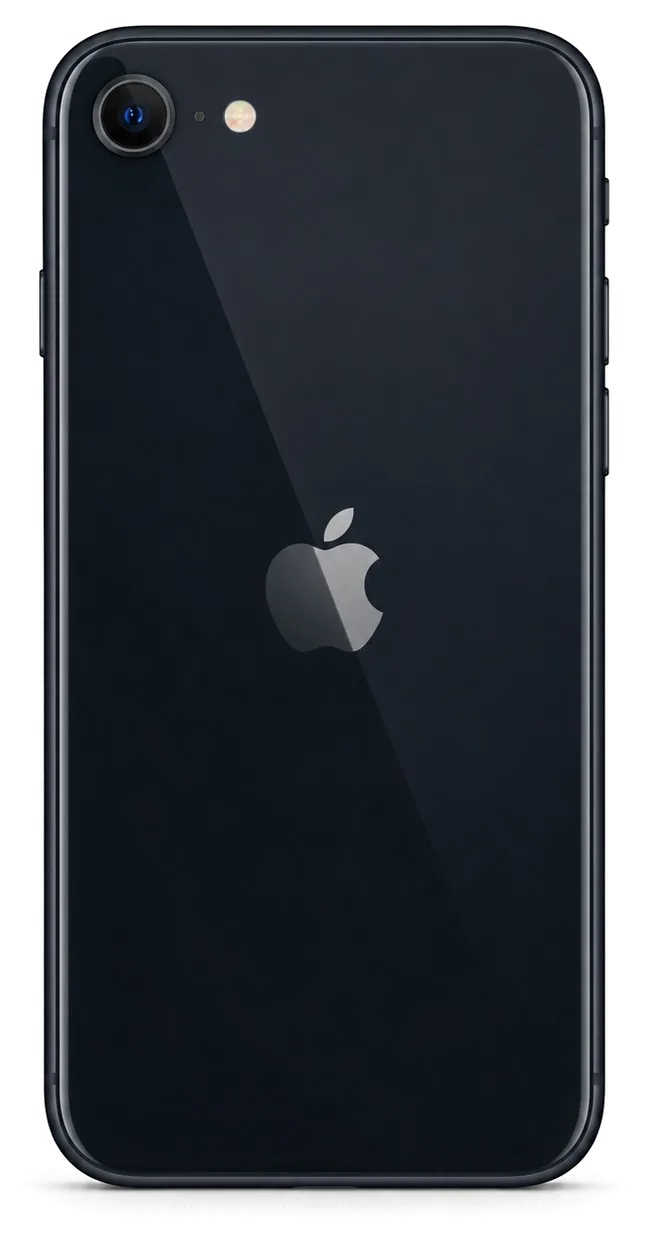
A shattered camera lens on the SE 2 is a 20-minute job, and we replace just the glass ring rather than the whole camera when the sensor itself is intact. The rear panel is aluminium, so it dents and scuffs instead of cracking, while the small window around the optic takes the impact in most drops. We inspect the sensor under magnification to confirm no debris has reached it before we fit new cover glass. A cracked optic left in place lets dust settle on the sensor, and cleaning a dusty sensor later costs more than the swap would have.
Screen Repair for iPhone SE 2
A cracked front panel is the most common reason owners bring this phone to us. Here is when a glass swap alone is enough, when the full display assembly is required, and what happens to True Tone afterwards.
Glass Only or the Whole Display Module
If only the outer glass is cracked and the LCD still shows a clean image with a working touch layer, we can replace the glass alone; if there are dead pixels, lines or a failing touch, the full module goes in. The engineer runs a free 15-minute check in front of you and presses on the surface to see whether the matrix reacts. A glass-only job keeps your original LCD, so the image and colour stay exactly as before the drop. A full swap replaces cover, digitiser and panel together, which is the only route once the touch layer misses taps along one edge. On this model the home button stays with your phone either way, so Touch ID is unaffected by the work itself.
How Long an iPhone SE 2 Screen Repair Takes
An iPhone SE 2 repair of the display takes about 40 minutes, and 72% of our repairs finish while the customer waits in the seating area with coffee and Wi-Fi. The bench time covers opening the phone, moving the home button and front camera across, seating the new module and running the 32-function check. Sending a photo of the damage on WhatsApp gets you a price and a free time slot within five minutes, and the spare is set aside before you arrive. That is why the 40 minutes is bench time, not queue time — walk-ins wait for the next free engineer, booked ones do not.
Will True Tone Survive a New Screen
True Tone keeps working after a swap when the calibration is transferred to the new panel, and on a genuine module we carry that transfer through as part of the job. The setting shifts white balance to match the room light, and it depends on a calibration file tied to the original part, which the programmer copies across during assembly. On some aftermarket panels True Tone cannot be restored at all, so if the warm-to-cool shift matters to you, that is a reason to pick the genuine option — 64% of our customers do. Check it yourself at handover by toggling the switch under a lamp and in shade; if the tint does not move, the engineer can redo the transfer before you leave the counter.
Touch ID and Functions After iPhone SE 2 Repair
The SE 2 unlocks with a Home button that reads your fingerprint, not with Face ID. Here is what happens to that control and to the other functions once the device has been opened and put back together.
Touch ID and the Home Button
Touch ID on the SE 2 sits in the Home button, a separate part from the display module, so a screen swap does not touch it and the fingerprint sensor keeps working. The control connects to the board through its own flex cable and stays paired to that specific unit. If this component itself is damaged, the fingerprint pairing is tied to it, which is why we test the sensor before and after any work here rather than assuming it survived. The scanner is one of the functions engineers check at handover, alongside the cameras and the charging port. Ask for a quick unlock test on the spot — a working fingerprint after reassembly tells you more about the repair than any sticker on the box.
Water Resistance After the Phone Is Opened
The SE 2 carries an IP67 rating from the factory, but once the case is opened that seal is broken, and we re-glue the frame without promising the original water protection. The rating comes from a gasket and adhesive layer around the perimeter, and any prying tool disturbs it. We press the frame back with fresh moisture-resistant adhesive, which restores a basic barrier against splashes and dust, not against a dropped unit in a sink. Even a factory-sealed device loses water resistance with age as the adhesive dries, so treat any liquid contact as a risk regardless of what the spec sheet says. Keep it away from pools and heavy rain after service — that habit matters more than the IP number printed in the manual.
The Unknown Part Message Explained
A "genuine" or "unknown part" notice is an indicator of which component is installed, not a fault, and it does not stop the device from working. The message appears because the unit logs the serial of certain parts, so it tells you what was fitted rather than whether the repair was done well. A screen or battery without a matching serial triggers the note in Settings, while the touch response, brightness and charging behave normally. The notice can show up after a display swap even when the new module performs perfectly, and it stays until the component is paired by a service tool. Read it as a label, not a verdict: judge the repair by how the handset behaves in your hand, not by a line of text in the menu.
Genuine or Aftermarket Parts
The component you choose shapes how the phone behaves afterwards and how long it lasts. Below is how genuine and aftermarket options compare on the SE 2, and how we lock your decision down before work begins.
How the Two Part Types Differ by Function
how part types affect functions| Part | Genuine option | Aftermarket option |
|---|
| Display module | True Tone transfers reliably | True Tone may not restore |
|---|
| Battery | Full health reading | Health reading may vary |
|---|
| Camera glass | Matches original optics | Close optical match |
|---|
| Charging flex | Stable fast charging | Charging speed may differ |
|---|
How We Fix Your Choice on the Receipt
Before any work starts, we write the price, the part type, the turnaround and the warranty on the receipt, and that takes about 2 minutes. The engineer notes whether the unit is genuine or aftermarket, the exact model, and the warranty period up to 1 year, so nothing about the job stays verbal. You sign once both sides agree, and the same document travels with the device through the workshop. About 64% of our customers pick the original option, and the engineer can explain the trade-offs on the spot if you are undecided. A receipt that names the component type protects you later, because a warranty claim can be checked against exactly what was fitted.
Seeing the Part Before It Goes In
We show the new part in its factory packaging before installation, so you can see what is going into your phone rather than taking it on trust. The engineer opens the box in front of you, matches the label to the model, and points out whether it is the genuine or the aftermarket unit you agreed on. For a battery or a display module on the SE 2, this takes a moment and settles most doubts before the screwdriver comes out. Seeing the sealed packaging also lets you confirm the component type matches the receipt, which closes the gap between what was promised and what is fitted.
How the Visit Works and What You Get Back
A repair moves along a short, predictable route: first message, diagnostics, agreed terms, the work itself, then handover. Below is what each step looks like and what you carry out of the workshop.
From WhatsApp Photo to Pickup
- Send a photo: message the damage on WhatsApp and an engineer replies within 5 minutes with a price and a free slot.
- Free diagnostics: the engineer checks the device in front of you for 15 minutes and shows what is broken.
- Fix the terms: price, part type, turnaround and warranty are written on the receipt in about 2 minutes.
- Wait or leave: most jobs finish while you sit in the waiting area, and 72% of repairs are completed on the spot.
- Courier option: if you cannot come in, a courier collects and returns the phone.
- Sending the photo first reserves the spare before you travel, so an iPhone SE 2 repair in Astana becomes bench time rather than a wait for stock.
The 32-Point Check at Handover
After the repair we run a 32-function check of about 10 minutes, and you go through Touch ID, cameras, microphones, speakers, charging and network together with the engineer. The test covers the Home button response, both camera modules, the earpiece and loudspeaker, the Lightning port under load, Wi-Fi and cellular signal, and True Tone on the display. The engineer walks the list with you rather than handing the phone over silently, so nothing is assumed. On a device this compact, a loose display connector or a pinched antenna cable shows up in exactly these checks. Testing with you present means any issue is caught before you leave, not after a second trip back to the workshop.
What Stays in Your Hands
You leave with the device, the receipt, a warranty card covering up to 1 year, and the old component. We are the direct contractor, with our own technicians and workshop rather than a middleman reselling someone else's bench time. The receipt repeats the item you approved, the turnaround and the warranty terms, so the paper matches what was fitted. Payment works by Kaspi, card or cash, whichever suits you at the counter. Keeping the removed piece lets you see exactly what came out, which is a simple way to confirm the swap actually happened. Eleven years in the trade and 46,000+ repairs sit behind that handover routine, and 64% of customers here pick an original unit.
Summary: iPhone SE 2 repair
Five factors decide how an iPhone SE 2 repair ends: what failed, which component goes in, how long the work takes, what the paperwork records, and whether the fingerprint sensor still reads after reassembly.
- Four faults cover most cases: a cracked display, a worn battery, a clogged charging port and shattered camera glass account for the bulk of incoming devices.
- Glass-only replacement: swapping just the cracked layer preserves the original panel when the LCD and digitizer underneath remain intact.
- Fingerprint stays put: the sensor sits inside the Home button, so a display swap leaves unlocking unaffected.
- Genuine versus aftermarket: the two types differ mainly in how reliably True Tone and battery health readings hold up over months of use.
- Paperwork is your protection: a receipt naming the component, the turnaround and the warranty is what you rely on if the device fails later.









 iPad
 MacBook
 iMac
 Mac mini and Studio
 Apple Watch
 AirPods
 Apple Pencil
 Apple TV
 HomePod




