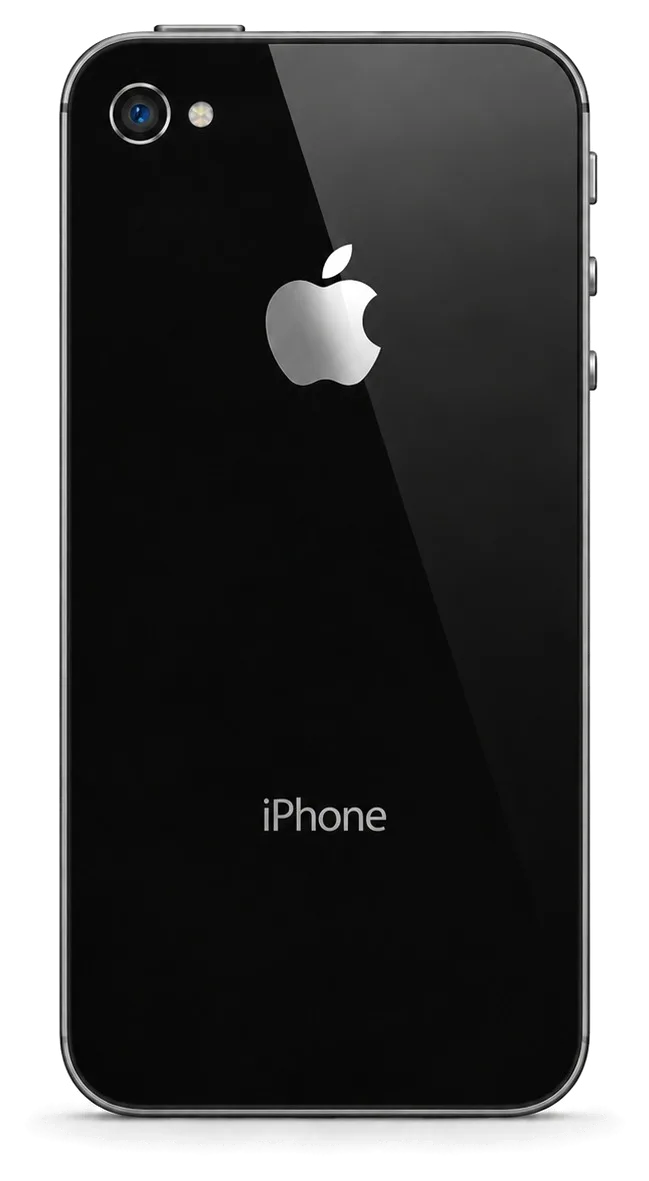
The iPhone 4s carries a 30-pin connector and a physical Home button, two parts that age faster than the rest of the hardware. After years of use the failures are predictable.
Common Breakdowns for This Device
We see the same short list on the iPhone 4s — a worn battery, a tired Home button, a loose 30-pin connector and a cracked screen, in that order of frequency. The battery is the oldest part in the phone and loses capacity simply with age, while the Home button takes thousands of presses and its mechanism softens until it needs a hard push. The 30-pin connector collects dust and bends at the pins, so charging becomes unreliable long before anything on the board fails. Screens crack from drops, and the compact glass front takes the hit first. Because the 4s is compact and old, a single drop often cracks the glass while the LCD underneath still works, so the first question at the bench is whether the display itself survived — that answer decides whether you pay for glass alone or the full module.
What You Notice, the Probable Reason, and Our Approach
How each complaint maps to a cause| Symptom | Probable cause | What we do |
|---|
| Won't charge or charges only at an angle | Dirty or worn 30-pin connector | Clean or replace the connector |
|---|
| Battery dies within hours | Aged battery cells | Replace the battery |
|---|
| Home button needs hard presses | Worn button mechanism | Replace the Home button |
|---|
| Cracked front, image still shows | Broken glass, intact LCD | Replace glass or full module |
|---|
| No sound on calls | Speaker clogged or faulty | Clean or replace the speaker |
|---|
Why an Old iPhone 4s Still Makes Sense to Repair
We repair the iPhone 4s because a single failed part, not the whole phone, is usually what stops it working, and one replacement often brings it back for daily use. A fresh battery restores a full day of standby, a new Home button brings back reliable navigation, and a connector swap ends the ritual of holding the cable at an angle. The display module and the motherboard are the two expensive nodes, and they fail far less often than the wear parts around them. With hardware this aged, the key question is whether a single defect accounts for every symptom; when two or three separate nodes have died together, you hear that from us up front instead of afterwards — such a phone deserves rescue only if the repair stays limited.
Display and Front Panel Work for the iPhone 4s
A cracked iPhone 4s screen is the most common reason people call us. The key decision is whether only the outer layer is broken or the display underneath is damaged too, because that changes the work and the time.
Just the Glass, or a Complete Display Assembly
If the image is clean and the touch works, only the glass is broken and we can replace it alone; if there are lines, dead zones or no image, the module itself needs replacing. On this model the outer layer sits on a separate touch layer above the LCD, so the two parts fail independently. A drop that cracks the surface often leaves the picture intact — you see fracture lines but icons stay sharp and the touchscreen answers every tap. Once liquid gets between the layers or the display takes a direct hit, the LCD shows vertical lines or nothing at all, and the whole assembly comes off. The 4s separates these layers, so a cracked surface with a working picture is a cheaper and faster job than on models where everything is fused. For an iPhone 4s repair in Astana, this distinction decides both the part and the price.
What Changes After a Screen Repair
After each screen job we test touch sensitivity, the front camera, the earpiece and the Home button, and every item is verified together with you prior to your departure. The front assembly on this model carries all four, so a careless swap can leave the camera misaligned, the speaker muffled or the Home key stiff, and none of that shows until the phone is back in your hand. Our engineer runs a finger across the whole touchscreen, takes a test shot with the selfie lens, plays a call through the earpiece and presses the key several times. You test them yourself as well, on the spot. The 4s has no Face ID or True Tone to worry about, so what matters after a display job is the hardware built into the front assembly — touch, lens, earpiece and the key.
How Long a Screen Repair Takes
A screen job runs roughly 40 minutes, and rather than leaving the device most of our clients spend that time in the lounge over coffee and Wi-Fi. That figure covers the full swap of the module, including the transfer of the front camera, earpiece and Home button onto the new assembly and the function check afterwards. We book a free slot from your WhatsApp photo, so the engineer has the right part ready when you arrive and the clock starts at the diagnostic, not at the counter. Since 72% of our repairs are completed while the client waits, a screen job on the 4s realistically means: come in, take the diagnostic, and walk out with the phone on the same visit.
Power, Charging and Battery Issues
Problems with the battery, charging or power rank second among iPhone 4s repairs we take on. Fast dying or refusing to charge usually points to the battery or the 30-pin port, and diagnostics tell them apart.
Cases Where a New Battery Is Required
We replace the iPhone 4s battery when it drains within hours, shuts down at random percentages or swells enough to lift the screen, and the swap takes about 25 minutes. The tell-tale sign is a handset that shows 40 percent one minute and a black screen the next, or a rear case that bulges slightly under a fingertip. A swollen pack is the urgent case: it presses on the display and the frame, so we deal with it before anything else in the device. Our engineers fit the new power unit and then run a charge-and-discharge check to confirm it holds. On hardware this old the pack has usually been through many full cycles, so a sudden drop from a healthy-looking percentage to shutdown is a sign of wear, not a software bug.
Charging Faults and the 30-pin Connector
If the handset refuses to charge, the usual culprits are a worn or grimy 30-pin connector or a cable at the end of its life; we establish which during the free diagnostic before quoting any board-level work. The deep slot gathers pocket lint and oxidises over a decade, so the pins stop making clean contact even when the cable clicks in. The inlet gets cleaned by our technicians, charging is verified using a cable known to work, and the flex is swapped when pins show corrosion. Only when a fresh part and cable still fail do we look at the charging circuit on the mainboard. The inlet on the 4s collects lint and oxidises over the years, so a clean or a swap often restores charging without the logic board ever being touched.
Power Problems That Point to the Board
If the battery and port are fine but the device still won't power on, we move to board-level diagnosis and repair the mainboard under a microscope. Typical symptoms are a handset that heats up near the camera, draws current the moment a charger is connected, or shows nothing on screen while the power source tests good. Our engineers trace the power rail with a microscope and micro-soldering tools rather than swapping parts at random. Logic-board faults on the 4s are the slowest case we handle, so we tell you at the diagnostic that this path takes longer than a battery or screen swap rather than promising a quick fix.
Genuine vs Aftermarket Spares and the Functions Each Keeps
What you fit changes what the phone can do afterwards. Two spare grades are kept in stock, the trade-offs are spelled out in plain language, and your choice is fixed on the receipt prior to the start of work.
Genuine and Aftermarket Spares the Difference
how each spare option affects functions| Part | What you keep | Best for |
|---|
| Original battery | Full runtime, stable charging | Daily use |
|---|
| Aftermarket battery | Shorter runtime, lower cost | Backup phone |
|---|
| Original screen | Full touch response, full brightness | Daily use |
|---|
| Aftermarket screen | Working touch, dimmer panel | Light use |
|---|
Which Functions Survive Each Repair
The iPhone 4s has no Face ID or True Tone, so the functions that matter after service are touch, the Home button, the cameras, the speaker and charging, and all of these keep working when the spare is fitted correctly. There is no fingerprint sensor on this model either, so nothing biometric depends on the Home button and a fresh one breaks no security feature. The 30-pin connector carries charge and data, and a replacement port restores both. The rear camera sits on its own flex, so swapping the camera glass leaves autofocus and the LED flash untouched. Speaker and microphone run through separate contacts, and replacing the dock silences neither. Because the 4s predates the software pairing that later models rely on, a correctly installed unit does not trigger the unknown part message newer handsets display.
What We Fix on the Receipt Before We Start
Prior to starting, the receipt gets the cost, part grade (original or aftermarket), completion time and warranty — roughly two minutes. The engineer shows the new item in factory packaging before installation, so you see exactly what goes into the phone. The warranty runs up to 1 year and covers the fitted piece and the labour on it. If you later notice the panel dimming or the battery draining faster than agreed, the receipt is the document the claim is checked against. Fixing the grade on paper means the choice cannot quietly change mid-repair, so what you agreed at the counter is what gets installed and what the warranty covers.
Your Visit Step by Step from WhatsApp Photo Through to Pickup
Predictability is built into every stage of the visit. You send a picture, we quote and book a slot, the diagnostic and repair happen while you watch, and you check the phone with the engineer before you take it home.
From Photo to Booked Slot
Snap the damaged area on WhatsApp — an engineer gets back to you in 5 minutes flat, quoting cost and an available slot, so the price is clear before you set off. The image tells us enough for most jobs: a cracked front glass, a swollen battery or a shattered camera lens can be quoted straight from the shot, and you pick a window that fits your day. If the picture is unclear we ask for a second angle rather than guess at the problem. Quoting from an image works well for a cracked 4s screen or a dead battery, but a charging issue sometimes needs the in-person diagnostic to separate the connector from the board.
The Free Diagnostic and the Waiting Area
In your presence, the engineer performs a no-charge 15-minute check and points out the faulty component, whether or not you go ahead with the fix; meanwhile you can sit in the lounge, coffee and Wi-Fi provided. Nothing happens behind a closed door: the phone stays on the desk while the trouble is traced, and 72% of jobs are finished while the customer waits. Unlike an aggregator, we work as a direct contractor: our own workshop and in-house technicians, which means the specialist diagnosing your 4s also carries out the repair. That continuity matters on an old board, where a connector that looks fine under a lamp can still be the real cause.
What You Check Together Before Pickup
- Touch and display: tap across the screen and confirm the image is clean.
- Home button: press it and check it responds every time.
- Cameras: open both cameras and take a test shot.
- Speaker and microphone: make a test call and check sound both ways.
- Charging: plug in the 30-pin cable and confirm it charges.
- Paperwork: take the receipt, warranty card and old part with you.
Summary: iPhone 4s repair
Familiar patterns account for most iPhone 4s faults; recognising them helps you decide with confidence prior to handing the device in.
- Common faults: a worn battery, a tired Home button, a loose 30-pin connector or a cracked screen covers most of what this model develops.
- Glass versus display: a cracked front with a clean, working image can often be fixed by replacing the glass alone.
- Part choice: original or aftermarket decides which functions survive, so settle it before work begins.
- Charging faults: usually the connector or the cable, not the board, and a proper diagnostic separates the two.
- At the counter: nothing beats inspecting the phone in person, receipt and replaced component at hand, for a worry-free finish.









 iPad
 MacBook
 iMac
 Mac mini and Studio
 Apple Watch
 AirPods
 Apple Pencil
 Apple TV
 HomePod




