Eng

iPad Pro 13" M4 Repair in Astana

If your iPad Pro 13 M4 is cracked or has stopped charging, iServices specialists will find the cause free of charge and quote the price upfront — no surprises.

iPad Pro 13-inch M4 tablet shown on a plain background
iPad Pro 13" M4 repair
Front camera replacementfrom 33 900 ₸
Button replacementfrom 38 900 ₸
Speaker replacementfrom 20 900 ₸
All services and prices

Which Parts of iPad Pro 13 M4 Fail Most Often

The slim body and dual-layer OLED screen make this model vulnerable to impacts and temperature swings, especially in wintery Astana.

01

Cracks in the glass

The thin glass shatters from a knock against a table edge or a tile floor.

02

Spots on the OLED screen

After a drop, dark or rainbow spots appear — the pixel layer is damaged.

03

Touchscreen not responding

Touches are ignored in places or entirely: the impact damaged the touch layer.

04

Lines in the image

Vertical or horizontal lines run across the picture after the body has been bent.

05

Not charging via USB-C

Dirt builds up inside the connector or it becomes loose, so the cord won't hold.

06

Battery drains fast

The battery is worn out and won't hold a charge even under light use.

07

Face ID not working

After an impact or contact with liquid, the edge sensors stop working.

08

Pencil Pro won't connect

The magnetic connector on the edge won't charge the stylus or recognize it.

09

Magic Keyboard not working

The magnetic connector is dirty or damaged, and the keyboard isn't detected.

10

Shuts down in the cold

Outside, the tablet turns off even with charge — typical for lithium batteries.

11

Condensation inside

After the cold, moisture settles on the screen and in the port, causing glitches.

12

Can't hear the other person

The speaker or microphone sounds quiet after dust or moisture gets in.

Price to Fix iPad Pro 13 M4 in Astana

Cost varies with the defect and the component; the chart lists baseline rates for the key procedures on this device.

ServiceOriginalAftermarket
USB-C port replacement83 900 ₸46 900 ₸
Battery replacement96 900 ₸55 900 ₸
Display replacement273 900 ₸169 900 ₸
Main camera replacement96 900 ₸53 900 ₸
Front camera replacement85 900 ₸47 900 ₸
Button replacement78 900 ₸43 900 ₸
Speaker replacement67 900 ₸37 900 ₸
Microphone replacement73 900 ₸40 900 ₸
Housing replacement202 900 ₸112 900 ₸
Flex cable replacement21 900 ₸15 900 ₸
Other repairsPrice
Logic board repairmicrosoldering · 1–3 days36 900 ₸per job
Liquid damage cleaningcorrosion cleaning · diagnostics up to 2 days13 900 ₸per job
Wi-Fi module repairwireless module · board-level repair21 900 ₸with parts
Firmware flashingsoftware restore, no parts replaced12 900 ₸per job

The technician will give the final quote after diagnostics — it depends on the tablet's condition and the part you choose.

Choosing an Apple Display or Compatible Screen for iPad Pro 13 M4

There are two display module options for this model, and the choice affects brightness, color accuracy and stylus response.

Original Applewarranty up to 1 year
iPad Pro 13" M4 glass and display
iPad Pro 13" M4 glass and display: original part in Apple packaging
Screen
Brightness and colors as from the factory, no difference
Pencil Pro
Familiar stylus response, no lag
Cost
Higher than the alternative
Warranty
One year of coverage on repairs
Aftermarket
iPad Pro 13" M4 glass and display
iPad Pro 13" M4 glass and display: aftermarket part in an antistatic bag
Screen
Good picture, but the tint may differ
Features
Ask the technician about Pencil and Face ID support
Cost
Lower — an option for a limited budget
Warranty
One year of coverage on repairs

iPad Pro 13" M4 service in Astana our approach

The dual-layer OLED display makes repairing an expensive tablet delicate work that requires skill — so trust it to experienced specialists.

11years

Eleven years with Apple devices

Over eleven years of work we have come to know the slim iPad Pro bodies well and know how to safely open laminated screens.

1year

Warranty up to 1 year

Every job comes with a warranty of twelve months or more; the exact term is set by the technician before work begins.

2options

Experienced technicians

Our specialists are experienced and know how to work with fragile OLED modules without damaging neighboring parts.

5min

Choice of part

We'll explain how the original screen differs from the alternative and pick the option that suits your needs and budget.

2cities

Astana and Almaty

We serve you in Astana, and our Almaty service follows the same standards — the same quality and terms.

7days a week

Convenient hours

Weekdays from ten in the morning to seven in the evening, weekends and public holidays from eleven to six: come whenever suits you.

iPad Pro 13" M4 before and after repair

1 / 3
iPad Pro 13 M4 with a retriever puppy wallpaper on a mat, technician's hands on both sides

iPad Pro 13" M4: coloured lines after a drop

The client dropped the tablet on tile — coloured lines appeared across the screen and the touchscreen stopped responding in places. We replaced the display module and checked touch and image across the whole panel — the tablet works properly again.

from 106 900 ₸repair cost
I want the same
iPad Pro 13 M4 tablet on a mat with a technician's hands on both sides, screen shows a father and son in the mountains

iPad Pro 13" M4: battery died by evening

A client from Astana brought in the tablet: the battery would drain to almost zero by evening, even with light use. We replaced the battery and checked the charging — now the device holds its charge properly.

from 41 900 ₸repair cost
I want the same
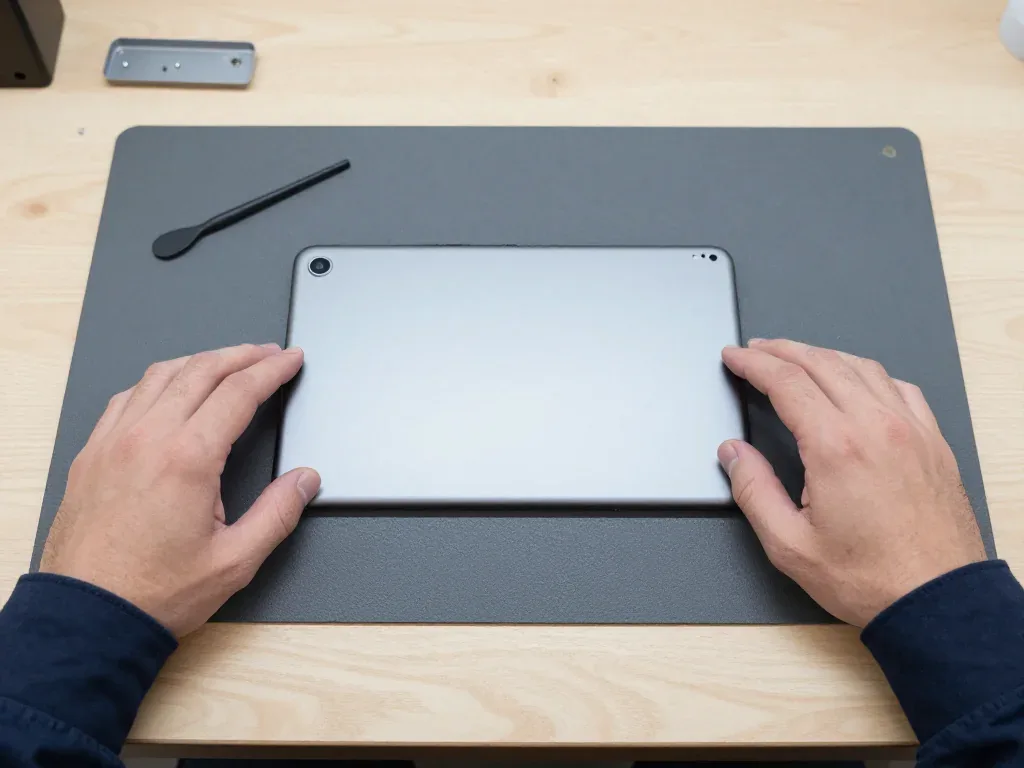
Silver iPad Pro 13 M4 from the back after a housing swap, camera and flash in the corner, technician's hands on both sides

iPad Pro 13" M4: dented corner

The tablet rode in a backpack next to keys and a laptop — the corner got dented and the back cover warped. We moved the internals into a new housing and checked the buttons and screen — everything works as before.

from 81 900 ₸repair cost
I want the same

How iPad Pro 13" M4 repair is done in Astana

Usually the whole journey — from message to pickup — takes less than an hour; complex repairs follow the timeline in the receipt.

Book a repair
  1. Step 1

    Message or call

    5 min

    You send a photo of the damage on WhatsApp — we quote the price and available time. Or you call a courier.

  2. Step 2

    Free diagnostics

    15 min

    An engineer checks the device in front of you and shows what is broken. 0 ₸, even if you decline the repair.

  3. Step 3

    Price in the receipt

    2 min

    We fix the price, the part (original or analog), the timeline and the warranty. You sign — we start.

  4. Step 4

    Repair while you wait

    20–40 min

    Before installation we show you the new part in its factory packaging. You wait in the waiting area with coffee and Wi‑Fi.

  5. Step 5

    Post-repair check

    10 min

    Screen and touch, Face ID or Touch ID, cameras, microphones, speakers, charging, Wi‑Fi. You check together with the engineer.

  6. Step 6

    Pick up your device

    warranty up to 1 year

    Together with the receipt, warranty card and the old part. Payment — Kaspi, card or cash.

Meet the iServices team

Technicians for iPhone, Mac, iPad, Apple Watch and AirPods repair.

1 / 5
BSBakmukhammed S. — on-site iPhone technician, iServices service center in AstanaPhoto: Bakmukhammed S.

Bakmukhammed S.

on-site iPhone technician
13years of experience
4.93rating, 107 reviews
GSGalymzhan S. — iPhone repair technician, iServices service center in AstanaPhoto: Galymzhan S.

Galymzhan S.

iPhone repair technician
8years of experience
4.79rating, 90 reviews
ZSZhandos Sh. — iPhone screen replacement technician, iServices service center in AstanaPhoto: Zhandos Sh.

Zhandos Sh.

iPhone screen replacement technician
6years of experience
4.65rating, 112 reviews
DTDarkhan T. — iPhone firmware technician, iServices service center in AstanaPhoto: Darkhan T.

Darkhan T.

iPhone firmware technician
8years of experience
4.44rating, 19 reviews
KSKudiret S. — iCloud unlock specialist, iServices service center in AstanaPhoto: Kudiret S.

Kudiret S.

iCloud unlock specialist
10years of experience
4.37rating, 100 reviews
Bakmukhammed S., on-site iPhone technician
“If the repair didn’t suit you or you have a complaint, write to me personally.”
Bakmukhammed S.on-site iPhone technician · +7 701 333-47-01

We'll quote iPad Pro 13" M4 repair in Astana from a photo in 5 minutes

Send a photo of the fault — an engineer will reply on WhatsApp, give the price and a time you can come in.

  1. 5 minAn engineer replies and names the price
  2. 0 ₸Diagnostics in front of you in 15 minutes
  3. 30 minMost repairs — while you wait

iPad Pro 13 M4 Repair in Astana by Our Own Technicians

In short

iServices handles iPad Pro 13 M4 repair in Astana as a direct contractor with its own technicians, covering the Ultra Retina XDR tandem OLED module, battery, USB-C port, Face ID and board. Free 15-minute diagnostics in front of you, price and part fixed on the receipt, most jobs done while you wait, warranty up to 1 year.

iServices Editorial TeamWe reply on WhatsApp within 10 minutes
Ask

What Breaks on the iPad Pro 13 M4 and What It Looks Like

On this model almost every complaint comes down to five nodes: the display assembly, the battery, the USB-C port, Face ID and the board. Here is how each announces itself.

Cracks, Lines and Dead Touch on the Tandem OLED Screen

Glass, touch layer and tandem OLED panel are fused into one laminated module on the iPad Pro 13 M4, so a crack or a line makes the whole assembly the repair unit. At the factory this tandem OLED stack is bonded, and separating the outer glass from the panel without destroying the OLED underneath is impossible for any shop. A hairline over the camera, a green vertical band after a corner drop, or a bright spot that grows by the week all lead to the same part. Apple Pencil Pro input usually survives a cracked outer layer but stops registering where the digitizer layer is cut. A display that still shows a picture but ignores touch is not a cheap glass job — the digitizer sits inside the same stack, so budget for the full part and ask for the old assembly back to see what was replaced.

Why the Battery Swells and Pushes the Screen Up

A bloated battery inside this tablet pushes the screen away from the chassis and may fracture the OLED panel from within, so a tablet showing an obvious gap must not be plugged in or squeezed shut. The cell is bonded to the aluminium body, and while it releases gas it swells toward the weakest side — the front glass. Users typically report a rapid fall from 40% to nothing or unexpected power-offs under demand. Warmth speeds this up: leaving a swelling battery on the charger overnight is the worst possible mix. The battery sits glued beneath the internal assembly, so the display must be lifted to get at it — that is why a swollen cell is an urgent two-stage repair rather than something to postpone until the device dies.

Charging, Face ID and Board Symptoms Worth Checking Early

  • USB-C port wear: a loose cable, charging only at an angle or not at all points to the port or its flex.
  • Face ID dropout: an unavailable Face ID message after a drop or a screen swap means the TrueDepth module or its board pairing is affected.
  • Spontaneous power-offs and warmth: a hot area close to the upper bezel during mild use often points to the power management chip.
  • No network or weak signal: a dropped Wi-Fi or cellular antenna connector after a fall shows as greyed-out toggles in Settings.
  • Board-level faults: liquid contact and dead-on-arrival units need bench work under a microscope before any part is ordered.

Screen Module Repair on the iPad Pro 13 M4

The display is the most expensive and most discussed part on this tablet. Here is why the top layer is never swapped alone, and what happens to Face ID and the Pencil after a fresh panel goes on.

Glass-Only Replacement and Why It Does Not Apply Here

Older iPads allowed a glass-only swap because their digitizer peels away separately, yet the iPad Pro 13 M4 uses a fully fused tandem OLED sandwich in which the cover, touch grid and matrix are glued as one unit, so the whole assembly comes out and a fresh one goes in. No such shortcut applies here: the touch grid occupies the same layers as the panel, and the adhesive reaches the aluminium chassis. Attempting to separate those surfaces on a fused stack typically ruins both the matrix and the touch grid — which is exactly why an oddly low quote for just the top layer on this tablet should raise suspicion instead of optimism about saving money.

What Happens to Face ID and Apple Pencil After a Screen Swap

We transfer the TrueDepth block and its flex from the old unit to the new one, so biometric unlock keeps working, and we test Apple Pencil Pro hover and pressure on the fresh panel before handover. The tablet has no Home button, so authentication depends entirely on that sensor and its alignment inside the cutout. A misplaced flex or a pinched cable shows up as a failed enrolment during the check. The sensor is paired to the logic board rather than to the cover sheet, so if a workshop offers a new biometric unit instead of a transfer, it will not authenticate — ask which component is being moved over before you agree to the job.

Original Module or Aftermarket and What Each One Gives You

Two screen choices compared by origin and output
OptionWhat it isColour and brightnessWarranty
Original partFactory tandem OLED assemblyMatches factory calibrationUp to 1 year
Aftermarket partTested third-party OLEDClose, may differ in HDR peaks6 months
Fit and finishBoth, checked on the frameOriginal sits flush by defaultUp to 1 year original, 6 months aftermarket

Our Workflow for iPad Pro 13 M4 Repair in Astana

Our workflow keeps nothing hidden — starting with a picture sent over WhatsApp and ending with a joint test of the device alongside the technician. Here is what that involves day to day.

From a Messenger Snapshot to a Signed Work Order

WhatsApp us a photo of the fault and within 5 minutes an engineer sends back a price estimate and a confirmed appointment. At the branch, diagnostics run 15 minutes in front of you, and the cost, part, timeline and warranty are fixed in the documents in about 2 minutes. This intake applies to every iPad Pro 13 M4 repair in Astana, whether the issue is a shattered OLED, a swollen battery or a charging defect. Payment options include Kaspi, bank card or cash. That signed form is where the estimate becomes binding: once the part and timeline are recorded, the scope cannot quietly expand, so read those four lines before you hand over the tablet.

The New Part in Factory Packaging and the Old Part Back

Before fitting, we present the replacement module or battery in the manufacturer's sealed box, and the device is returned together with the warranty certificate and the old component, so you can verify precisely what was removed. The guarantee lasts up to 1 year, and whether the part is original or third-party is recorded on the handover paperwork before any work begins. Original components are picked by 64% of clients, and that decision remains theirs once the pros and cons are laid out. Hold on to the old module until the new screen has been inspected in daylight: a complaint about colour or brightness is much simpler to settle while the replaced part is still with you.

The 32-Point Inspection That You and the Technician Run Together

  • Face ID: unlock the tablet several times at different angles and confirm the sensor still recognises you.
  • True Tone: open a white page and watch the tint shift between daylight and indoor light.
  • Cameras: shoot with the front and rear lens, checking focus, colour and flash.
  • Microphones and speakers: record a voice note, play it back and listen for distortion.
  • Charging and network: plug in the adapter, watch the charge indicator and confirm Wi-Fi connects.
  • Apple Pencil Pro and Magic Keyboard: attach both and test hover, pressure and the magnetic connector.

How Long Does iPad Pro 13 M4 Repair Take and What Shapes the Schedule

Duration is set by the component that failed, not by the model overall. Here is the time each kind of repair requires and why liquid damage and board-level faults disrupt the normal schedule.

Most Jobs Finish While You Wait

Most iPad Pro 13 M4 repairs run between 1 hour and 1 day, and 72% are finished while the client waits in the lounge with coffee and Wi-Fi. A battery replacement ranks among the quicker bench tasks, whereas a display module sits at the slower end since the adhesive needs curing and the TrueDepth unit must be reseated by hand. The engineer starts within the free slot reserved over WhatsApp, so timing begins when you arrive. A module swap is the job most likely to exceed an hour — set aside a half-day if the screen is at fault, and drop the tablet off in the morning so curing does not run past closing time.

Board Work Under the Microscope and the 1 to 3 Day Window

Board-level faults on this device are repaired under a microscope and take 1 to 3 days, because the work is component-level and each stage is tested before the next one starts. A dropped tablet that loses Wi-Fi, overheats near the camera bar or refuses to charge often carries a cracked solder joint on the power controller rather than a dead chip, and finding it means probing the circuitry at high magnification with a soldering station at hand. We test each stage of the board work before the next one starts, so you can see what changed. If the joint cannot be reflowed cleanly, the engineer replaces the component itself and re-tests the chain before closing the unit.

After Water Contact Diagnostics Can Take Up to Two Days

Following liquid exposure, diagnostics on the iPad Pro 13 M4 may stretch to two days, since corrosion beneath the shields only shows after cleaning and a controlled power-up. Moisture reaches the battery connector and power controller well before the glass, and the residue keeps corroding traces after the surface feels dry. We clean the circuitry, then monitor current draw on a bench supply for a short that appears only under load. Never charge a wet tablet and never dry it with heat — the tandem OLED and battery sit right under the module, and warmth pushes moisture deeper into the board before anyone has inspected it.

Preparing the iPad Pro 13 M4 for Repair and Choosing the Correct Part

Certain preparations happen before your arrival. A fresh backup, a password for the Apple ID you know and Find My iPad disabled save time at the desk, and picking the right battery determines how long the repair holds up.

Back Up, Know Your Apple ID and Turn Off Find My iPad

  • Save a copy first: create an iCloud or desktop backup on the day of your appointment, so recent notes, pictures and app data survive a module replacement.
  • Know the Apple ID password: without it the unit cannot be released from the account, and activation after service stalls.
  • Turn off Find My iPad: open Settings, tap your name, then Find My, and switch the toggle off before handing the device over.
  • Update iPadOS: install the pending update so the engineer tests the repaired unit on the same software you use daily.

Battery Choice and When a Replacement Is Worth It

We fit either an original battery, covered up to 1 year, or a tested aftermarket one, covered for 6 months, and 64% of customers choose an original part. Capacity, charge cycles and swelling behaviour differ between the two options: the original component holds its rated capacity longer under heavy Pencil and keyboard use, while a quality aftermarket unit suits a device kept mostly at home. Swelling is the decisive symptom — a pack that pushes the glass up needs replacing regardless of the option you pick. On hardware this recent the battery is rarely worn out by age, so if it drains fast, ask for a charging-circuit check first, because a tired USB-C port can mimic a failing cell.

When Repair Makes Sense and When It Does Not

Repair makes sense when one node has failed and the rest of the tablet is healthy, and it makes less sense when a board fault, a swollen battery and a cracked module arrive together on an old device. A single module swap on a working board returns the unit to full function for years of iPadOS updates, while a chain of linked faults raises the bill and the risk of a second failure. Ask the engineer to list every fault found during diagnostics, not just the one you came in for — a second hidden issue changes the decision more than the first one does.

Summary: iPad Pro 13" M4 Repair

These points decide how a repair on this model turns out — from the type of display assembly to Face ID pairing and realistic turnaround.

  • Display assembly: the iPad Pro 13 M4 uses a single fused tandem OLED unit, so glass-only service is not possible and the whole component must be swapped.
  • Swollen battery: a cell that lifts the panel from inside is an urgent case, not a wait-and-see item, since the pressure keeps stressing the front glass.
  • Face ID pairing: since the sensor is matched to the motherboard, it gets moved over from the original part when replacing rather than installed fresh.
  • Turnaround: most jobs run between 1 hour and 1 day, board-level work takes 1 to 3 days, and liquid diagnostics may extend to two days.


Frequent Questions on Fixing iPad Pro 13 M4

Did not find an answer? Message us on WhatsApp: an engineer replies, not a bot.

Ask a question
Is it possible to change only the glass on iPad Pro 13 M4?

No: in this model the screen, glass and digitizer form one fused unit. When damaged, the entire module is swapped out — otherwise touch input and display output will fail.

Why does iPad Pro 13 M4 stay off after being dropped?

The impact may have damaged the display flex cable, the battery or the power controller. Diagnostics will show the exact cause: sometimes reconnecting the cable is enough, but sometimes a component needs replacing.

Will I lose data if the display or battery is replaced?

Such procedures normally leave your files intact. Still, we advise backing up beforehand, particularly when the tablet boots inconsistently.

iPad Pro 13 M4 got wet in the rain — what now?

Turn it off immediately and don't charge it. Bring it in for diagnostics as soon as possible: moisture inside causes corrosion, and delay can increase the repair cost.

Will a screen from the iPad Pro 12.9 fit the 13 M4 model?

No, the 13-inch M4 model has a different size, mounting and type of OLED panel. Installing an unsuitable module will leave the touchscreen and Face ID non-functional.

How much time does swapping the battery in iPad Pro 13 M4 require?

The job usually takes a few hours, but the exact time depends on the service workload and part availability. The technician will give an estimate after diagnostics.

iPad Pro 13" M4 repair reviews from Astana customers

1 / 10
4.9

iServices network rating on Google Maps, wikicity and our website · 2 028 reviews
Google Maps4.438 reviews ›wikicity5.015 reviews ›Reviews on the iServices website4.91 975 reviews ›
ЕХ
Еділ Х.Order No. ISV‑•••76 · 28 October 2026
iPad Pro 13″ (M4)

Позвонил насчёт iPad Pro 13" M4. Проблема — не работает тач. Работает, как будто и не ломалось.

iServices customer review, in Russian
РЮ
Роза Ю.Order No. ЗК‑IS‑•••13 · 15 July 2026
iPad Pro 13″ (M4) · screen

Было важно, чтобы сделали до конца недели. Проблема — треснул экран. После ремонта — как новое.

iServices customer review, in Russian
АЩ
Анель Щ.Order No. IS‑•••34 · 22 May 2026
iPad Pro 13″ (M4) · screen

Проблема — не работает тач. Всё чётко, без сюрпризов. Экран яркий, батарея держит.

iServices customer review, in Russian
ЛЭ
Лев Э.Order No. IS‑•••61 · 22 March 2026
iPad Pro 13″ (M4)

Астанада тұрамын, қаланың арғы жағына бару ыңғайсыз болды. Алдымен интернеттен қарадым, кейін осында келдім. Кепілдік берді, бұл маңызды. Жұмысты сол күні аяқтады. Ескі бөлшекті көрсетіп, қайтарып берді. Диагностика тегін болды. Бағаны алдын ала айтты, соңында өзгермеді. Екі күннен кейін өзі қоңырау шалды. Барлығы ресми, чек берді. Жақсы сервис.

iServices customer review, in Kazakh
АИ
Асыл И.Order No. IS‑•••70 · 27 January 2026
iPad Pro 13″ (M4)

Проблема — не держит заряд. Ғалымжан С. — мастер от бога, если можно так сказать. Всё чётко, без сюрпризов.

iServices customer review, in Russian
МЮ
Медет Ю.Order No. ISV‑•••00 · 20 November 2025
iPad Pro 13″ (M4) · battery

Живу в Есиле, искал поближе к дому. Обратился по поводу iPad Pro 13" M4. Проблема — не заряжается. Ғалымжан С. пообещал и сделал, без напоминаний. Всё оформили по договору, с печатью. Вскрытие показало: аккумулятор. Советую. Ни разу не пожалел.

iServices customer review, in Russian
РП
Рахим П.Order No. IS‑•••24 · 20 August 2025
iPad Pro 13″ (M4) · charging

Проблема — не заряжается. Ғалымжан С. объяснял без умных слов, за это спасибо. Работает, даже лучше прежнего.

iServices customer review, in Russian
ЖТ
Жанболат Т.Order No. ЗК‑IS‑•••95 · 29 June 2025
iPad Pro 13″ (M4) · screen

Думал, проще новое купить. Проблема — треснул экран. Приняли без записи, оформили за пять минут. Вытащили и показали: аккумулятор. В 33 500 уложился, как и обещали. Пришлось самому напомнить о себе. Рекомендую без оговорок. Работает, даже лучше прежнего.

iServices customer review, in Russian
АС
Азалия С.Order No. IS•••07 · 25 May 2025
iPad Pro 13″ (M4)

Расстроилась, если честно. Проблема — не работает тач. Приняли вечером, хотя до закрытия было минут десять. Вскрытие показало: шлейф. Работает, как будто и не ломалось.

iServices customer review, in Russian
МТ
Максим Т.Order No. IS•••73 · 26 February 2025
iPad Pro 13″ (M4) · charging

Проблема — не заряжается. Всё чётко, без сюрпризов. Работает, как будто и не ломалось.

iServices customer review, in Russian
Showing 10 of 14

Where to get iPad Pro 13" M4 repair in Astana

Address
Astana, Kabanbay Batyr Ave., 7/2
Opening hours
Mon–Fri 10:00–19:00Sat–Sun 11:00–18:00
Phone and messengers
+7 727 339-99-12WhatsApp: +7 701 333-47-01
Directions map: iServices Astana© OpenStreetMapFind us on the maps: Google Maps · 2GIS