Eng

iPad 3 Battery Replacement in Astana

iPad 3 drains in an hour and heats up — we'll fit a new battery in a couple of hours, test it with you and give a warranty up to 1 year.

iPad 3 tablet shown with its screen lit up
Price incl. labor
from 17 900 ₸
Warranty
6 months
  • Power check
  • Screen removal
  • Taking out the old cell

How an iPad 3 tells you the battery is spent

A tablet that empties in a couple of hours, dies with charge left or never finishes charging: this is how a worn battery signals.

Empty within hours

The charge melts away even while reading, and the percentage drops in jumps rather than a smooth slide.

Shuts down with charge left

The tablet dies at twenty or thirty percent, then starts up on the charger as if nothing happened.

Never seems to charge

Plugged in, the iPad 3 gains almost nothing, and sometimes even loses charge while you use it.

The body bulges

The glass lifts at an edge or the back shows a bump: the battery has swollen, and that is dangerous.

How much iPad 3 battery replacement costs in Astana

The figure below is a guide for the iPad 3; the final sum depends on whether you pick an original or an aftermarket battery.

ServiceOriginalAftermarket
Battery replacement30 900 ₸17 900 ₸
Charging port replacement24 900 ₸13 900 ₸
Display replacement44 900 ₸27 900 ₸
Display glass replacement24 900 ₸13 900 ₸
Main camera replacement24 900 ₸13 900 ₸
Front camera replacement60 900 ₸33 900 ₸
Home button replacement24 900 ₸13 900 ₸
Button replacement28 900 ₸15 900 ₸
Speaker replacement24 900 ₸13 900 ₸
Microphone replacement24 900 ₸13 900 ₸
Housing replacement49 900 ₸27 900 ₸
Flex cable replacement23 900 ₸17 900 ₸
Other repairsPrice
Water damage cleaningcorrosion cleaning · diagnostics up to 2 days13 900 ₸per job
Logic board repairmicrosoldering · 1–3 days33 900 ₸per job
Wi-Fi module repairwireless module · board-level repair20 900 ₸with parts
Firmware flashingsoftware restore, no parts replaced8 900 ₸per job

The technician confirms the exact cost after inspection, since the state of the case and contacts can reveal hidden issues.

How the battery job goes

The battery job is done carefully and in order, from the power check to a test charge, and these are its stages.

iPad 3 battery replacement
from17 900 ₸
You collect a tablet that holds its charge again and is neatly put back together.
Price for my model
  1. Step 1

    Power check

    We check whether the battery is at fault or the port, power circuit or background tasks are draining it.

  2. Step 2

    Screen removal

    The adhesive is warmed and the glass and LCD lifted away together without flexing, so the cables stay safe.

  3. Step 3

    Taking out the old cell

    The big battery is glued in, so it is separated slowly and never pierced, especially if it has swollen.

  4. Step 4

    Fitting the new one

    The new cell is seated, its connector attached, and we make sure no cable is pinched underneath.

  5. Step 5

    Bonding and closing

    The screen returns to a fresh adhesive line and we confirm the frame lies flat with no twist.

  6. Step 6

    Charging test

    We plug in a cable and watch the tablet recognise power and begin charging as it should.

Which cell to choose for iPad 3 battery replacement

The choice decides how well the new cell copes with load and how closely it matches the space inside.

Original Applewarranty up to 1 year
iPad 344 900 ₸
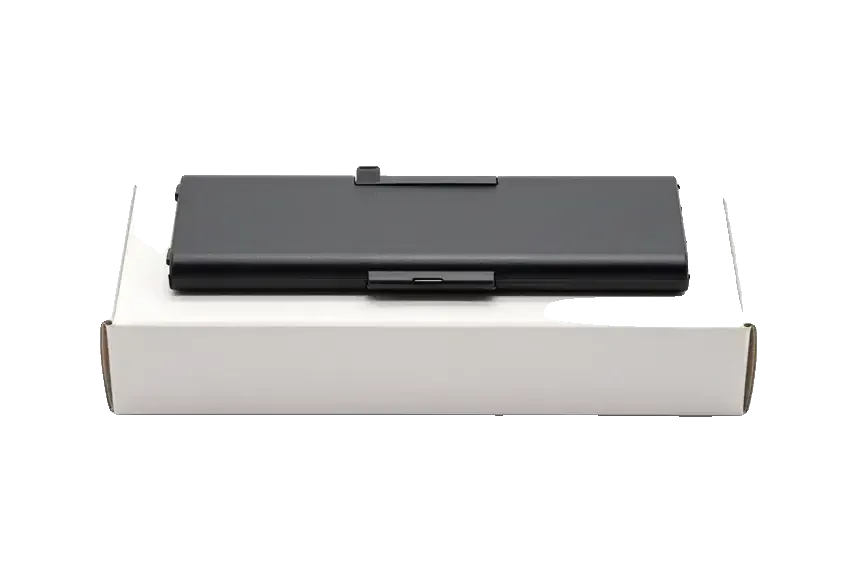
Original: an iPad battery on a white box
Capacity
Sized for the model's normal use
Size
Matches the bay exactly
Who it suits
A tablet you rely on for years
Availability
Ask the technician before visiting
Chosen by 64% of clients
Book with an original part
Aftermarketwarranty 6 months
iPad 327 900 ₸−38%
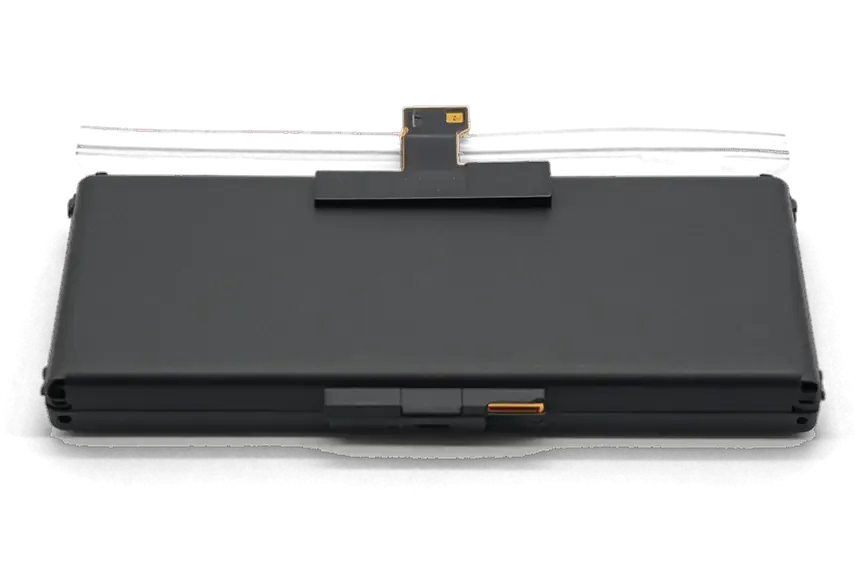
Analog: an iPad battery in an antistatic bag
Capacity
Works, though it may hold a little less
Size
Sometimes needs a bit of adjusting
Who it suits
A household or kids' tablet
Budget
Costs less than an original
Chosen by 36% of clients
Book with an aftermarket part

Why leave your iPad 3 battery with us

A swollen cell must never be yanked out blindly, and below is how we treat such a tablet in Astana.

11years

11 years of practice

We have worked on Apple devices for eleven years, so a third-generation tablet is familiar, from its adhesive to its cable layout.

1year

Warranty up to 1 year

A battery swap comes with a warranty up to 1 year: if odd behaviour traces back to our work, we put it right.

6technicians

Care with swollen cells

A puffed battery must never be bent or pierced. Our experienced technicians know how to lift it out safely.

2options

A frank verdict

If the drain comes from something other than the battery, we say so rather than sell you a part you do not need.

5min

Options to choose from

We show the original and the aftermarket cell, explain the difference and let you decide without pressure.

7days a week

Open in Astana

In Astana we work Mon–Fri 10:00–19:00, and on weekends and public holidays 11:00–18:00.

iPad 3 before and after repair

1 / 1
Gray iPad 3 on a mat, charging cable connected at the bottom, technician's hands on both sides, night city wallpaper on screen

iPad 3: battery drained in a couple of hours

A customer brought in an iPad 3 — the battery was draining before his eyes, especially during games. We replaced the battery and checked the charging: now the device holds its charge properly.

from 17 900 ₸repair cost
I want the same

How iPad 3 battery replacement is done in Astana

Usually the whole journey — from message to pickup — takes less than an hour; complex repairs follow the timeline in the receipt.

Book a repair
  1. Step 1

    Message or call

    5 min

    You send a photo of the damage on WhatsApp — we quote the price and available time. Or you call a courier.

  2. Step 2

    Free diagnostics

    15 min

    An engineer checks the device in front of you and shows what is broken. 0 ₸, even if you decline the repair.

  3. Step 3

    Price in the receipt

    2 min

    We fix the price, the part (original or analog), the timeline and the warranty. You sign — we start.

  4. Step 4

    Repair while you wait

    20–40 min

    Before installation we show you the new part in its factory packaging. You wait in the waiting area with coffee and Wi‑Fi.

  5. Step 5

    Post-repair check

    10 min

    Screen and touch, Face ID or Touch ID, cameras, microphones, speakers, charging, Wi‑Fi. You check together with the engineer.

  6. Step 6

    Pick up your device

    warranty up to 1 year

    Together with the receipt, warranty card and the old part. Payment — Kaspi, card or cash.

Meet the iServices team

Technicians for iPhone, Mac, iPad, Apple Watch and AirPods repair.

1 / 5
BSBakmukhammed S. — on-site iPhone technician, iServices service center in AstanaPhoto: Bakmukhammed S.

Bakmukhammed S.

on-site iPhone technician
13years of experience
4.93rating, 107 reviews
GSGalymzhan S. — iPhone repair technician, iServices service center in AstanaPhoto: Galymzhan S.

Galymzhan S.

iPhone repair technician
8years of experience
4.79rating, 90 reviews
ZSZhandos Sh. — iPhone screen replacement technician, iServices service center in AstanaPhoto: Zhandos Sh.

Zhandos Sh.

iPhone screen replacement technician
6years of experience
4.65rating, 112 reviews
DTDarkhan T. — iPhone firmware technician, iServices service center in AstanaPhoto: Darkhan T.

Darkhan T.

iPhone firmware technician
8years of experience
4.44rating, 19 reviews
KSKudiret S. — iCloud unlock specialist, iServices service center in AstanaPhoto: Kudiret S.

Kudiret S.

iCloud unlock specialist
10years of experience
4.37rating, 100 reviews
Bakmukhammed S., on-site iPhone technician
“If the repair didn’t suit you or you have a complaint, write to me personally.”
Bakmukhammed S.on-site iPhone technician · +7 701 333-47-01

We'll quote iPad 3 battery replacement in Astana from a photo in 5 minutes

Send a photo of the screen and the iPad model. An engineer will reply on WhatsApp, give the price and today's available time.

  1. 5 minAn engineer replies and names the price
  2. 0 ₸Diagnostics in front of you in 15 minutes
  3. 30 minMost repairs — while you wait

iPad 3 Battery Replacement in Astana with a Retina-Ready Cell

In short

For an iPad 3 battery replacement in Astana, iServices lifts the glued front glass, swaps the large Retina-era cell for an original or aftermarket part, and returns the tablet the same day. Expect 1 hour to 1 day and a warranty up to 1 year.

iServices Editorial TeamWe reply on WhatsApp within 10 minutes
Ask

Why Your iPad 3 Battery Replacement Wears Out Faster Than You Expect

The iPad 3 carries the largest battery of the early models, so its wear shows up differently — as sharp percentage drops and shutdowns rather than a slow, even decline.

Signs the Cell Is Tired Even Without a Battery Health Menu

  • Sudden percentage drops: the indicator falls from 40 % to 10 % in minutes while idle.
  • Shutdowns at partial charge: the screen goes black at 20–30 %, then the unit boots after a minute on the charger.
  • Slow top-up: a full charge that once took a couple of hours now crawls through an evening.
  • Heat under the lower edge: the aluminium near the dock connector warms up during ordinary browsing, not just gaming.
  • Cold-weather collapse: a short walk outside drains a worn pack several times faster than a healthy one.

When the Fault Is the Port or the Charging Board Rather Than the Battery

We check the 30-pin port, the cable and the charging board before quoting a battery, because a dead port mimics a dead battery almost perfectly. Free diagnostics take 15 minutes: an engineer opens the connector, inspects the pins for corrosion and lint, tests the adapter with a meter and reads the charging current on the board. No charge icon at all usually points to the port or power controller, while slow charging that holds some power is more often the pack itself. Eleven years of work and 46,000+ repairs have taught our technicians that the two faults look identical on screen. Bring the cable and adapter you use daily — a failing third-party charger is the cheapest cause to rule out first.

How We Reach the iPad 3 Battery Replacement Under the Glued Glass

The power pack is bonded beneath the display, so the only route in runs through the front glass — that fact drives the main risk and sets it apart from an iPhone.

Why the Front Glass Has to Come Off First

On the iPad 3 the lithium-polymer cell sits beneath the LCD and the touch layer, both bonded to the aluminium frame, so the front sheet is heated and lifted before the battery is visible. The same layout runs through the iPad 2 and iPad 4, which also need a glass lift for any battery swap. We warm the assembly on a heating mat to soften the frame glue, then slide thin plastic tools under the edge and work around the perimeter. The glass on these models is thin and brittle with age, so a slow, even warm-up matters more than force — a cracked sheet turns a battery job into a glass-and-battery job.

The Steps We Follow Once the Tablet Is Open

  • Disconnect the pack: unclip the battery flex from the logic board first, so no live current reaches tools.
  • Soften the strips: the glue under the pouch gets a controlled warm-up until it releases without tearing foil.
  • Lift the pouch: plastic levers slide underneath and raise the pack evenly, never prying one corner.
  • Seat the replacement: the new unit goes onto fresh strips, pressed flat against the tray.
  • Re-bond the glass: refit the front sheet, press edges down and let frame glue set.

Original or Aftermarket Cell for Your iPad 3 Battery Replacement

For the iPad 3 you can have a factory battery or a quality compatible one, and the choice affects cycle life, how linear the charge indicator reads, and the warranty.

How the Two Options Differ in Practice

Two battery types by fit and lifespan
Battery typeCapacity matchIndicator accuracyTypical cycle life
Factory cellMeets factory specMatches the systemLongest
Compatible cellClose to specSlightly less linearShorter
Warranty coverageUp to 1 yearUp to 1 yearUp to 1 year

Which One Most Owners Pick

Across our workshop 64% of customers choose a factory part, and on a tablet kept for daily use that is usually the sensible pick. We show the new battery in factory packaging before installation, so you see exactly which unit goes into your device. The remaining 36% take the compatible route, often on a second tablet used mainly for streaming or games. Both choices carry the same warranty up to 1 year, and both are fixed on the receipt before we open the glass. A factory battery holds its capacity curve longer under heavy daily charging, while a compatible unit saves money upfront. If the device is a spare one for kids or video, the cheaper route often makes more sense, since the saving matters more than the last few percent of capacity.

What the Service Visit Looks Like From Photo to Pickup

A battery job on the iPad 3 starts with a photo on WhatsApp and ends with a function check beside the engineer — usually within a single visit.

From a WhatsApp Photo to a Fixed Receipt

  • Photo first: send a damage picture on WhatsApp; get a reply in 5 minutes with price and a free slot.
  • Terms on paper: price, part, turnaround and warranty are fixed on the receipt in 2 minutes.
  • Backup at home: copy your data and note the passcode; a backup removes the worry.
  • Factory packaging: the new cell is shown sealed in its box before the tablet is opened.
  • Waiting area: coffee and Wi-Fi are there if you stay, and the warranty card leaves with you.

How Long the Job Actually Takes

A battery replacement runs from 1 hour to 1 day depending on the glass and the adhesive, and 72% of our repairs finish while the customer waits in the waiting area. The battery itself is a 25-minute portion; the front panel stretches the clock, because it is glued down and has to be warmed on a heating platform before it lifts. A clean, previously unopened screen comes away quickly, while an aged one with cracked edges needs slower warming and adds time. The glued glass, not the power source, sets the pace — ask at intake how the seal looks, and that answer tells you more about pickup time than a general estimate. If you are planning an iPad 3 battery replacement in Astana, the same photo on WhatsApp is enough to start.

The 32-Point Check Before Handover

  • Charging: we plug in the device and you watch the percentage climb; a healthy battery gains within a minute.
  • Network and radios: Wi-Fi and cellular are toggled to confirm antennas connect after the panel was reseated.
  • Cameras and microphones: both lenses and the mic are tested with a live shot and short recording.
  • Speakers and touch: sound plays at full volume and every part of the digitizer is traced by finger.
  • Handover: you leave with the receipt, warranty card and old battery.

Swelling, Heat and the Old-Tablet Question

A swollen battery and the question of whether repair is worth it are decided before any work begins, and both need an honest answer rather than an automatic swap.

A Lifted Screen Means You Should Stop Charging Now

  • Power down at once: if the front glass rises above the frame, the battery is almost certainly swelling.
  • Leave the charger alone: charging a swollen pouch adds pressure and heat, so unplug it.
  • Do not press the glass back: squeezing the lifted corner forces the pouch against the LCD and can crack the panel.
  • Store it flat and cool: keep it on a hard surface away from sunlight and bring it in soon.
  • Watch for heat and smell: a warm frame or sweet chemical odour means the pouch is venting; do not wait.

Whether a New Battery Is Worth It on an iPad 3 Today

For a device used as a kids' reader or video screen, a fresh battery gives the iPad 3 a genuine second life, while a unit failing elsewhere may not justify the work. The swap does not erase data — photos, apps and accounts stay exactly where they were, since only the battery is changed. Judge by what else functions: if the screen, Wi-Fi and charging port are sound, the battery is the only weak link and replacement pays off. If several parts are failing at once, weigh the whole device against what you actually use it for. An old tablet brought in for a battery is often still used daily for video and reading.

Caring for the New Cell After the Swap

A new iPad 3 battery needs no special calibration — run two or three full cycles and the indicator settles. Heat is the real enemy: leaving the device on a dashboard in summer sun or under a pillow while charging ages the cell faster than ordinary use. Leaving it flat for months kills a stored battery, so top it to roughly half every few months. A spare tablet in a drawer should be charged to about half and checked every two or three months, because a pouch that sits empty loses capacity for good. Avoid fast third-party chargers overnight, since high-current topping-up adds heat the old frame cannot shed. The old part is handed back with the receipt.

Summary: iPad 3 Battery Replacement

A worn battery in this unit rarely announces itself through a menu — the hardware tells you instead. Here is what the work comes down to, in five points.

  • The panel sets the pace: the iPad 3 hides its battery under glued glass, so opening the front assembly defines the risk and time.
  • Sudden drops and shutdowns at 20–30 % point to a tired battery; no charge usually means a port or board fault.
  • Original and aftermarket cells differ mainly in cycle life and charge tracking honesty, not whether the unit runs.
  • A lifted screen means a swollen battery — power down and stop charging first.
  • On a sound old unit a fresh cell is a genuine second life; with several failing parts, weigh the whole device.


Frequent questions about iPad 3 battery replacement

Did not find an answer? Message us on WhatsApp: an engineer replies, not a bot.

Ask a question
Why does the iPad 3 take so long to charge even with a new battery?

The iPad 3 has an unusually large battery for its time, so it fills slowly, and a small phone adapter can barely keep up. Use a full-size tablet adapter and a sound cable, and do not judge the new cell by the charging time alone.

Will my iPad 3 run cooler after the battery is replaced?

A little, if the old cell was worn: a tired battery heats up under load and adds to the warmth from the processor. Some warmth on the back of the iPad 3 is normal for this model even with a fresh battery.

Why does my iPad 3 switch off while the screen still shows charge left?

A worn cell cannot hold its voltage when the tablet asks for power, so the system cuts out early. That is a classic sign the iPad 3 battery is spent, and a new one removes these sudden shutdowns.

Can a swollen battery crack the iPad 3 screen?

Yes, a swelling cell pushes the display up from the inside, and the glass may lift at the edge or crack. If you see a gap between the glass and the frame of your iPad 3, stop charging it and bring it in.

How should I store an iPad 3 with a new battery if I rarely use it?

Leave it at about half charge rather than full or empty, and top it up every few months. A cell that sits completely flat for a long time can go into deep discharge and stop taking a charge.

What should I check on the iPad 3 right after the battery job?

Check that it charges from your adapter, that the glass sits flush around the edges and that touch works over the whole screen. The engineer goes through these points with you before you leave the Astana branch.

Reviews of iPad 3 battery replacement in Astana

4.9

iServices network rating on Google Maps, wikicity and our website · 2 028 reviews
Google Maps4.438 reviews ›wikicity5.015 reviews ›Reviews on the iServices website4.91 975 reviews ›

Where to get iPad 3 Battery replacement in Astana

Address
Astana, Kabanbay Batyr Ave., 7/2
Opening hours
Mon–Fri 10:00–19:00Sat–Sun 11:00–18:00
Phone and messengers
+7 727 339-99-12WhatsApp: +7 701 333-47-01
Directions map: iServices Astana© OpenStreetMapFind us on the maps: Google Maps · 2GIS